Encryption
Learn it by playing
Answer these questions to earn energy, then fish and explore. No account needed.
Lesson notes
What is Encryption?
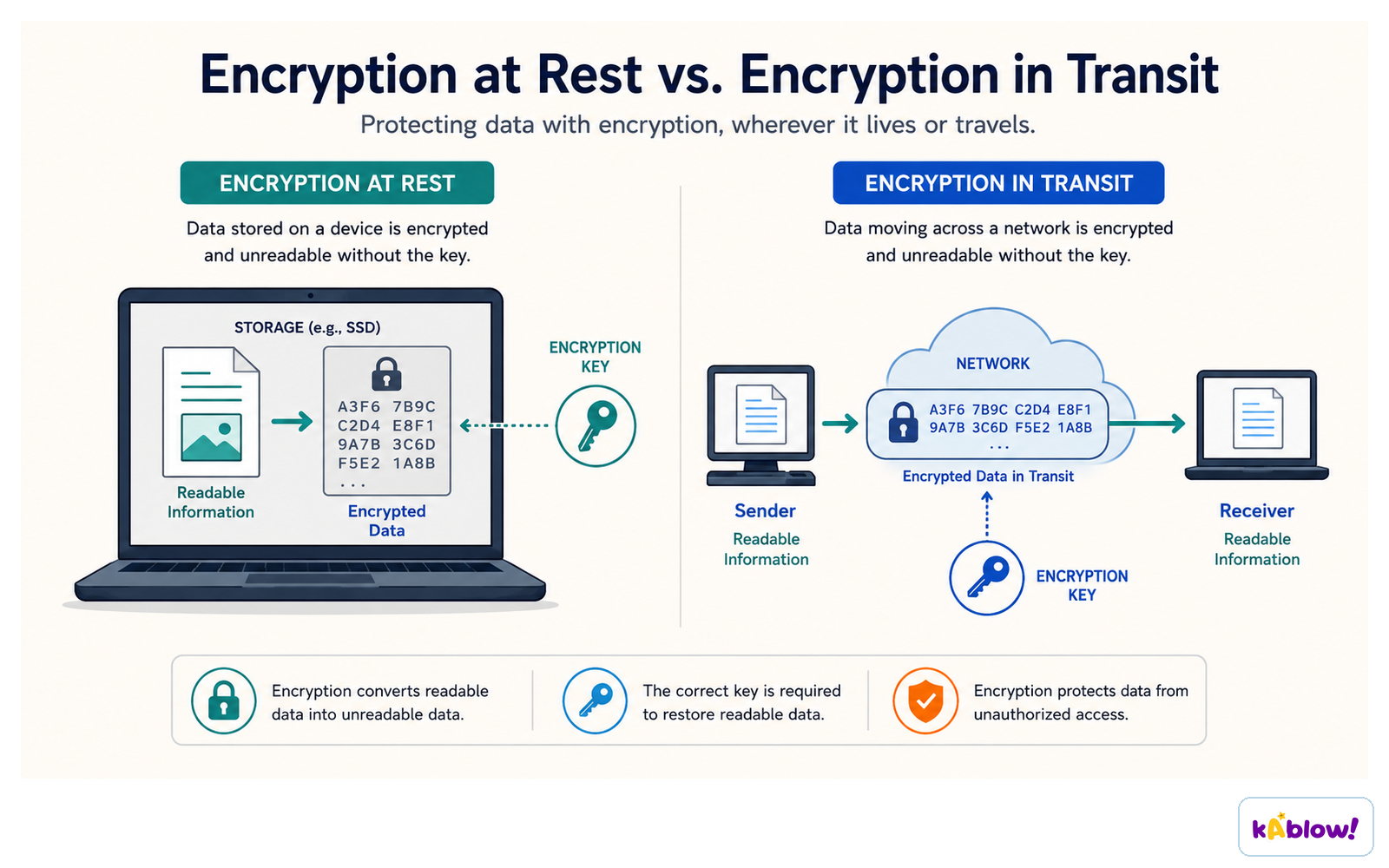
- Encryption is a method of scrambling data before transmission across a network.
- It protects data from unauthorised access by making it meaningless.
- Encryption is especially important on wireless networks because data is sent over radio waves and can be easily intercepted.
Encryption at rest protects data stored on a device; encryption in transit protects data moving across a network.
Wireless Network Encryption
- Wireless networks use an SSID and password to create a master key.
- Connected devices receive a copy of the master key.
- Data is encrypted into ciphertext using the master key before transmission.
- The receiver uses the same master key to decrypt the ciphertext back to plaintext.
- The master key is never transmitted to ensure security.
- Protocols like WPA2 are used for Wi-Fi security.
Wired Network Encryption
- Wired networks also use a master key to encrypt and decrypt data.
- Encryption on wired networks is often handled by individual applications (e.g., HTTPS).
Symmetric Encryption
- Both sender and receiver share an identical secret key.
- The same key is used to encrypt and decrypt data.
- If a hacker obtains the key, they can decrypt intercepted data.
- The key can be shared in person, by post, or via a non-electronic algorithm.
Asymmetric Encryption
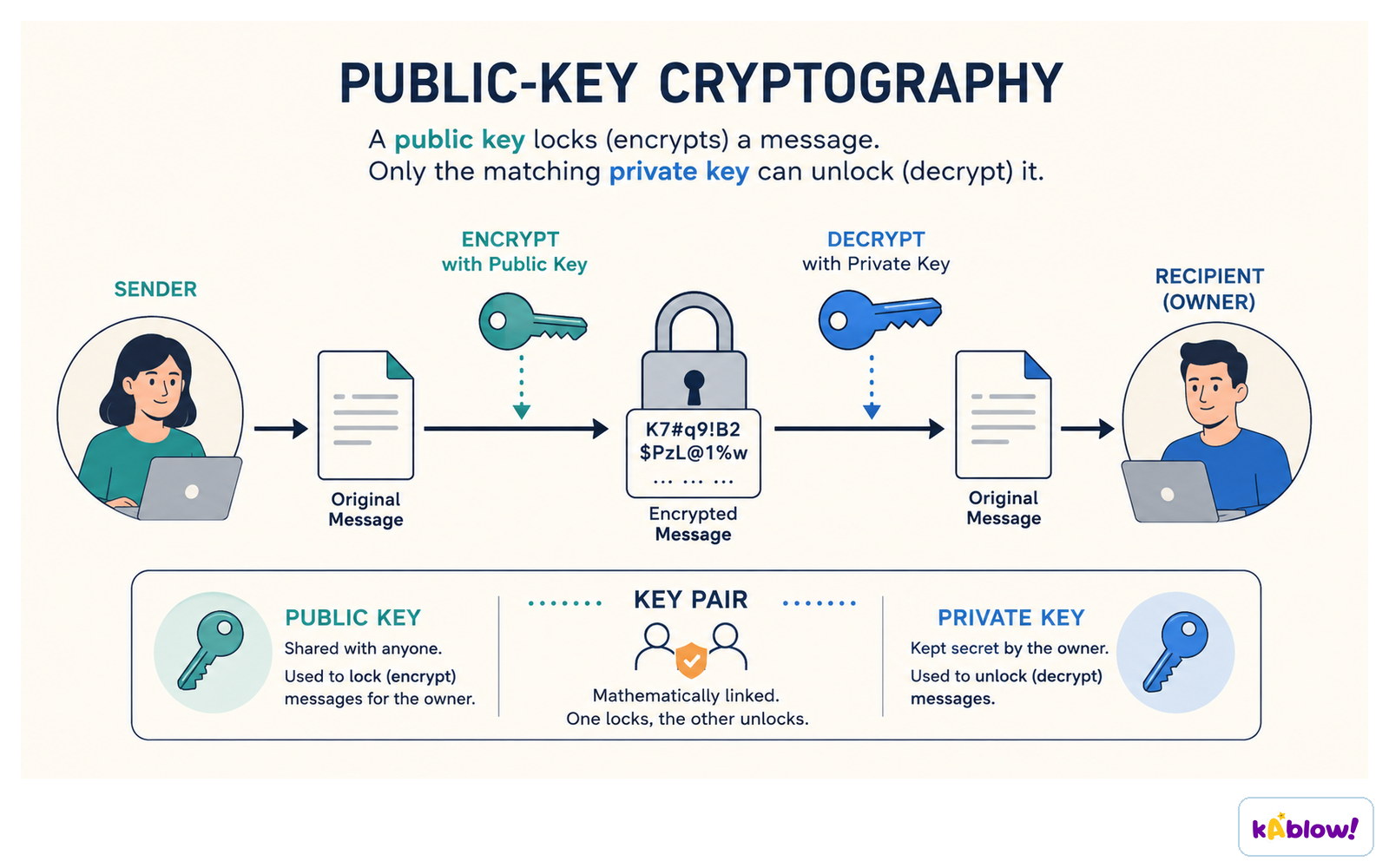
- Uses two keys: a public key (known to everyone) and a private key (known only to the receiver).
- The sender encrypts the message with the public key.
- The receiver decrypts the message with their private key.
- The private key is never sent over the network.
- Large keys (e.g., 100 bits) have billions of combinations, making them hard to crack.
In public-key cryptography the public key encrypts the message and only the matching private key can decrypt it.
Key Terminology
- Plaintext: data before encryption.
- Ciphertext: data after encryption.
- Key: a binary string used by an encryption algorithm to encrypt/decrypt data.
- Encryption prevents data from being understood by unauthorised parties.
Slides
Sign up free to view the lesson slides
Step through every slide for this topic — plus flashcards and revision notes — with a free account.
Practice questions
Free preview — 8 of 59 questions. Sign up to see them all.
1.What is the name for data before it is encrypted?
Easy- APlaintext
- BCiphertext
- CCleartext
- DKeytext
2.What is the name for data after it has been encrypted?
Easy- APlaintext
- BCiphertext
- CCleartext
- DKeytext
3.Which of the following is used to encrypt and decrypt data in symmetric encryption?
Easy- AA single shared secret key
- BA public key and a private key
- CA password only
- DA digital certificate
4.In asymmetric encryption, which key is used to encrypt a message?
Easy- AThe recipient's public key
- BThe recipient's private key
- CThe sender's public key
- DA shared secret key
5.Which of the following best describes why encryption is especially important on wireless networks?
Easy- AData is transmitted over radio waves which are easy to intercept
- BWireless networks are slower than wired networks
- CWireless networks use a different protocol stack
- DWireless networks cannot use firewalls
6.What is the purpose of a master key in wireless network encryption?
Medium- ATo encrypt data into ciphertext before transmission
- BTo identify the network (SSID)
- CTo provide a password for user login
- DTo authenticate users via a certificate
7.In asymmetric encryption, if a hacker intercepts the public key, what can they do?
Medium- AEncrypt messages but not decrypt them
- BDecrypt messages sent to the owner
- CBoth encrypt and decrypt messages
- DOnly read the encrypted messages
8.A 100-bit key can generate over 1.27 × 1030 different combinations. Why does this make encryption secure?
Medium- AIt is computationally infeasible to try all combinations
- BThe key is too long to store
- CAll combinations are equally likely
- DThe key is randomly generated each time
Unlock all 59 questions & more
Create a free account to see every question, the slides, flashcards and revision notes for this topic.