Network Hardware
Learn it by playing
Answer these questions to earn energy, then fish and explore. No account needed.
Lesson notes
Network Interface Card (NIC)
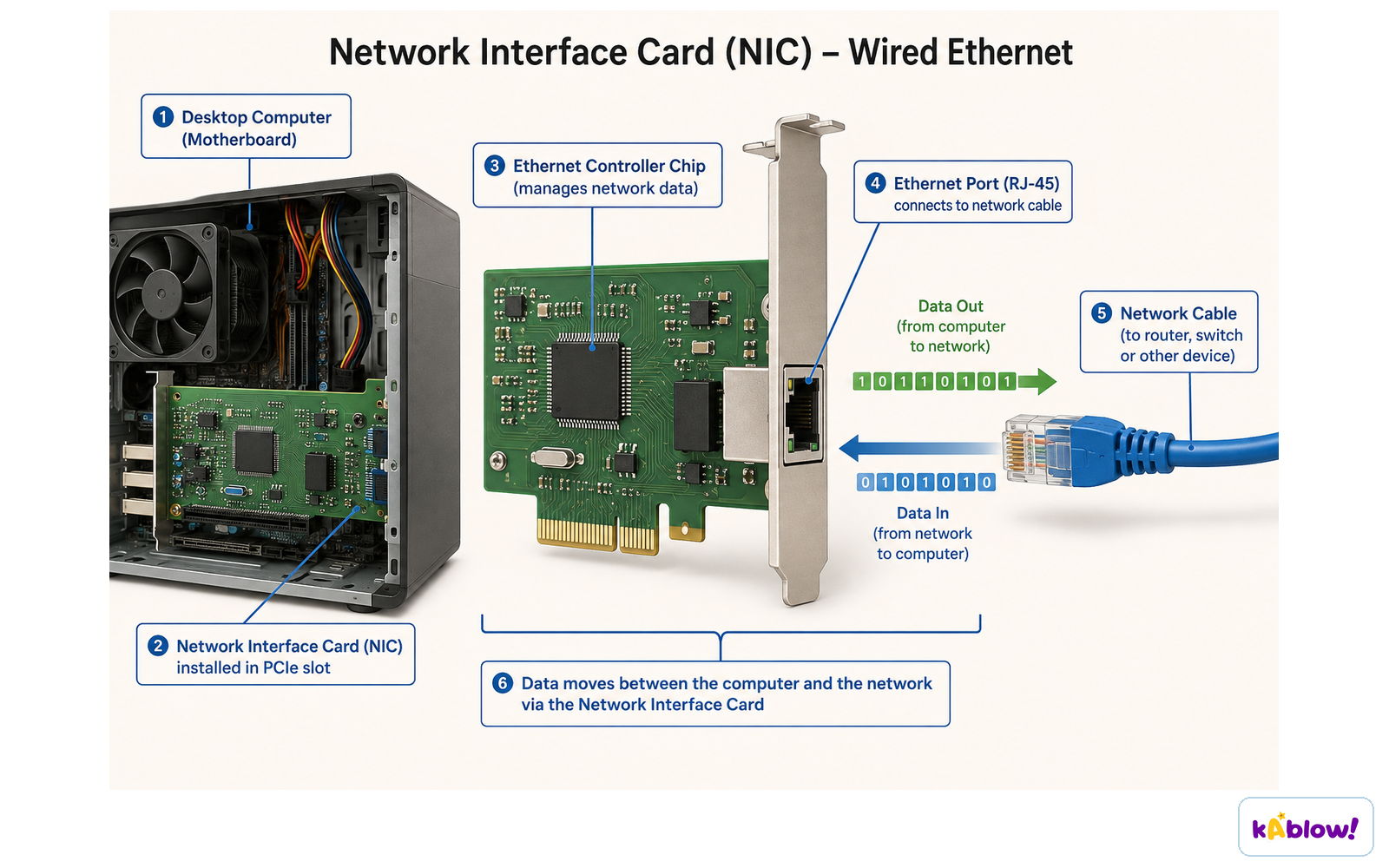
- A Network Interface Card (NIC) is required for a computer to connect to a network.
- A NIC can be wired or wireless and allows a device to send and receive data over a network.
- Every NIC has a unique MAC address assigned at the point of manufacture.
- The NIC is a key piece of network hardware enabling connectivity.
A network interface card connects the computer to the network and moves data in both directions.
MAC Addresses
- A MAC (Media Access Control) address is a unique identifier for devices on a LAN.
- MAC addresses are static (never change) and are assigned to the NIC during manufacturing.
- A MAC address is 12 hexadecimal digits (48 bits), usually grouped in pairs (e.g., AA:BB:CC:DD:EE:FF).
- The first three pairs are the manufacturer ID (OUI), the last three are the serial number of the NIC.
- MAC addresses allow switches to forward data to the correct device on a LAN.
IP Addresses
- An IP (Internet Protocol) address is a unique identifier for devices communicating over the Internet (WAN).
- IP addresses can be static (fixed) or dynamic (can change).
- Dynamic IP addresses are assigned automatically by a DHCP server.
- IPv4 uses 4 blocks of denary numbers (0–255) separated by dots, 32 bits total (over 4 billion addresses).
- IPv6 uses 8 blocks of 4 hexadecimal digits separated by colons, 128 bits total (vastly more addresses).
- A device's IP address changes when it moves to a different network.
Router
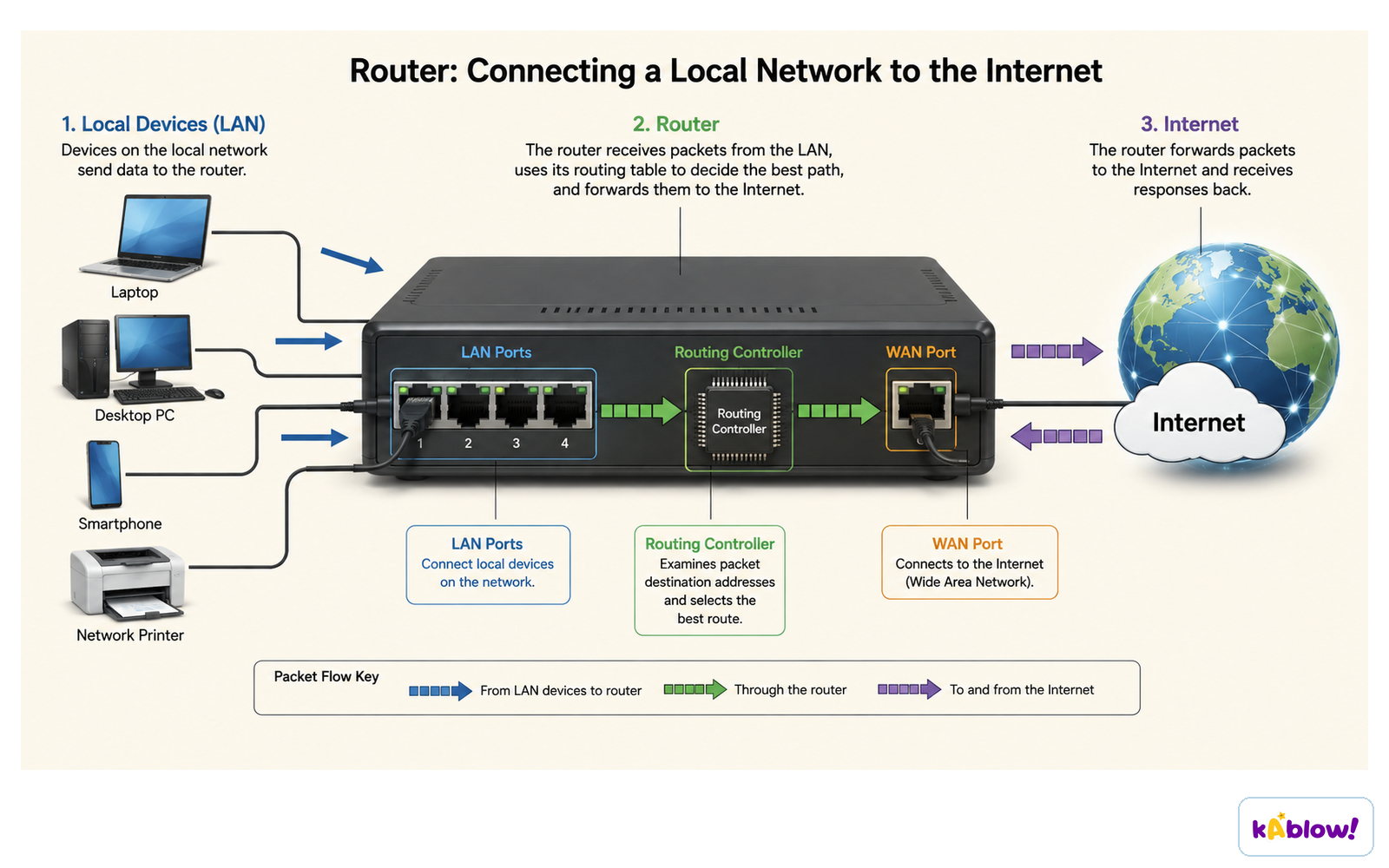
- A router routes data packets between different networks (e.g., LAN to WAN/Internet).
- It connects a local network to the wider Internet.
- Routers can manage and prioritise data traffic to keep connections stable.
- A router assigns IP addresses to devices on the network (often via DHCP).
- Routers can also convert packets from one protocol to another.
A router reads each packet's destination address and uses its routing table to forward it between the LAN and the internet.
Comparison: MAC vs IP Address
- MAC address is static; IP address can be dynamic (change).
- MAC address is used for communication on a LAN; IP address is used on a WAN/Internet.
- MAC address is tied to the hardware (NIC); IP address is assigned by the network.
Slides
Sign up free to view the lesson slides
Step through every slide for this topic — plus flashcards and revision notes — with a free account.
Practice questions
Free preview — 8 of 58 questions. Sign up to see them all.
1.What is the purpose of a Network Interface Card (NIC)?
Easy- ATo allow a computer to connect to a network
- BTo assign IP addresses to devices
- CTo route data between different networks
- DTo amplify the network signal
2.What does MAC stand for?
Easy- AMedia Access Control
- BMemory Address Control
- CMultiple Access Connection
- DMain Address Code
3.Which of the following is a characteristic of a MAC address?
Easy- AIt is assigned by the network when a device connects
- BIt is static and never changes
- CIt is used to communicate over the Internet
- DIt is represented as 4 blocks of denary numbers
4.An IPv4 address is made up of how many bits?
Easy- A32
- B48
- C64
- D128
5.A device moves from one network to another. Which of the following is true?
Medium- AIts MAC address changes, but its IP address stays the same
- BIts IP address changes, but its MAC address stays the same
- CBoth its MAC and IP addresses change
- DNeither its MAC nor IP address changes
6.Which device is responsible for routing data packets between different networks?
Easy- ASwitch
- BRouter
- CNetwork Interface Card
- DWireless Access Point
7.Which of the following is a valid IPv4 address?
Easy- A192.168.1.1
- BFE80::1
- C00:1A:2B:3C:4D:5E
- D1234:5678:9ABC:DEF0:1234:5678:9ABC:DEF0
8.How many hexadecimal digits are in a MAC address?
Easy- A8
- B12
- C16
- D32
Unlock all 58 questions & more
Create a free account to see every question, the slides, flashcards and revision notes for this topic.