Text, Sound & Images
Learn it by playing
Answer these questions to earn energy, then fish and explore. No account needed.
Lesson notes
Character Sets
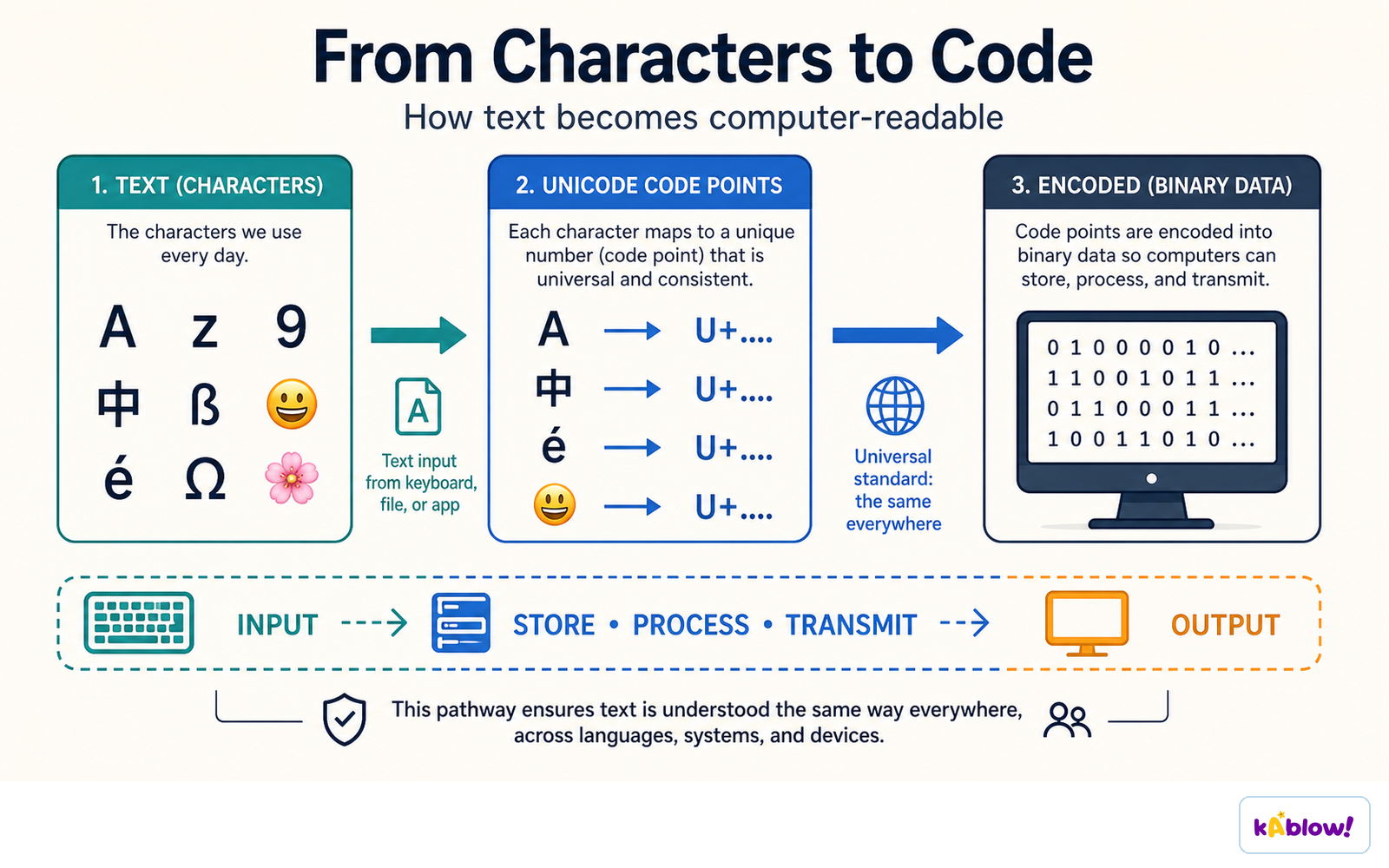
- A character set is all characters and symbols a computer can represent; each character has a unique binary code.
- Character sets are ordered logically (e.g., code for 'B' is one more than code for 'A').
- They provide a standard for computers to communicate; without one, the same binary code could be interpreted differently.
- The number of representable characters = 2^(number of bits used).
- Two common character sets: ASCII (7-bit, 128 characters) and UNICODE (minimum 16-bit, 65,536+ characters).
- ASCII covers English letters, digits, and some symbols; cannot represent other languages or emojis.
- Extended ASCII uses 8 bits (256 characters), adding mathematical operators and symbols like ©.
- UNICODE supports characters from all major languages and special symbols like emojis; uses more storage than ASCII.
Text becomes computer-readable by mapping each character to a code point and then to binary.
Representing Sound – Sampling
- Sound is originally analogue; it must be converted to digital via Analogue-to-Digital conversion (A2D).
- The process measures the amplitude of the sound wave at regular intervals; each measurement is a sample.
- Each sample is stored as a binary value; the collection of samples forms a digital representation of the wave.
- The digital wave can be stored on secondary storage and played back by reversing the process.
Sample Rate and Sample Resolution
- Sample rate is the number of samples taken per second, measured in Hertz (Hz) (1 Hz = 1 sample/second).
- Higher sample rate → digital wave closer to original → better quality, but larger file size.
- A typical audio CD uses a sample rate of 44.1 kHz (44,100 samples per second).
- Sample resolution (or bit depth) is the number of bits stored per sample.
- Higher sample resolution → more possible amplitude values → better quality, but larger file size.
- Both high sample rate and high sample resolution increase playback quality and file size.
Bitmap Images
- A bitmap image is made up of a grid of pixels (picture elements).
- A pixel is the smallest element of a bitmap image; each pixel is stored as a binary code representing its colour.
- More colours and more detail → higher quality → more binary data needed.
Resolution and Colour Depth
- Resolution is the total number of pixels in an image, calculated as width × height (in pixels).
- Higher resolution → more detail → larger file size.
- Colour depth is the number of bits used per pixel; determines the number of possible colours (2colour depth).
- Examples: 1-bit → 2 colours (black & white); 8-bit → 256 colours; 24-bit → 16.7 million colours (True Colour).
- Higher colour depth → more colours → larger file size.
- File size = width × height × colour depth (in bits).
- A balance between quality and file size must be considered.
Sampling measures the amplitude of a sound wave at regular moments to produce discrete sample points.
A bitmap image is a grid of pixels, and each pixel colour is stored as binary.
Slides
Sign up free to view the lesson slides
Step through every slide for this topic — plus flashcards and revision notes — with a free account.
Practice questions
Free preview — 8 of 59 questions. Sign up to see them all.
1.What is a character set?
Easy- AAll the characters and symbols that can be represented by a computer system
- BA set of instructions for encoding images
- CA collection of fonts used in word processing
- DA standard for compressing text files
2.How many bits does standard ASCII use to represent a character?
Easy- A7 bits
- B8 bits
- C16 bits
- D32 bits
3.Which character set can represent characters from all major languages around the world?
Easy- AASCII
- BExtended ASCII
- CUNICODE
- DEBCDIC
4.If an image has a resolution of 100 × 100 pixels and a colour depth of 4 bits, how many bits are needed to store the image?
Medium- A10,000 bits
- B40,000 bits
- C100,000 bits
- D400,000 bits
5.What is the sample rate of a typical audio CD?
Easy- A44.1 kHz
- B22.05 kHz
- C96 kHz
- D192 kHz
6.Which of the following is a benefit of using UNICODE over ASCII?
Easy- AUNICODE uses fewer bits per character
- BUNICODE can represent emojis and symbols from many languages
- CUNICODE is faster to process
- DUNICODE requires less storage space
7.A sound recording has a sample rate of 44.1 kHz and a sample resolution of 16 bits. If the recording is 10 seconds long, what is the approximate file size in bits? (Ignore any compression or header.)
Medium- A7,056,000 bits
- B44,100 bits
- C705,600 bits
- D441,000 bits
8.An image has a colour depth of 24 bits. How many different colours can it represent?
Easy- A256
- B65,536
- C16,777,216
- D24
Unlock all 59 questions & more
Create a free account to see every question, the slides, flashcards and revision notes for this topic.