Cybersecurity basics: passwords, malware and phishing
Lerne es beim Spielen
Beantworte diese Fragen für Energie, dann angle und erkunde. Kein Konto nötig.
Lektionsnotizen
Strong Passwords
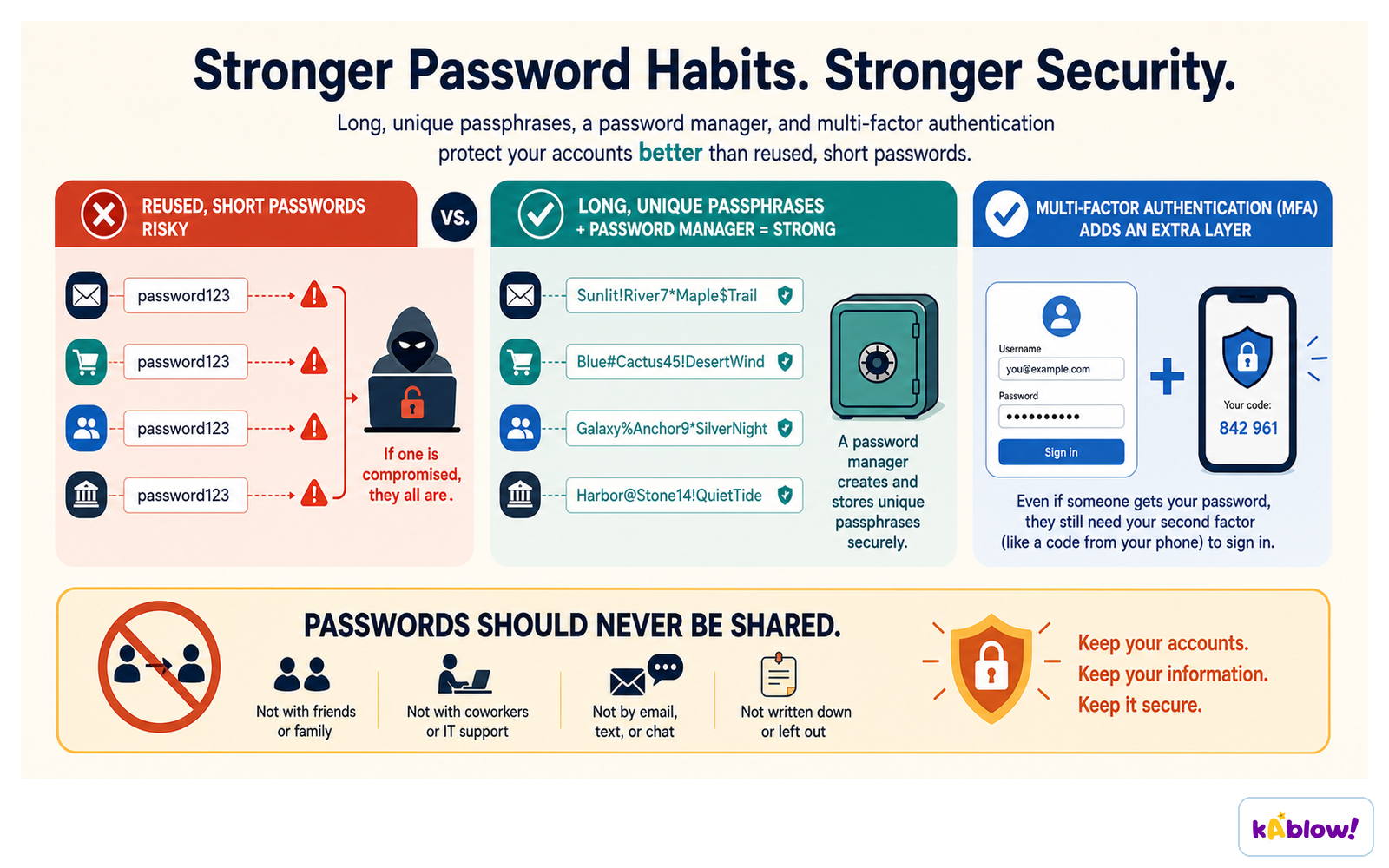
- A strong password is long, random, and unique for each account.
- Use a mix of upper and lower case letters, numbers, and symbols.
- Avoid using personal information like names, birthdays, or common words.
- Consider using a passphrase – a sequence of random words – which is easier to remember and harder to crack.
- Never reuse passwords across different accounts; if one is compromised, others are at risk.
- Use a password manager to store and generate strong passwords securely.
Long, unique passphrases with a password manager and multi-factor authentication resist guessing far better than short reused passwords.
Malware Types
- Malware is malicious software designed to harm or exploit devices and data.
- A virus attaches itself to a file or program and spreads when the infected file is opened.
- A worm spreads automatically across networks without needing a host file.
- Ransomware locks your files or device and demands payment to restore access.
- Malware can be delivered via email attachments, malicious links, or compromised websites.
- Keeping software updated helps patch vulnerabilities that malware exploits.
Phishing and Social Engineering
- Phishing is a scam where attackers trick people into revealing sensitive information or installing malware.
- It is a form of social engineering – manipulating people rather than hacking systems.
- Phishing messages often pretend to be from trusted sources like banks or government agencies.
- They create urgency or fear, e.g., 'Your account has been compromised – click here now.'
- The goal is usually to steal login credentials, financial details, or install malware.
- Phishing is the most common type of cybercrime globally.
Types of Phishing
- Email phishing – bulk emails sent to many people, often with fake login links.
- Spear phishing – targeted attacks on specific individuals using personal information to seem credible.
- Vishing (voice phishing) – fake phone calls, often using VoIP and number spoofing.
- Smishing (SMS phishing) – fraudulent text messages with links or phone numbers.
- Quishing – phishing using QR codes that lead to malicious sites.
- Page hijacking – redirecting users from legitimate websites to malicious ones.
Staying Safe Online
- Always think critically before clicking links or opening attachments, even if they look familiar.
- Check the sender's email address or phone number for unusual details.
- Hover over links to see the real URL before clicking.
- Never enter personal information on a site reached via a suspicious link.
- Use multi-factor authentication (MFA) where possible for extra security.
- Keep all software and devices updated to protect against known vulnerabilities.
Software Updates
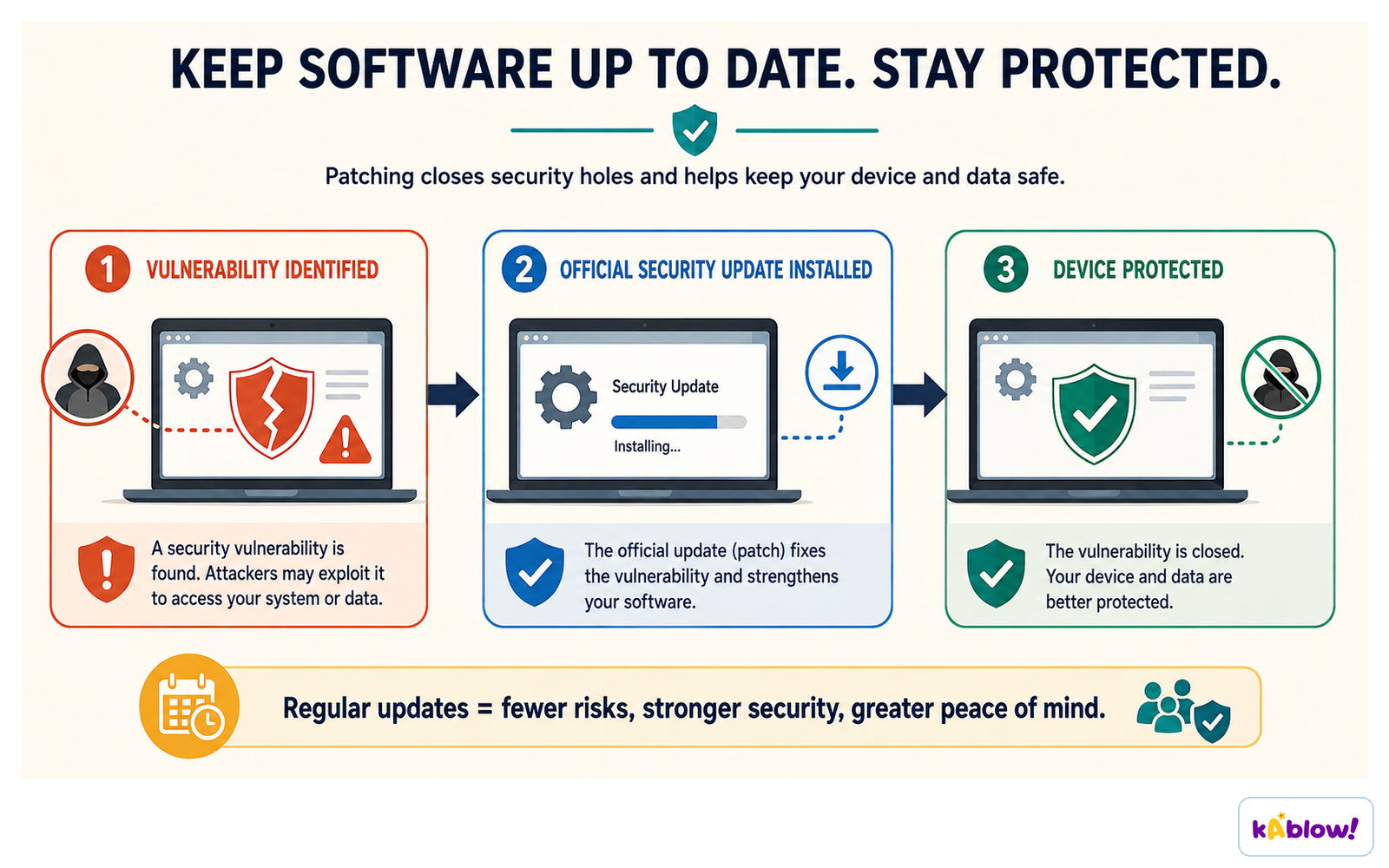
- Software updates fix security holes (vulnerabilities) that attackers can exploit.
- Enable automatic updates for your operating system, apps, and antivirus.
- Updates often include patches for newly discovered malware threats.
- Ignoring updates leaves your device at higher risk of infection.
- Only download updates from official sources to avoid fake update scams.
A security update patches the vulnerability an attacker could otherwise exploit.
Account and Device Safety
- Use a different strong password for each important account.
- Log out of accounts on shared or public devices.
- Be cautious when using public Wi-Fi – avoid accessing sensitive accounts without a VPN.
- Install and maintain reputable antivirus software.
- Back up important data regularly to recover from ransomware attacks.
- Report phishing attempts to your school, workplace, or relevant authorities.
A phishing message uses urgency to make you click; the safe response is stop, check independently, report.
The malware infection chain: delivery, execution, infection, impact, then persistence and spread.
Social engineering relies on urgency, impersonation and requests for sensitive information; pause, verify, report.
Folien
Sign up free to view the lesson slides
Step through every slide for this topic — plus flashcards and revision notes — with a free account.
Übungsfragen
Gratis-Vorschau — 8 von 58 Fragen. Registriere dich, um alle zu sehen.
1.Phishing is a type of social engineering attack.
EasyTrue or false?
2.What does the term 'phishing' refer to?
Easy- AUsing a fishing rod to catch fish
- BA type of computer virus
- CA scam that uses lures to 'fish' for sensitive information
- DA method of securing passwords
3.Malware only includes viruses.
EasyTrue or false?
4.Which of the following are types of malware mentioned in the source? (Select all that apply)
Easy- AVirus
- BWorm
- CRansomware
- DPhishing
- EAdware
5.Spear phishing targets a specific individual or group.
EasyTrue or false?
6.What is 'smishing'?
Easy- APhishing via email
- BPhishing via SMS text messages
- CPhishing via voice calls
- DPhishing via QR codes
7.Keeping software up to date is not important for cybersecurity.
EasyTrue or false?
8.Match each phishing type to its description.
Medium- Vishing
- Smishing
- Quishing
- Voice phishing
- SMS phishing
- QR code phishing
Unlock all 58 questions, flashcards & more
Erstelle ein Gratis-Konto, um alle Fragen, Folien, Karteikarten und Lernnotizen zu diesem Thema zu sehen.