Using A Calculator
Apprends en jouant
Réponds à ces questions pour gagner de l'énergie, puis pêche et explore. Sans compte.
Pour les enseignants : diapos de leçon, notes de révision, schémas prêts à l'emploi pour Using A Calculator (Maths [CIE], Core) — utilise-les en cours, ou lance le thème en activité de classe interactive que tes apprenants jouent en direct.
Notes de leçon
Calculator Basics & Settings
- Check your calculator is in MATH mode (display shows 'MATH').
- Set angle unit to degrees – look for a 'D' symbol on screen.
- Use SETUP or MODE button to change settings; reset before exam.
- Switch between exact (fraction) and approximate (decimal) answers using S⇔D button.
- Know your specific model (e.g., Casio fx-83GT) – functions may be accessed differently.
The Casio fx-83GTX Classwiz
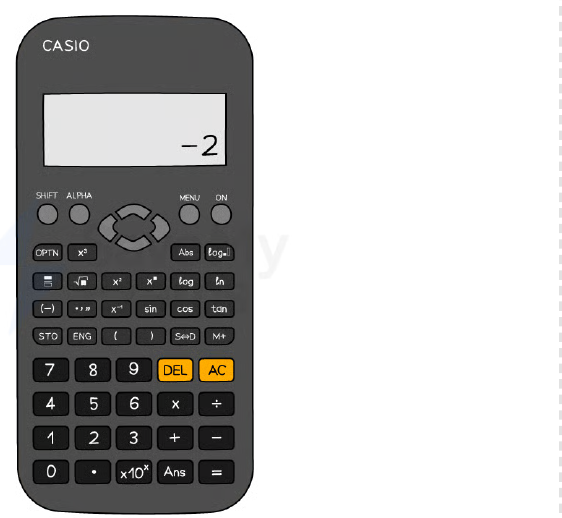
Essential Shortcut Buttons
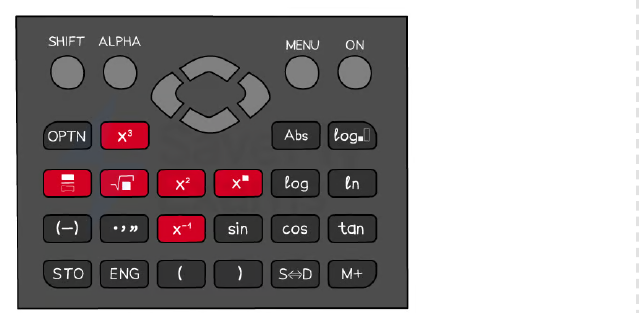
- Use fraction button (a b/c) for fractions; square (x²), cube (x³), power (^) for exponents.
- Square root (√) and cube root (∛) via SHIFT + √ or dedicated button.
- SHIFT key gives access to inverse functions (e.g., sin⁻¹, cos⁻¹, tan⁻¹) and nth roots.
- π is often near the standard form button; may require SHIFT.
- ×10ˣ button enters standard form; modern calculators display as '×10ⁿ'.
Calculator shortcut buttons
Using Brackets Correctly
- Always use brackets around negative numbers – e.g., (-3)² gives 9, but -3² gives -9.
- Use the (-) button for negative values, not the minus button.
- Brackets ensure correct order of operations – e.g., (68+18)÷(9-5) vs 68+18÷9-5.
- Close all brackets after functions like sin(45°) – type sin(45) then close bracket.
Trigonometry Functions
- Use sin, cos, tan for finding sides; ensure calculator is in degrees mode.
- For angles, use sin⁻¹, cos⁻¹, tan⁻¹ via SHIFT + sin/cos/tan.
- After typing a trig function, an open bracket appears – remember to close it.
- Example: sin(30) = 0.5; sin⁻¹(0.5) = 30°.
Standard Form & π
- Enter standard form using ×10ˣ button – e.g., 1.2×10⁻³ is 1.2 ×10ˣ (-)3.
- Modern calculators display standard form as '1.2×10⁻³'; older models may show '1.2E-3'.
- π is a constant; use it in calculations like area of a circle (πr²).
- Combine with brackets for complex expressions: (π × 5²) gives 78.5398...
The Ans (Answer) Function
- Ans recalls the last calculated result – useful for multi-step calculations.
- Avoid rounding intermediate answers by using Ans in the next step.
- Example: compute 4.69² = 21.9961, then √(Ans) = 4.689... (but better to do in one go).
- Press Ans button (often above '=') to insert the previous answer.
Table Function for Graphs
- Use TABLE mode to generate values for functions like y = x³ – 6x + 1.
- Enter the function, set start/end/step, and calculator outputs a table.
- Helps reduce errors in 'complete the table' questions.
- Example: for y = x³ – 6x + 1, table gives x=-3 → y=-8, x=-2 → y=5, etc.
Time Calculations
- Use ° ' '' button to enter time in hours/minutes/seconds – e.g., 3°45'0'' for 3h45m.
- Convert between decimal time and hh:mm:ss using the same button.
- Example: 2.7 hours = 2°42'0'' (since 0.7×60=42 minutes).
- Useful for speed, distance, time problems.
Worked Example Tips
- Do one calculation at a time and write down intermediate results with '...' to show no rounding.
- Use fraction button for numerator/denominator – e.g., (4.69²)/(0.343+sin45°).
- For standard form substitution, use brackets: (1.2×10⁻³)² × (7.83×10⁵).
- Always write down more digits than needed; round only the final answer.
Diapos
Sign up free to view the lesson slides
Step through every slide for this topic — plus flashcards and revision notes — with a free account.
Questions d'entraînement
Aperçu gratuit — 8 sur 39 questions. Inscris-toi pour toutes les voir.
1.Find the value of \√{3481}.
Easy- A59
- B61
- C49
- D69
2.Find the value of 3\√{2744}.
Easy- A14
- B16
- C12
- D18
3.Find the value of \√{70}.
Easy- A8.3666...
- B7.0711...
- C8.6023...
- D8.4261...
4.Find the value of 5-2.
Easy- A0.04
- B0.2
- C0.4
- D0.008
5.Find the value of \√{196}.
Easy- A14
- B16
- C12
- D18
6.Calculate 153.
Easy- A3375
- B225
- C45
- D3376
7.Edelgard tries to calculate \frac{68+18}{9-5}. She types into her calculator 68+18 \div 9-5. Explain why this does not give Edelgard the correct answer.
Medium- AThe calculator performs division before addition and subtraction, so it computes 68 + (18 \div 9) - 5.
- BThe calculator performs addition before division, so it computes (68+18) \div 9 - 5.
- CThe calculator performs subtraction before division, so it computes 68 + 18 \div (9-5).
- DThe calculator performs operations from left to right without order of operations.
8.Work out the correct answer to \frac{68+18}{9-5}.
Easy- A21.5
- B65
- C17.2
- D86
Unlock all 39 questions, flashcards & more
Crée un compte gratuit pour voir toutes les questions, les diapos, les cartes mémo et les notes de révision de ce thème.
Annales
Les annales d'entraînement pour ce thème arrivent bientôt.
Bientôt disponible