From blocks to text: programming languages
Apprends en jouant
Réponds à ces questions pour gagner de l'énergie, puis pêche et explore. Sans compte.
Notes de leçon
What is a Programming Language?
- A programming language is a set of rules for giving instructions to a computer.
- Languages can be visual (using blocks/diagrams) or textual (using words and symbols).
- Visual programming languages (VPLs) let you create programs by manipulating graphical elements, not typing text.
- VPLs are often called block coding or diagrammatic programming.
- Examples of VPLs include Scratch, Blockly, and App Inventor.
- Textual languages include Python, JavaScript, and C++.
Block-Based Programming (Visual)
- In block-based programming, you drag and drop blocks that snap together like puzzle pieces.
- Blocks represent commands, loops, conditions, and variables.
- Scratch and Blockly are popular block-based languages for education.
- Blocks are designed to prevent syntax errors because they only fit together in valid ways.
- This makes it easier for beginners to focus on logic rather than typing mistakes.
- Block-based programming is great for learning computational thinking and creating simple animations or games.
Text-Based Programming
- Text-based programming uses typed instructions in a specific syntax (grammar).
- Python is a common first textual language because it is readable and simple.
- Textual languages are more flexible and powerful for complex projects.
- They require careful attention to syntax (e.g., punctuation, indentation).
- Text-based code is easier to share and version control (like on GitHub).
- Most professional software is written in textual languages.
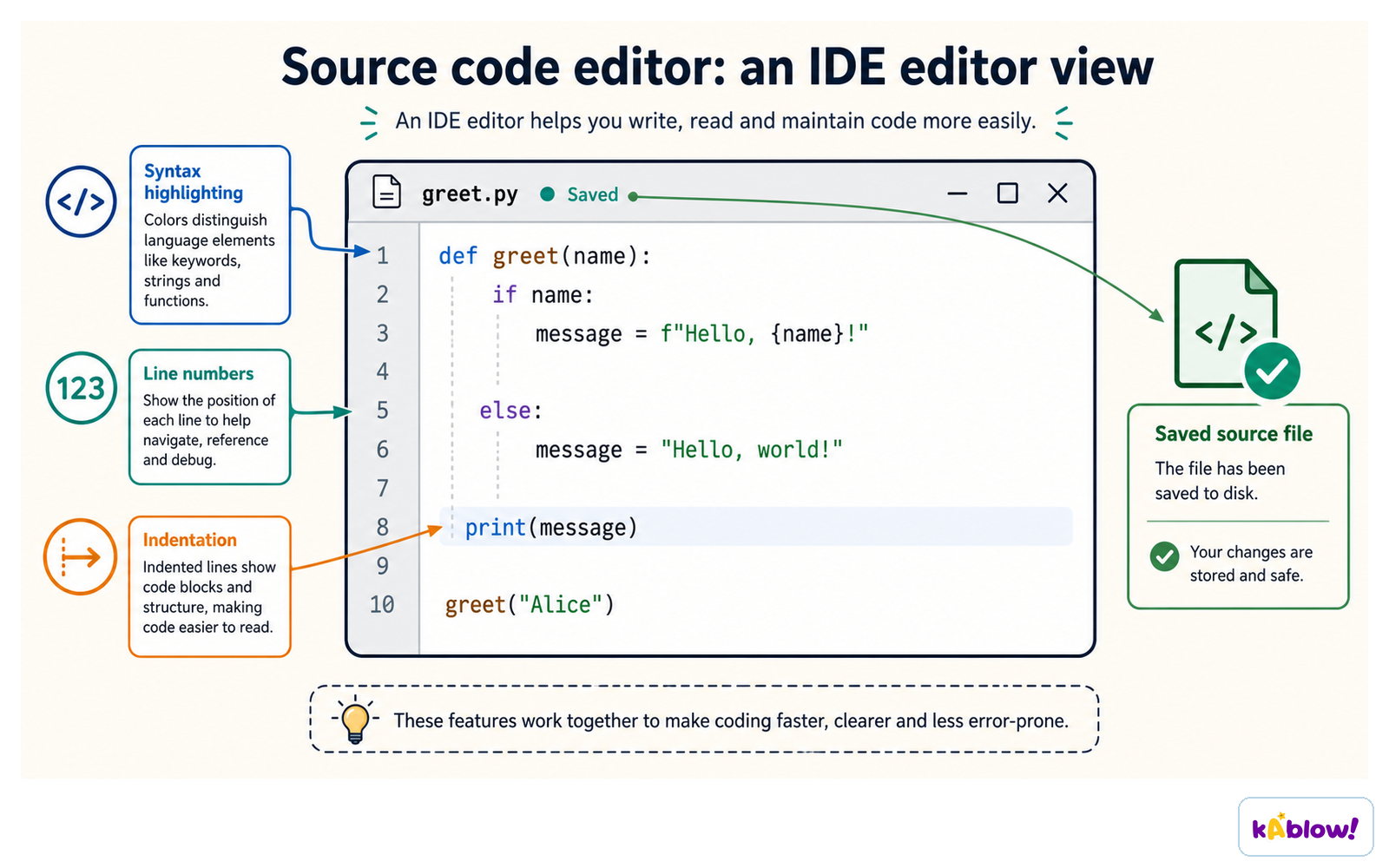
A code editor uses syntax highlighting, line numbers and indentation to make typed code easier to read.
Comparing Block and Text Languages
- Same algorithm can be implemented in both block and text languages.
- Blocks are visual and often use drag-and-drop; text uses typing.
- Blocks reduce syntax errors; text requires precise syntax.
- Blocks are often more intuitive for beginners; text is more efficient for experts.
- Text languages are usually faster to write once you know them.
- Translating between them helps understand programming concepts.
Translating Between Block and Text
- A block like `move 10 steps` in Scratch becomes `forward(10)` in Python (or similar).
- A `repeat 10` block becomes a `for i in range(10):` loop in Python.
- An `if` block becomes an `if` statement in text.
- Variables in blocks (e.g., `set x to 0`) become `x = 0` in Python.
- Understanding the translation helps you see the underlying logic.
- Practice by converting simple Scratch projects to Python or vice versa.
Strengths of Block-Based Languages
- Easy to learn – no syntax errors, visual feedback.
- Great for beginners – focus on logic and problem-solving.
- Immediate visual results – animations, sounds, and sprites.
- Encourages experimentation – blocks are easy to rearrange.
- Built-in help – blocks often have descriptions and examples.
- Used in education – e.g., Scratch, Blockly, App Inventor.
Strengths of Text-Based Languages
- More powerful – can handle complex algorithms and data structures.
- Faster to write – once you know the syntax.
- Industry standard – used in real-world software development.
- Easier to debug – error messages point to exact lines.
- Portable – code can run on many platforms with minimal changes.
- Supports large projects – modularity and libraries.
Other Types of Visual Languages
- Flowcharts – represent algorithms as boxes and arrows.
- Node graphs – used in game development and dataflow systems.
- Dataflow programming – data flows between nodes, e.g., LabVIEW.
- State machines – model states and transitions, used in control systems.
- Timeline-based – sequence events over time, used in animation.
- Form-based – like spreadsheet formulas, e.g., Excel.
Not All Visual Tools Are Visual Languages
- Visual Studio (IDE) is not a visual language – code is text, but the interface is graphical.
- Form designers in IDEs help create user interfaces, but the logic is still text.
- Graphical tools that illustrate control flow are not the same as defining it visually.
- A true VPL lets you build the program using visual elements, not just edit text.
Why Learn Both?
- KS3 requirement: use at least two languages, one textual.
- Blocks help you learn concepts without syntax barriers.
- Text gives you real-world skills for future study and careers.
- Translating between them deepens understanding of algorithms.
- You can choose the right tool for the job: blocks for quick prototypes, text for robust software.
- Both develop computational thinking – problem-solving, logic, and creativity.
Diapos
Sign up free to view the lesson slides
Step through every slide for this topic — plus flashcards and revision notes — with a free account.
Questions d'entraînement
Aperçu gratuit — 8 sur 52 questions. Inscris-toi pour toutes les voir.
1.What is a visual programming language (VPL)?
Easy- AA programming language that uses graphical elements like blocks or diagrams to create programs
- BA programming language that uses only text commands
- CA programming language that is only used for web development
- DA programming language that runs on visual hardware
2.In a visual programming language, users create programs by manipulating graphical elements rather than typing text.
EasyTrue or false?
3.Which of the following is an example of a visual programming language?
Easy- AScratch
- BPython
- CJava
- DC++
4.Match each type of visual programming language with its description.
Easy- Block-based
- Flowcharts
- Dataflow
- Uses blocks that snap together
- Represents algorithms as diagrams with boxes and arrows
- Programs expressed as a flow of data between nodes
5.Put these steps in the correct order for creating a program in a block-based language like Scratch.
Easy- Drag blocks from the palette
- Snap blocks together
- Run the program
- Check for errors
6.A visual programming language can help reduce syntax errors.
EasyTrue or false?
7.Which of the following is a key advantage of visual programming languages over textual languages?
Medium- AThey make programming more accessible to beginners
- BThey are always faster to run
- CThey can be used without a computer
- DThey require no understanding of logic
8.A student writes the same algorithm in Scratch and in Python. Which statement is true?
Medium- AThe algorithm is the same, but the code looks different
- BThe algorithm is different because the languages are different
- CScratch cannot run the same algorithm as Python
- DPython is a visual language, so the code is graphical
Unlock all 52 questions, flashcards & more
Crée un compte gratuit pour voir toutes les questions, les diapos, les cartes mémo et les notes de révision de ce thème.