Data units and file sizes: bits, bytes and beyond
Apprends en jouant
Réponds à ces questions pour gagner de l'énergie, puis pêche et explore. Sans compte.
Notes de leçon
The Bit and the Byte
- The bit is the smallest unit of data in computing, representing one of two values: 0 or 1.
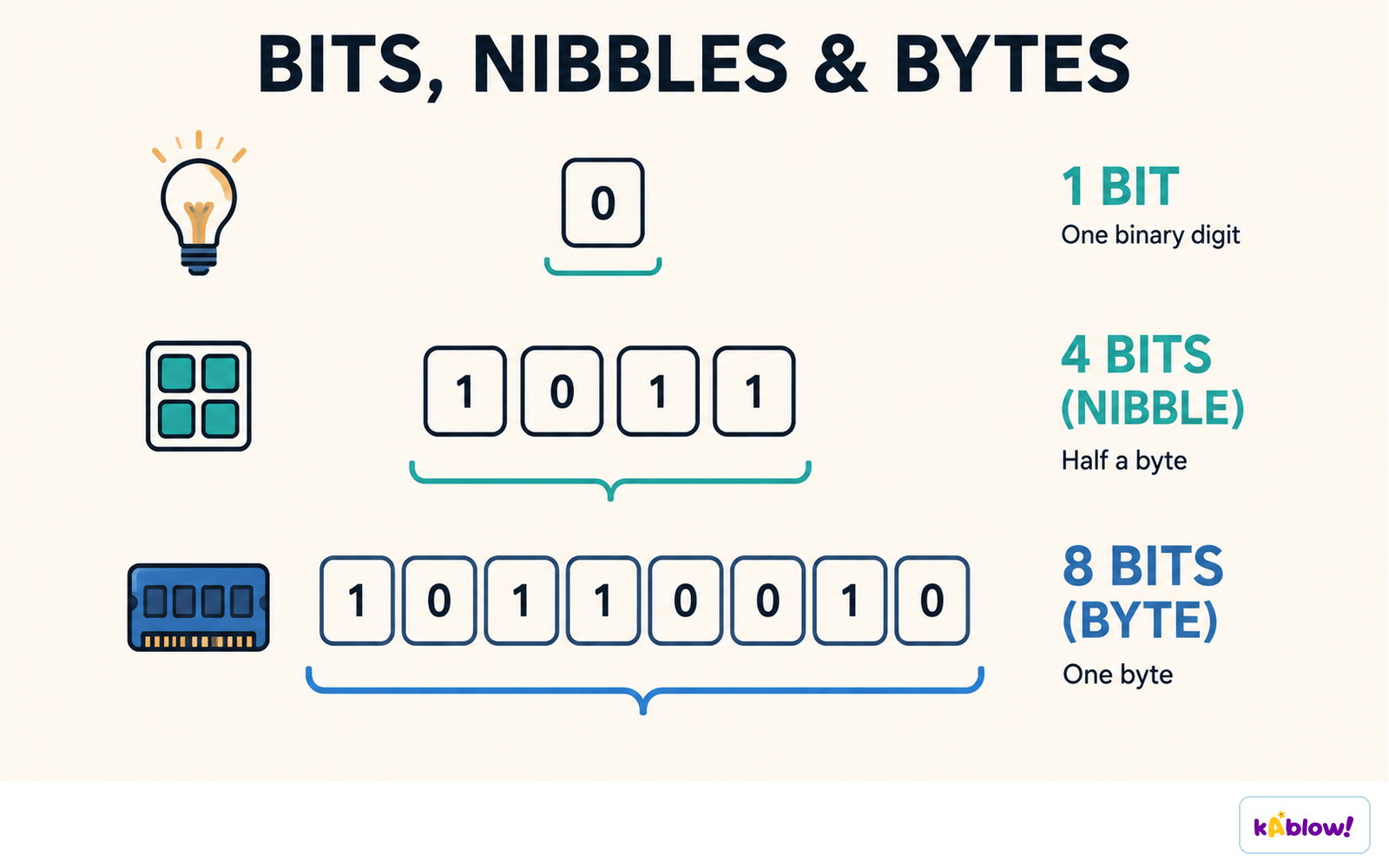
- A byte is a group of 8 bits; it can represent 256 distinct values (e.g., numbers 0–255).
- A nibble is a group of 4 bits (half a byte), matching one hexadecimal digit.
- The symbol for a bit is b (lowercase), and for a byte is B (uppercase) – don't mix them up!
- File sizes are almost always given in bytes or multiples of bytes, not bits.
One binary digit is a bit, four bits are a nibble, and eight bits are a byte.
From Bits to Bytes and Beyond
- To convert bits to bytes, divide by 8; to convert bytes to bits, multiply by 8.
- Larger units use prefixes: kilo (k), mega (M), giga (G), tera (T), peta (P).
- Using metric prefixes (powers of 10): 1 kilobyte (kB) = 1000 bytes, 1 megabyte (MB) = 1000 kB, etc.
- Using binary prefixes (powers of 2): 1 kibibyte (KiB) = 1024 bytes, 1 mebibyte (MiB) = 1024 KiB, etc.
- In everyday use, 'kilobyte' often means 1024 bytes, but the IEC binary prefixes (KiB, MiB) remove ambiguity.
- To convert between adjacent units, multiply by 1000 (or 1024) when going down (e.g., MB to kB) and divide when going up (e.g., kB to MB).
Reading and Writing Units Correctly
- Always use the correct abbreviation: b for bit, B for byte, kB for kilobyte, Mb for megabit, etc.
- A megabit (Mb) is 1,000,000 bits, while a megabyte (MB) is 1,000,000 bytes – 8 times larger.
- When writing file sizes, use uppercase B for bytes and lowercase b for bits to avoid confusion.
- For binary prefixes, the symbol is KiB, MiB, GiB, etc., with a capital K, M, G and a lowercase 'i' before the B.
Estimating File Sizes
- A text message is tiny, usually a few bytes (e.g., 1 byte per character).
- A short document might be a few kilobytes (kB) – e.g., a page of text is about 4 kB.
- A photo from a smartphone can be 2–5 MB, depending on resolution and compression.
- A song (3 minutes) is about 3 MB at 133 kbit/s, or up to 30–50 MB for high-quality audio.
- A film (2 hours) can be 1–4 GB depending on quality (e.g., 1 GB for 114 minutes of CD-quality audio).
- A video game can be tens of GB – e.g., 12 TB hard drives are sold for game storage.
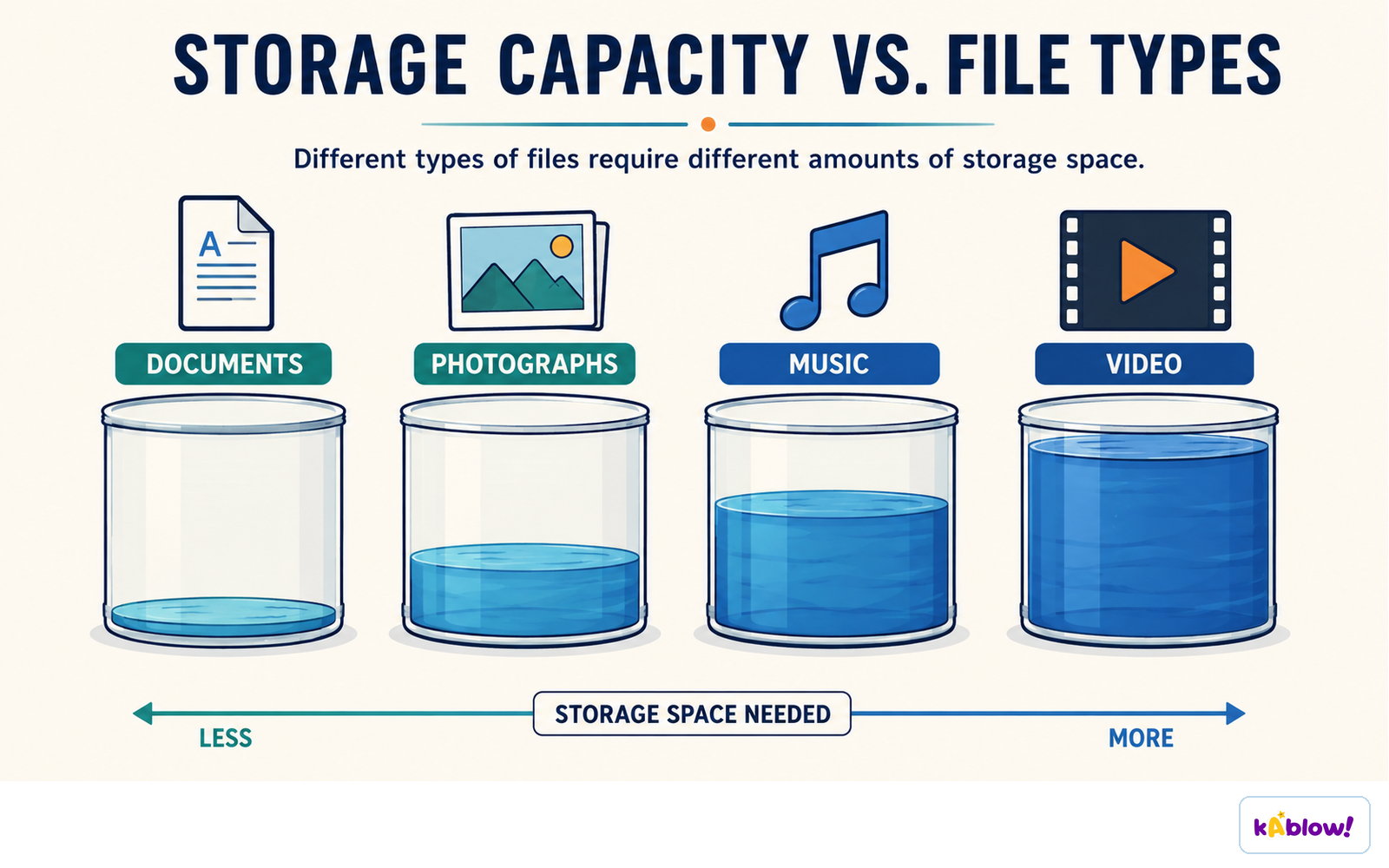
Documents, photographs, music and video need increasing amounts of storage space.
Ranking Everyday Files
- From smallest to largest: text message → document → photo → song → film → game.
- Justify order by the amount of data each must store: text uses few characters, while video and games have huge amounts of graphics and audio.
- A CD-ROM holds about 650–900 MB, which is roughly a 74-minute audio CD or a few hundred photos.
- A USB flash drive commonly comes in 32, 64, or 128 GB sizes.
- A hard disk drive can hold 1 TB (cheap) to 16 TB (enterprise).
Why Units Matter
- Knowing units helps you estimate storage needs – e.g., how many photos fit on a 32 GB drive.
- It helps you compare speeds – internet speed is often in megabits per second (Mbps), not megabytes.
- It prevents confusion when buying storage or transferring files – a 100 MB file is 800 Mb.
- It is essential for programming and system design – memory and file sizes are measured in bytes.
Diapos
Sign up free to view the lesson slides
Step through every slide for this topic — plus flashcards and revision notes — with a free account.
Questions d'entraînement
Aperçu gratuit — 8 sur 62 questions. Inscris-toi pour toutes les voir.
1.A bit can represent one of two possible values, typically shown as 0 and 1.
EasyTrue or false?
2.The symbol for byte is 'b' (lowercase).
EasyTrue or false?
3.How many bits are in one byte?
Easy- A4
- B8
- C16
- D32
4.A kilobyte is defined as exactly 1024 bytes according to the SI metric system.
EasyTrue or false?
5.Which of the following is the correct order of file sizes from smallest to largest?
Medium- A1 KB, 1 MB, 1 GB, 1 TB
- B1 MB, 1 KB, 1 GB, 1 TB
- C1 GB, 1 MB, 1 KB, 1 TB
- D1 TB, 1 GB, 1 MB, 1 KB
6.A 3-minute song at 133 kbit/s would be approximately 3 MB in size.
MediumTrue or false?
7.The IEC binary prefix 'kibi' (Ki) represents a multiple of 1024.
EasyTrue or false?
8.Match each unit of data to its correct size in bits.
Easy- nibble
- byte
- kilobyte (KB)
- megabyte (MB)
- 4 bits
- 8 bits
- 1000 bytes
- 1000 kilobytes
Unlock all 62 questions, flashcards & more
Crée un compte gratuit pour voir toutes les questions, les diapos, les cartes mémo et les notes de révision de ce thème.