Types & Methods Of Data Transmission
खेलकर सीखें
इन सवालों के जवाब देकर एनर्जी कमाएं, फिर मछली पकड़ें और घूमें। कोई अकाउंट नहीं चाहिए।
लेसन नोट्स
Data Packets
- Packets are small 'chunks' of data that make up a larger piece of data broken down by TCP (Transmission Control Protocol).
- Small packets are easier and quicker to route over the internet than large chunks.
- Each packet contains a header (source IP, destination IP, packet number), a payload (actual data), and optionally a trailer (security info, end-of-packet notification).
- Error checks (e.g., parity bits) are added to detect corruption — data being changed, lost, or extra data added.
- If a packet is corrupted or lost, the receiver can request a resend of only that packet, not the whole file.
Packet Switching
- Packet switching is a method of sending packets across a network using routers.
- Data is broken into packets, each assigned a header with source/destination IP and packet number.
- Routers use routing tables to send each packet along the most optimal path, avoiding traffic.
- Packets may take different routes and arrive out of order; they are reassembled using packet numbers.
- Advantages: minimal interference/corruption (individual packets can be resent), quicker than sending one large packet, harder to hack as each packet contains minimal data.
Serial & Parallel Transmission
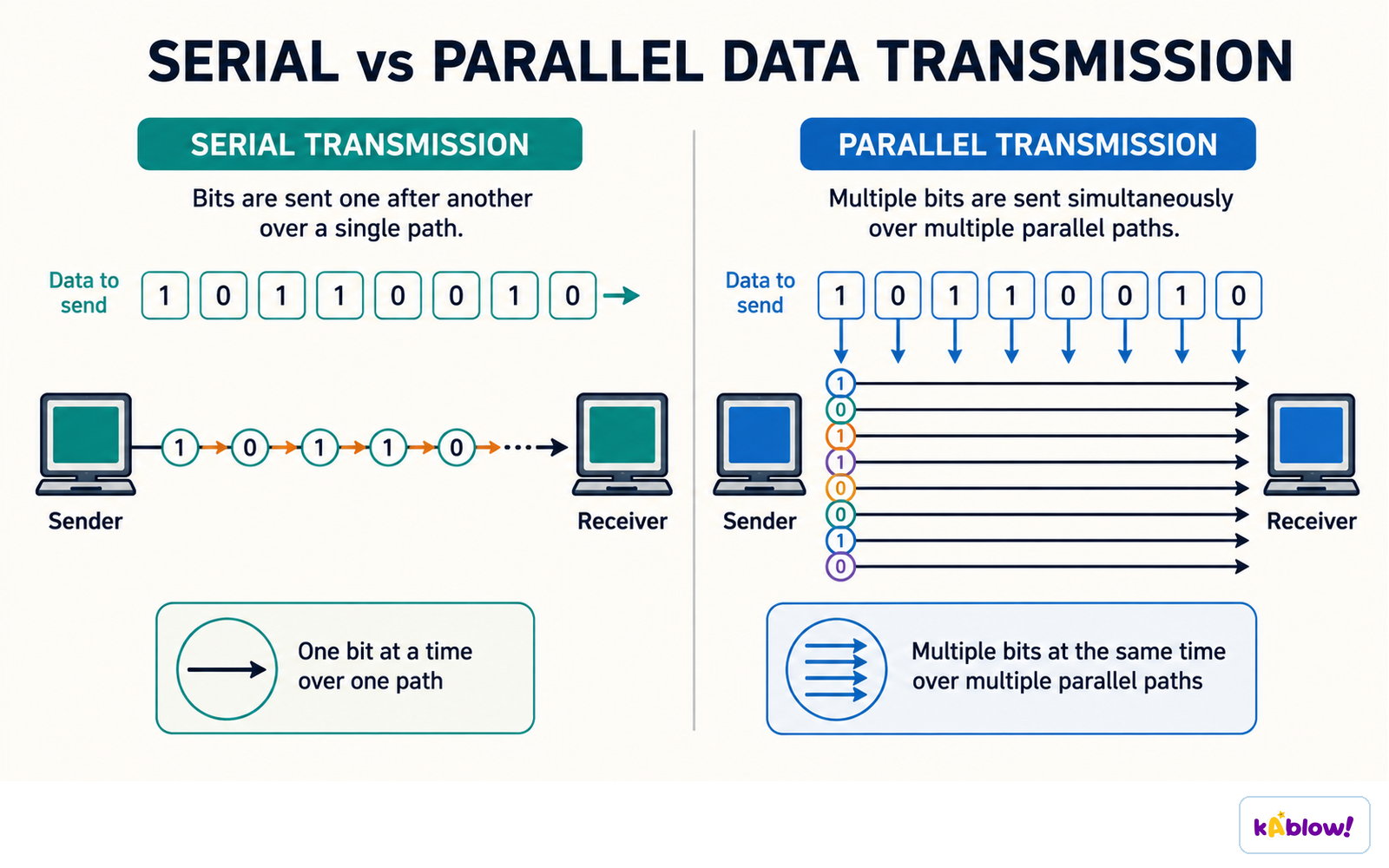
- Serial transmission: bits sent one at a time along a single wire. Example: USB.
- Parallel transmission: multiple bits sent simultaneously on separate wires. Example: traditional printer cable.
- Serial advantages: reliable over longer distances, cheaper, low interference. Disadvantage: slower.
- Parallel advantages: very fast. Disadvantages: only used over short distances, prone to interference and skew (timing differences).
Serial transmission sends bits one after another over one path; parallel sends several at once over several paths.
Simplex, Half-Duplex & Full-Duplex
- Simplex: data travels in one direction only (e.g., computer to monitor).
- Half-duplex: data travels both ways but only one direction at a time (e.g., printer cable sending data then receiving 'low ink' message).
- Full-duplex: data travels both ways simultaneously (e.g., network cables in LAN/WAN).
- Full-duplex is fastest but most expensive; half-duplex is cheaper than full-duplex for two-way communication; simplex is simplest and cheapest.
Simplex carries data one way, half-duplex both ways but not at once, full-duplex both ways at the same time.

Combinations of Transmission Methods
- Wires can combine serial/parallel with simplex/half-duplex/full-duplex (e.g., Serial-Simplex, Serial-Half-duplex, Serial-Full-duplex, Parallel-Simplex, Parallel-Half-duplex, Parallel-Full-duplex).
- Serial-Simplex: one bit at a time, one direction, single wire.
- Serial-Half-duplex: one bit at a time, both directions but not simultaneously, typically one shared wire.
- Serial-Full-duplex: one bit at a time, both directions simultaneously, requires two wires.
- Parallel-Simplex: multiple bits simultaneously, one direction, multiple wires.
- Parallel-Half-duplex: multiple bits simultaneously, both directions but one at a time, multiple wires.
- Parallel-Full-duplex: multiple bits simultaneously, both directions at once, multiple wires.
Asynchronous framing adds start and stop bits to each character; synchronous transmission shares a clock instead.

Universal Serial Bus (USB)
- USB is a widely used standard for serial, asynchronous data transmission between devices.
- Common devices: keyboards, mice, printers, disk drives, network adapters, mobile phones.
- Connector types: USB-A (flash drives, mice), USB-B (printers, scanners), USB-C (latest, small, high speed, carries power).
- Speed generations: USB 1.1 (12 Mbps), USB 2.0 (480 Mbps), USB 3.x (5–20 Gbps), USB4 (up to 80 Gbps).
- When connected, the computer automatically detects the device and loads the appropriate driver; if not found, the user must install it manually.
- Advantages: automatic detection, keyed connectors (fit one way), standardised support, backwards compatible, various speeds.
- Disadvantages: maximum cable length ~5 metres, older versions have limited speeds, very old standards may become unsupported.
स्लाइड्स
Sign up free to view the lesson slides
Step through every slide for this topic — plus flashcards and revision notes — with a free account.
प्रैक्टिस सवाल
फ्री प्रीव्यू — 60 में से 8 सवाल। सभी देखने के लिए साइन अप करें।
1.What does TCP stand for?
Easy- ATransmission Control Protocol
- BTransfer Control Protocol
- CTransmission Check Protocol
- DTransport Control Protocol
2.Which of the following is a component of a data packet?
Easy- AHeader
- BChecksum
- CRouter
- DSwitch
3.What type of data transmission does USB use?
Easy- ASerial
- BParallel
- CSimplex
- DHalf-duplex
4.In which type of transmission can data travel in both directions simultaneously?
Easy- AFull-duplex
- BHalf-duplex
- CSimplex
- DSerial
5.Which of the following is an advantage of serial transmission over parallel transmission?
Medium- AReliable over longer distances
- BFaster transmission speed
- CTransmits multiple bits at once
- DLess prone to skew
6.A printer cable that waits for data to be received before sending back a 'low ink' message is an example of which type of transmission?
Medium- AHalf-duplex
- BSimplex
- CFull-duplex
- DParallel
7.What is the purpose of the packet number in a data packet header?
Easy- ATo allow packets to be reassembled in the correct order
- BTo identify the source of the packet
- CTo encrypt the payload
- DTo specify the route the packet should take
8.Which USB version has a maximum data transfer rate of 480 Mbps?
Easy- AUSB 2.0
- BUSB 1.1
- CUSB 3.0
- DUSB4
Unlock all 60 questions & more
इस टॉपिक के हर सवाल, स्लाइड्स, फ्लैशकार्ड और रिवीज़न नोट्स देखने के लिए फ्री अकाउंट बनाएं।