Input & Output Devices
Belajar sambil bermain
Jawab soal-soal ini untuk dapat energi, lalu memancing dan menjelajah. Tanpa akun.
Catatan pelajaran
Input Devices
- Input devices are hardware components that allow users to interact with a computer system by inputting data or commands.
- Barcode scanner: reads barcodes to capture product information; used in supermarkets, warehouses, libraries for quick and accurate stock/checkout.
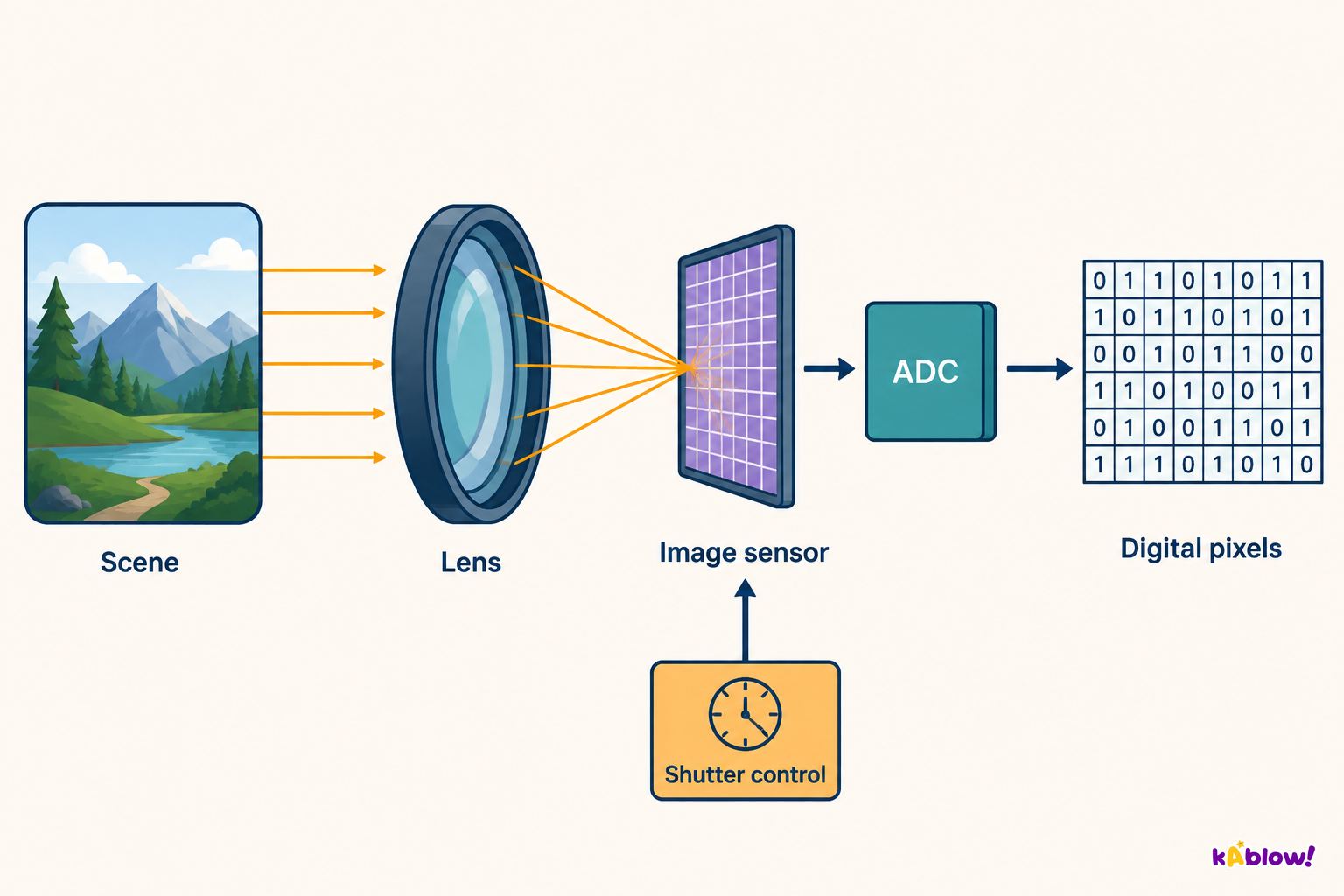
- Digital camera: captures photographs/videos as digital images; used in photography, smartphones, webcams for high-quality visual content.
- Keyboard: inputs text and commands by pressing keys; used with computers, tablets, laptops for typing, data entry, and software control.
- Microphone: captures analogue sound and converts it into digital signals; used in recording studios, smartphones, computers for audio recording and voice communication.
- Optical mouse: moves the cursor based on hand movements over a surface; used with computers and laptops for precise control and navigation.
- QR code scanner: reads QR codes to access stored information; used in retail shops and mobile apps for quick retrieval of website links or product info.
- Touch screens – three types: resistive (press flexible layer; ATMs, older devices), infra-red (interrupts IR beams; kiosks, large displays), capacitive (electrical charge change; modern smartphones, tablets, multi-touch).
- 2D scanner: captures flat images of documents/photos; used in offices, libraries, schools for digitisation.
- 3D scanner: captures detailed 3D shapes and dimensions; used in manufacturing, design, medical imaging for digital models.
Digital camera as an input device
Output Devices
- Output devices receive information from a computer system and present it to the user in an understandable form.
- Actuator: converts energy into motion; used to make robot arms move, open valves, rotate motors – essential in systems requiring movement.
- DLP projector: projects images/video by shining light through tiny mirrors; used in cinemas, classrooms, large presentations for high-quality images.
- Inkjet printer: prints text/images by spraying tiny ink droplets; used at home, schools, offices – low cost compared to other printers.
- Laser printer: heat from a laser fuses toner onto paper; used in offices and schools for high-quality, fast prints.
- LED screen: displays images/video using tiny LEDs; used in TVs, monitors, smartphones – bright, energy efficient, thin.
- LCD projector: projects images/video by shining light through liquid crystal panels; used in offices, classrooms, home cinemas – bright, good quality/affordability balance.
- LCD screen: displays images/video using liquid crystals with a backlight; used in TVs, monitors, smartphones, laptops – energy efficient, thin, sharp, lightweight.
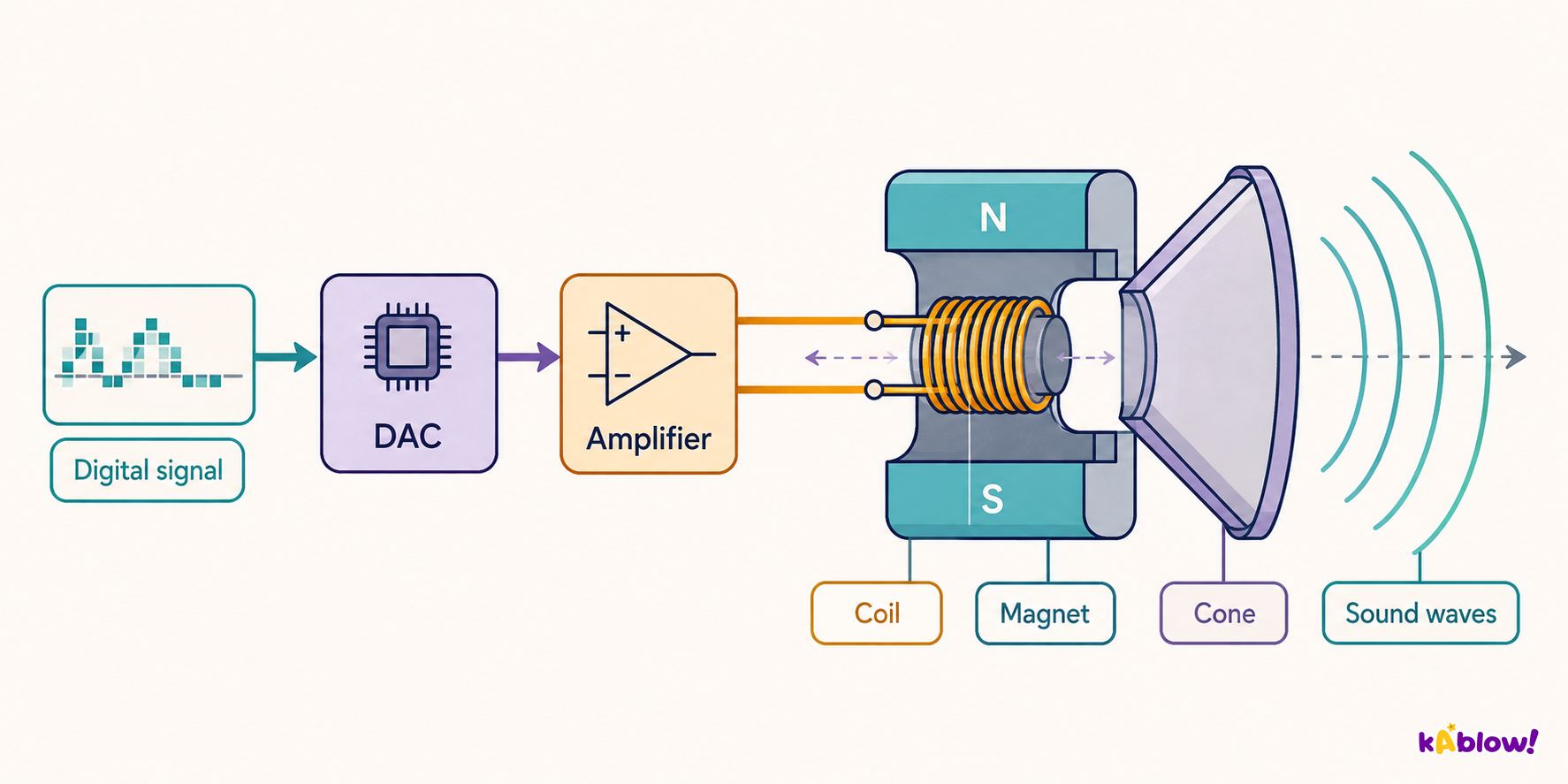
- Speaker: converts electrical signals into analogue sound waves; used in TVs, radios, smartphones – multiple shapes and sizes.
- 3D printer: adds thin layers of plastic to form a three-dimensional object; used in manufacturing, medicine, education, home for prototypes and custom parts.
Loudspeaker as an output device
Choosing the Right Device
- User Needs: consider tasks – a graphic designer may need a graphics tablet, a data entry clerk a keyboard with number pad.
- User Skills: touch screen may be more intuitive for some, mouse and keyboard for others.
- Environment: wireless mouse for clutter-free office, wired mouse for public computer lab to prevent theft.
- Cost: higher-end devices have more features but are more expensive; consider budget and whether extra features are worth the cost.
Sensors – Input Devices for Monitoring and Control
- Sensors are input devices that measure a physical property of the environment (e.g., light, temperature, movement).
- Monitoring system: tracks the state of a system, gathers data, may issue warning messages.
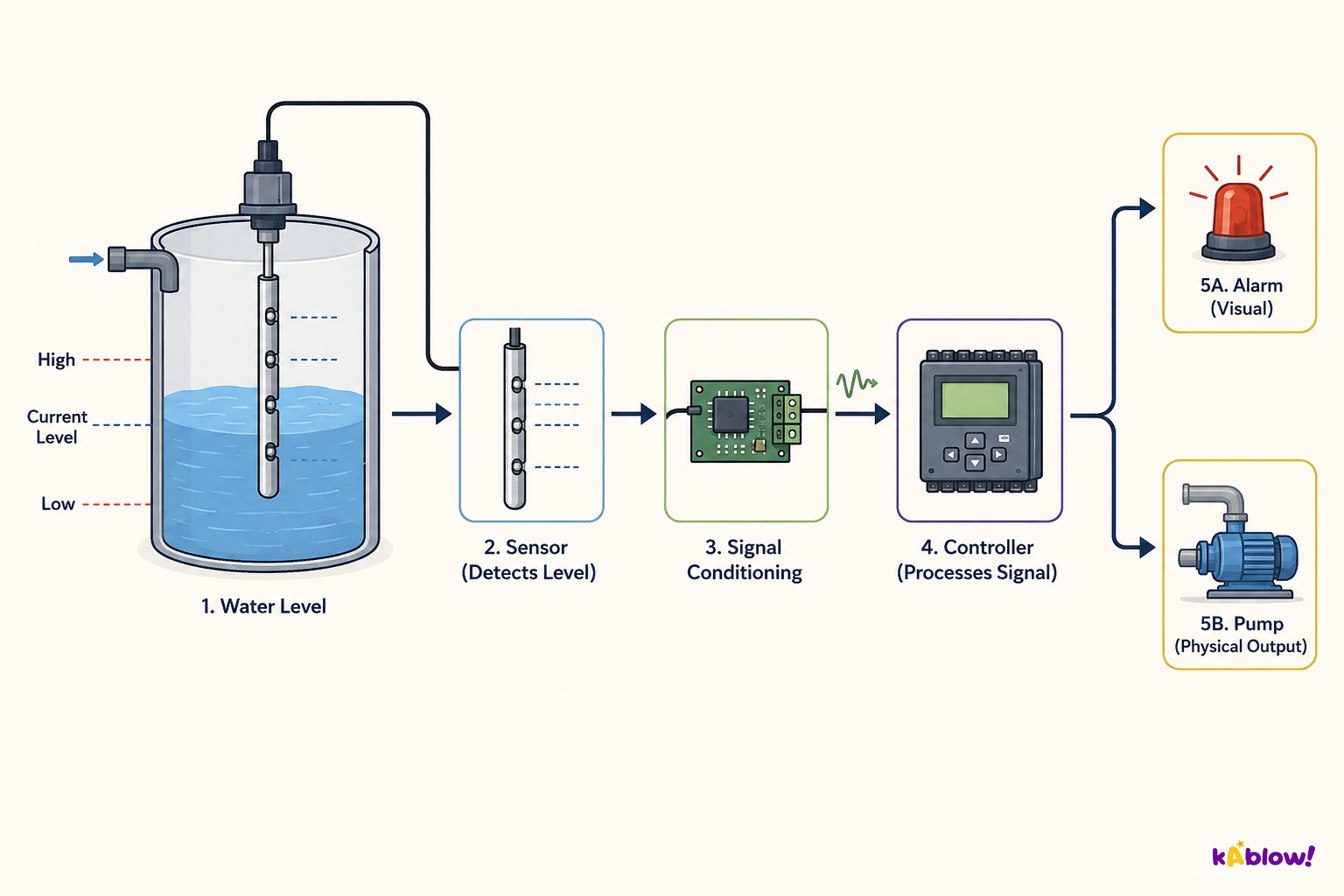
- Control system: controls the system based on sensor input – e.g., if water temperature in a fish tank falls below acceptable level, a heater is switched on.
- Feedback loop: outputs are recycled and used as inputs, creating a continuous cycle (e.g., heater switches off when temperature is within range).
Water-level monitoring and control
Types of Sensors
- Acoustic: measures sound levels; used to detect changes in industrial machinery, monitor noise pollution, security systems.
- Accelerometer: measures acceleration rate, tilt, vibration; used in vehicles to deploy safety features, in phones to detect orientation.
- Flow: measures rate of gas, liquid or powder flow; used to detect changes in flow through pipes in water systems.
- Gas: detects presence of a gas (e.g., carbon monoxide); used in confined spaces, fixing gas leaks.
- Humidity: measures levels of water vapour; used to monitor humidity in greenhouses.
- Infra-red: detects motion or heat source; used in security systems (break beam), emergency services to detect people.
- Level: measures liquid levels; used in car petrol tanks, water tanks, leak detection.
- Light: measures light levels; used to automatically switch on street lights/headlights when dark.
- Magnetic field: detects presence and strength; used in anti-lock braking systems, monitoring rotating machinery.
- Moisture: measures presence and levels of moisture; used in soil monitoring, dampness in buildings.
- pH: measures acidity or alkalinity; used in soil monitoring for optimum growing conditions, chemical processes.
- Pressure: measures gas, liquid or physical pressure; used in tyre pressure monitoring, pipe pressure in manufacturing.
- Proximity: measures distance; used in robotics for object positioning, safety systems to prevent collisions.
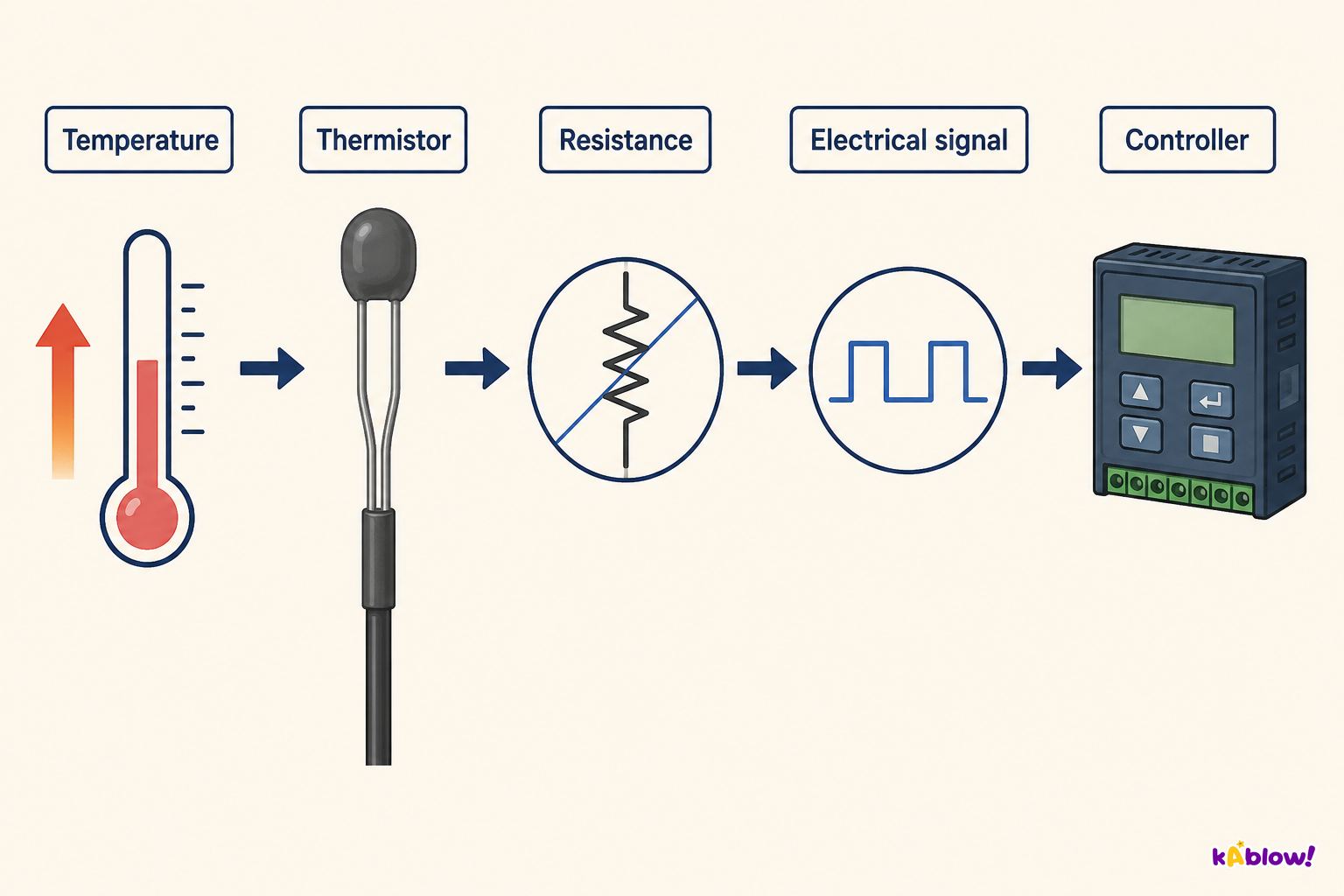
- Temperature: measures temperature; used to maintain temperature in swimming pools, control chemical processes.
Thermistor input signal
Worked Example – Sensors
- Question: What type of sensor would be used to help drivers when reversing? Options: A Motion, B Infra-red, C Light, D Proximity. Answer: D Proximity.
- Question: Is this a monitoring system or a control system? Options: A Monitoring, B Control. Answer: B Control.
Camera autofocus feedback loop
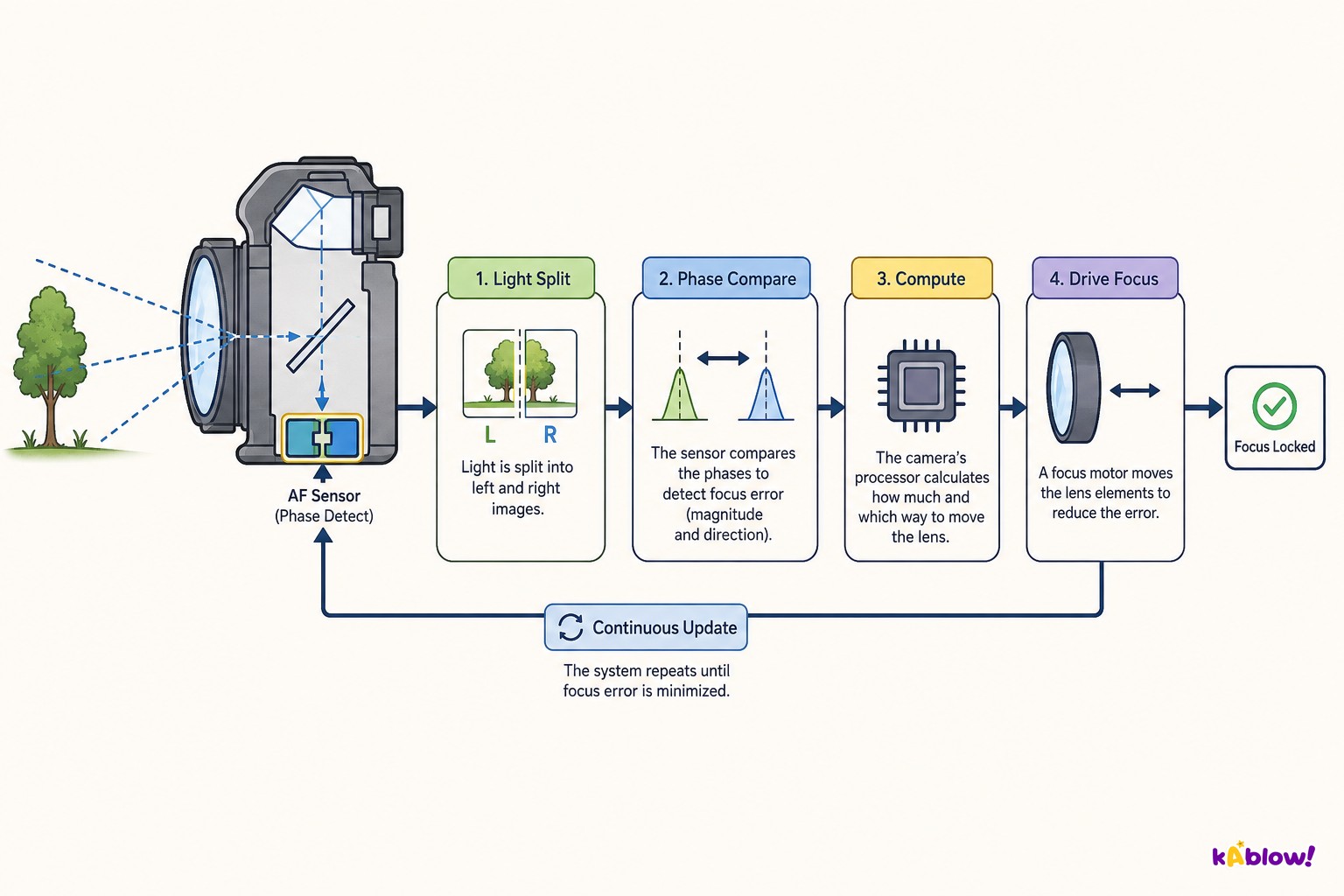
Sensors feed a controller as inputs; actuators carry out the controller's output actions.
In a control system, sensors gather data, the controller applies rules, actuators act, and the change feeds back to the sensors.
Slide
Sign up free to view the lesson slides
Step through every slide for this topic — plus flashcards and revision notes — with a free account.
Soal latihan
Pratinjau gratis — 8 dari 57 soal. Daftar untuk melihat semuanya.
1.Which of the following is an input device?
Easy- ASpeaker
- BLaser printer
- CBarcode scanner
- DLED screen
2.Which output device converts electrical signals into analogue sound waves?
Easy- AActuator
- BSpeaker
- CMicrophone
- DDLP projector
3.A sensor that measures acceleration rate, tilt, and vibration is called:
Easy- AAcoustic sensor
- BAccelerometer
- CPressure sensor
- DProximity sensor
4.Which type of touch screen detects touch through changes in electrical charge on the screen surface?
Medium- AResistive
- BInfra-red
- CCapacitive
- DOptical
5.A greenhouse uses a sensor to monitor water vapour levels. Which sensor is most suitable?
Medium- AHumidity sensor
- BMoisture sensor
- CTemperature sensor
- DLight sensor
6.Which of the following is an advantage of an inkjet printer compared to a laser printer?
Easy- AFaster print speed
- BHigher quality prints
- CLower cost
- DUses toner powder
7.In a control system, a sensor measures the water temperature in a fish tank. When the temperature falls below a set point, a heater is switched on. This is an example of:
Medium- AMonitoring system
- BFeedback loop
- COpen-loop system
- DManual control
8.Which sensor would be most appropriate for a system that detects intruders by sensing body heat?
Easy- AInfra-red sensor
- BMotion sensor
- CAcoustic sensor
- DPressure sensor
Unlock all 57 questions & more
Buat akun gratis untuk melihat setiap soal, slide, kartu flash, dan catatan ulasan topik ini.