Staying safe online: content, contact and conduct
Belajar sambil bermain
Jawab soal-soal ini untuk dapat energi, lalu memancing dan menjelajah. Tanpa akun.
Catatan pelajaran
What is Online Safety?
- Online safety (also called e-safety or cyber safety) means using the internet without being harmed by its misuse.
- The internet makes it easy to share and spread information, which can put private details at risk if you are not careful.
- Harm can come from uploaded media (like photos or videos) that may contain inappropriate content or be used in targeted attacks.
- Governments and organisations are especially concerned about the safety of children, teenagers, and elderly people online.
- Businesses also face cybercrime such as internet fraud, which can damage their finances, customer security, and trust.
The Three Cs: Content, Contact, and Conduct
- Content refers to what you see or read online – it can be inappropriate, offensive, or harmful.
- Contact means who you interact with online – some people may have bad intentions, like online predators or scammers.
- Conduct is how you behave online – you should be respectful and responsible, and avoid cyberbullying or other harmful actions.
- Being a good digital citizen means using technology safely, respectfully, and responsibly.
- You should be able to recognise inappropriate content, contact, and conduct, and know how to report your concerns.
Phishing
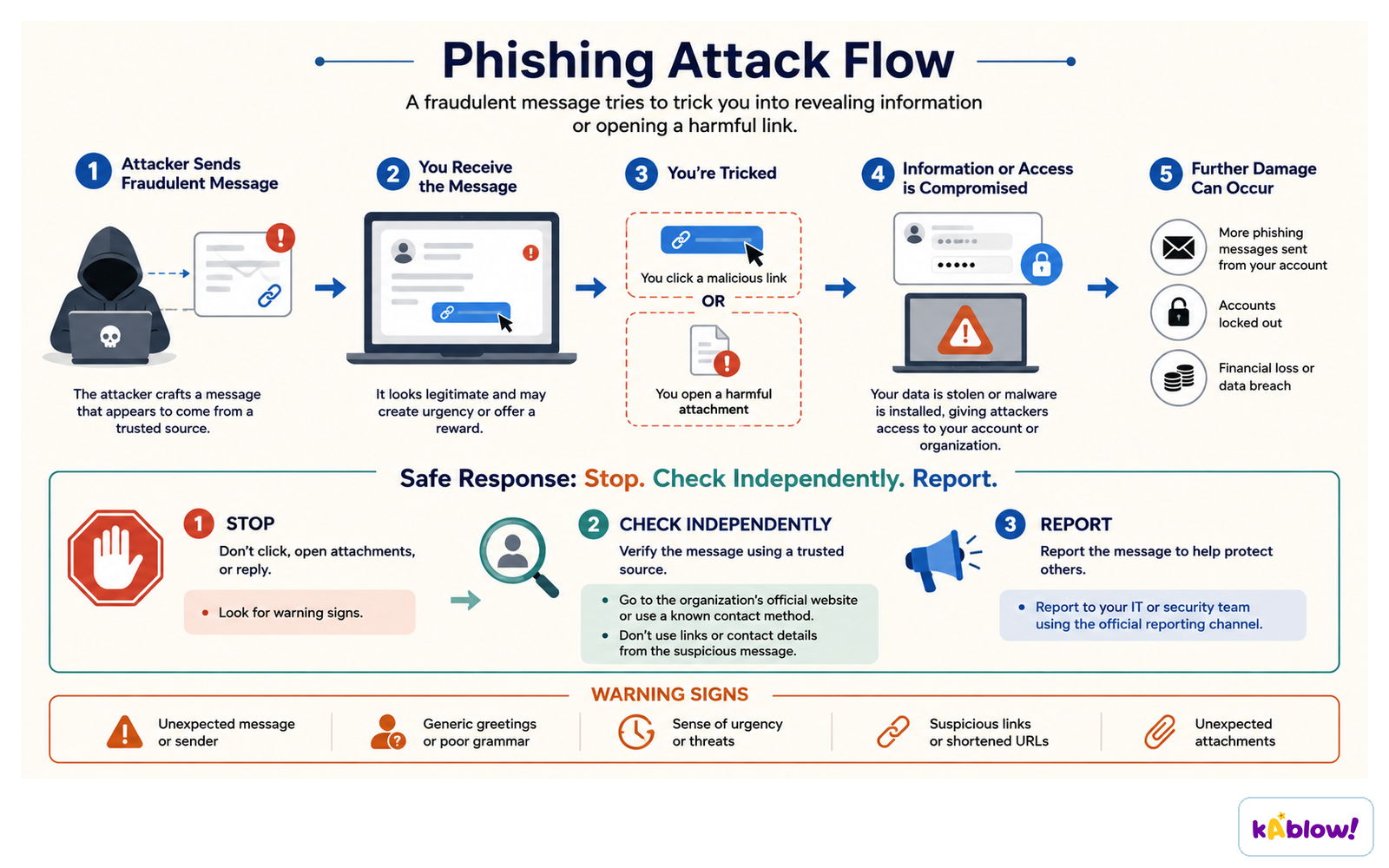
- Phishing is a scam where criminals pretend to be a trustworthy source (like a bank or a friend) to trick you into giving them private information.
- They often send fake emails or create fake websites that look identical to real ones, so you don't suspect anything.
- The goal is to steal passwords, credit card numbers, or other personal data.
- Never click on suspicious links or give out personal information in response to an unexpected email or message.
A phishing message uses urgency to make you click; the safe response is stop, check independently, report.
Malware and Spyware
- Malware is malicious software designed to harm your device or steal information.
- Spyware is a type of malware that secretly collects and sends your private information, like passwords, without your knowledge.
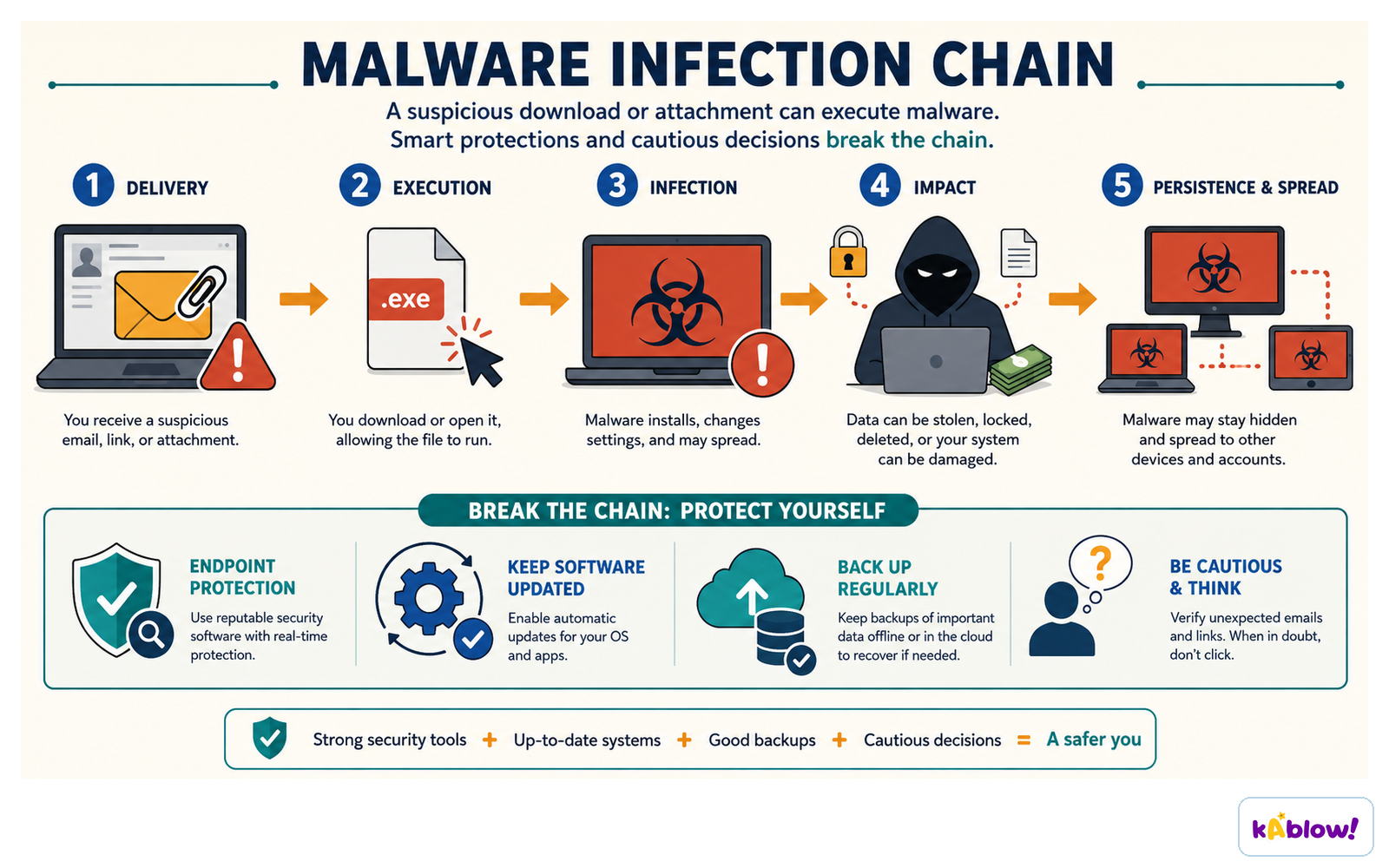
- Malware can be hidden in emails, software downloads, or files from unofficial sources.
- Types of malware include viruses, trojans, ransomware, worms, and rootkits.
- Malware is often hard to detect because it can be encrypted or disguised, so always use trusted sources and keep your security software updated.
The malware infection chain: delivery, execution, infection, impact, then persistence and spread.
Cyberstalking and Cyberbullying
- Cyberstalking is using the internet or electronic means to harass or stalk someone – it can include false accusations, threats, or gathering personal information to embarrass or harm.
- Cyberbullying is using online communication (like social media or messaging) to abuse, intimidate, or overpower someone.
- Cyberbullying is a serious problem: studies show that 23% of teens have been victims, and some victims experience suicidal thoughts.
- It can include posting hurtful comments, spreading rumours, or sharing embarrassing photos without permission.
- Child-on-child abuse online often falls under cyberbullying, but it can also involve physical or sexual harassment, relationship abuse, or grooming.
Obscene or Offensive Content
- Some websites contain offensive, explicit, or hateful content that can make users feel unsafe or uncomfortable.
- This content can appear as pop-up ads, unsuspecting links, or on social media.
- Hate speech targets marginalised groups and is often not taken seriously by moderation teams.
- Platforms try to balance moderation with free speech, but offensive content can still slip through.
- If you see offensive content, you should report it to the platform and talk to a trusted adult.
How to Stay Safe and Report Concerns
- Protect your personal information – never share passwords, addresses, or other private details online.
- Think before you post – once something is online, it can be hard to remove and may be shared widely.
- Use privacy settings on social media to control who can see your posts and contact you.
- Block and report users who make you feel uncomfortable or who are abusive.
- If you are worried about anything online, tell a trusted adult (like a parent or teacher) or use report buttons on websites and apps.
- In the UK, you can report concerns to CEOP (Child Exploitation and Online Protection) or the NSPCC.
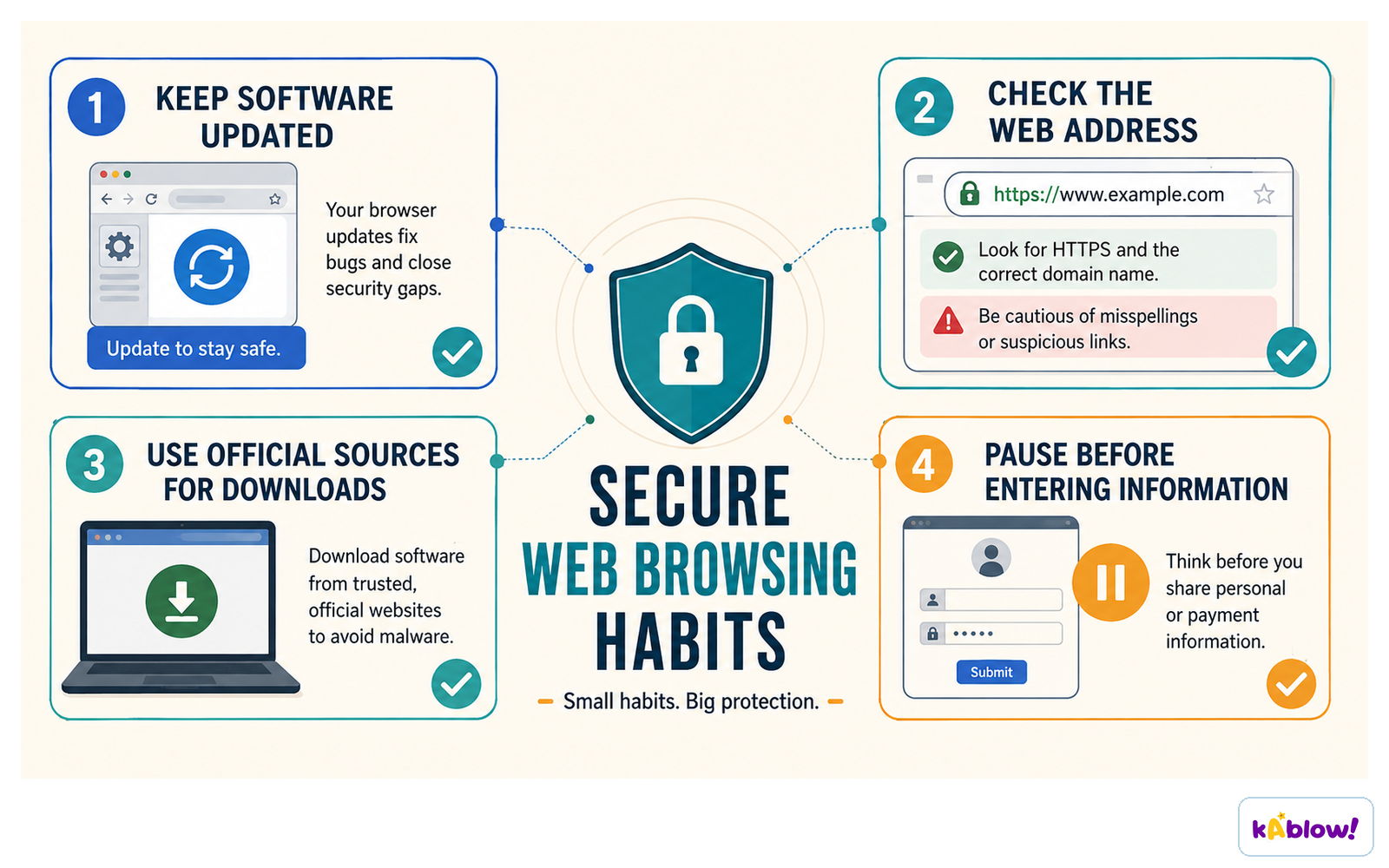
Small habits: keep software updated, check the web address, use official sources, and pause before entering information.
Being a Good Digital Citizen
- Respect others online – treat people the way you would like to be treated.
- Don't spread rumours or share hurtful content about others.
- Check facts before sharing information to avoid spreading misinformation.
- Support friends who are being bullied online and encourage them to report it.
- Remember that your online actions have consequences – they can affect your reputation and others' wellbeing.
Slide
Sign up free to view the lesson slides
Step through every slide for this topic — plus flashcards and revision notes — with a free account.
Soal latihan
Pratinjau gratis — 8 dari 60 soal. Daftar untuk melihat semuanya.
1.Internet safety is also known as online safety, cyber safety, and e-safety.
EasyTrue or false?
2.Which of the following best describes malware?
Easy- ASoftware designed to help protect your computer
- BMalicious software designed to collect and transmit private information without consent
- CA type of scam that tricks you into giving money
- DA tool used to block inappropriate content
3.Cyberstalking and cyberbullying are exactly the same and can be used interchangeably without any difference.
EasyTrue or false?
4.Which of the following are common threats to personal safety online? (Select all that apply)
Easy- APhishing
- BInternet scams
- CMalware
- DCyberstalking
- EGood digital citizenship
5.Malware can be distributed through email, software, and files from unofficial locations.
MediumTrue or false?
6.Which of the following is NOT a common threat to personal safety mentioned in the source?
Medium- APhishing
- BInternet scams
- CSextortion
- DDigital footprint
7.The terms cyberstalking and cyberbullying are often used interchangeably, but they are not exactly the same.
MediumTrue or false?
8.What is sextortion?
Medium- AA type of malware that steals credit card information
- BA scam where someone threatens to share intimate images unless they are paid
- CA form of cyberbullying that involves spreading rumors
- DA method of phishing that uses fake websites
Unlock all 60 questions, flashcards & more
Buat akun gratis untuk melihat setiap soal, slide, kartu flash, dan catatan ulasan topik ini.