Using A Calculator
遊んで学ぼう
問題に答えてエネルギーを集めたら、釣りや探検を楽しもう。アカウント不要。
教育者の方へ: Using A Calculator(Maths [CIE]、Extended)向けのすぐ使えるレッスンスライド, 復習ノート — レッスンで使うか、学習者がライブゲームとして遊ぶインタラクティブなクラス活動としてトピックを実施できます。
レッスンノート
Calculator Basics
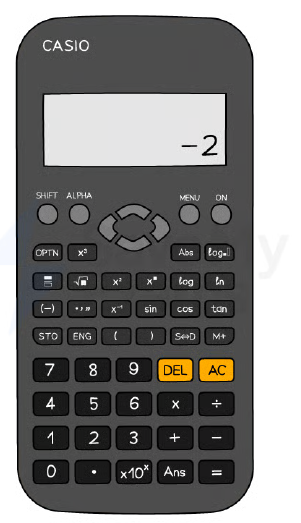
- Use a scientific calculator; know its specific functions (e.g., Casio fx-83GT).
- Reset your calculator before an exam to ensure correct settings.
- Default to MATH mode (display shows 'MATH').
- Set angle unit to degrees (display shows 'D').
- Use 'S⇔D' button to switch between exact (fraction) and approximate (decimal) answers.
- Press 'SHIFT' to access secondary functions (e.g., cube root, inverse trig).
The Casio fx-83GTX Classwiz
Using Brackets Correctly
- Use brackets as in written mathematics to avoid order-of-operations errors.
- Put brackets around negative numbers: e.g., `(-3)²` not `-3²`.
- Use the '(-)' button for negative values, not the minus sign.
- Always close brackets after functions like sin(45°).
Trigonometry Functions
- Use sin, cos, tan for missing sides; ensure degrees mode.
- Use sin⁻¹, cos⁻¹, tan⁻¹ (via SHIFT) for missing angles.
- Type angle inside brackets: e.g., `sin(57)`.
- For older calculators, you may need to enter angle first then press function.
Standard Form and π
- Use ×10ˣ button (or 'EXP') to enter standard form: e.g., `1.2×10⁻³`.
- Modern calculators display as `1.2×10⁻³`; older models may show `1.2E-3`.
- Access π via SHIFT button (often near standard form).
The Ans (Answer) Function
- Press 'Ans' to recall the last calculated result.
- Use Ans to avoid rounding intermediate decimals in multi-step problems.
- Example: after computing 4.69, press Ans to use it in next calculation.
Table Function
- Use TABLE mode to generate values for functions like y = x³ – 6x + 1.
- Enter the function, then specify start, end, and step values.
- Helps reduce errors in 'complete the table' questions.
Time Calculations
- Enter time using ° ' '' button (degrees/minutes/seconds).
- Example: 3 min 45 sec = `0°3'45''`.
- Press the same button to convert between decimal and HMS formats.
Worked Example Tips
- Do one calculation at a time and write down each step.
- Write down more digits than needed in working; round only final answer.
- Use fraction button for division, square root and cube buttons as needed.
- For multi-step, type whole expression in one go using brackets.
スライド
練習問題
無料プレビュー — 30問中8問。すべて見るには登録を。
1.Calculate 4 / 0.0025.
Easy- A1600
- B160
- C0.000625
- D0.00625
2.Calculate 5/8 + 3/4.
Easy- A1.375
- B1.25
- C1.5
- D1.625
3.Calculate 5.39 − 0.98.
Easy- A4.41
- B4.31
- C4.51
- D5.31
4.What is the value of 2.38 + 6.42?
Easy- A8.80
- B8.7
- C8.8
- D8.70
5.Calculate 0.743 − 0.0743.
Easy- A0.6687
- B0.669
- C0.668
6.Calculate 38.5 × 14.2 ÷ (18.4 − 5.9). Write down all the figures on your calculator display.
Easy- A44.44
- B44.4
- C44.444
7.Round the answer 44.44 to 1 significant figure.
Easy- A40
- B44
- C44.4
- D50
8.Calculate (16.379 − 0.879) / (4.2 × 1.241). Give your answer correct to 2 significant figures.
Medium- A3.0
- B2.9
- C3.1
過去問
このトピックの過去問練習は近日公開。
近日公開