Selection: making decisions in programs
遊んで学ぼう
問題に答えてエネルギーを集めたら、釣りや探検を楽しもう。アカウント不要。
レッスンノート
What is Selection?
- Selection is a programming construct that makes decisions by choosing which code to run based on a condition.
- A condition is a Boolean expression – it evaluates to either true or false.
- Selection changes the flow of control in a program: it decides which statement or block of statements executes next.
- It is one of the three basic building blocks of programming, alongside sequence and iteration.
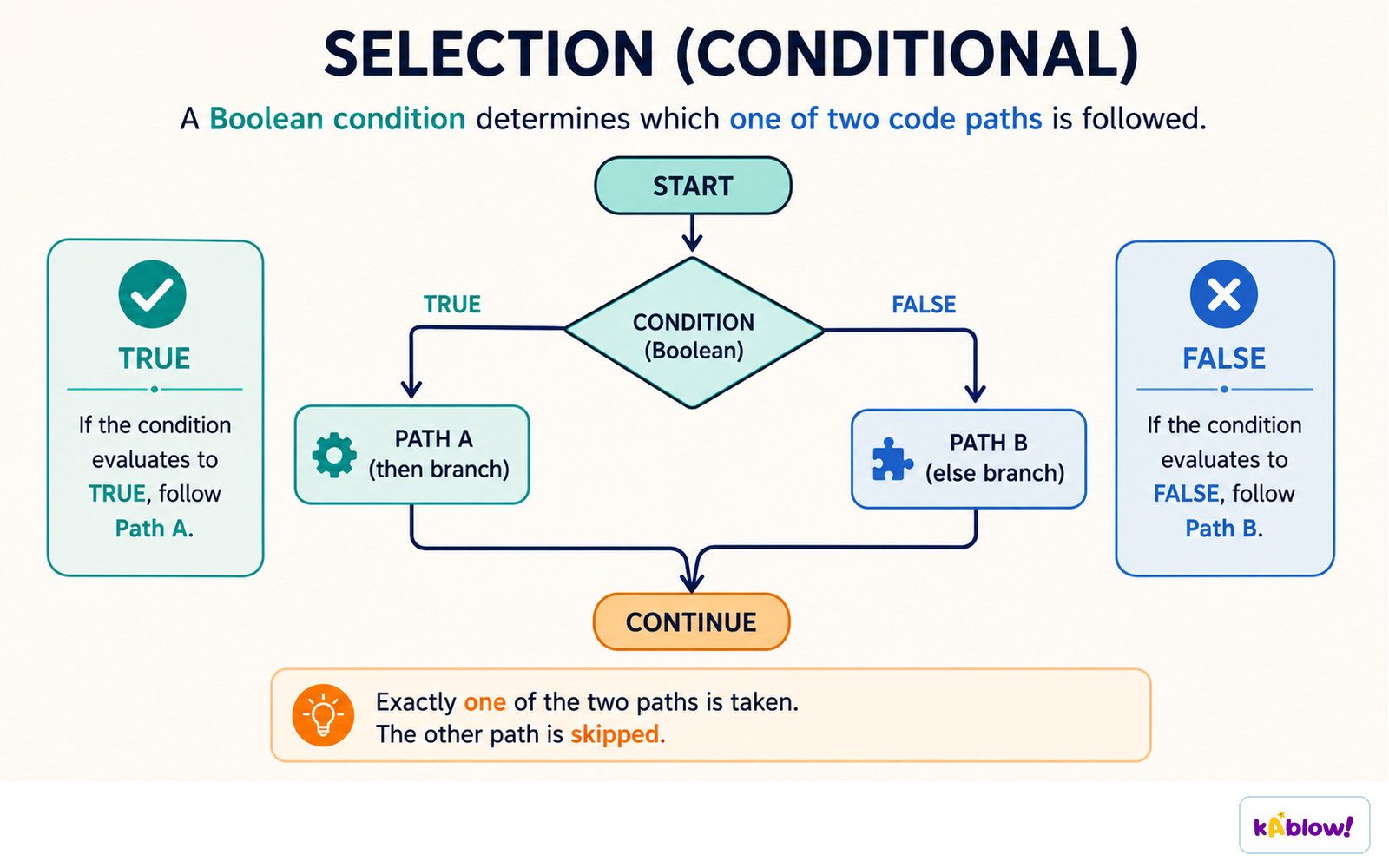
A Boolean condition decides which one of two paths runs; the other is skipped.
The if-then-else Statement
- The most common form of selection is the if-then-else statement.
- General syntax: `if condition then consequent else alternative end if`.
- If the condition is true, the consequent (the statements after `then`) runs.
- If the condition is false, the alternative (the statements after `else`) runs.
- The `else` part is optional – if omitted and the condition is false, nothing happens.
- The consequent and alternative can be a single statement or a block of statements.
Writing Conditions with Comparison Operators
- Conditions often use comparison operators to compare values.
- Common operators: `==` (equal to), `≠` (not equal to), `<` (less than), `>` (greater than), `≤` (less than or equal to), `≥` (greater than or equal to).
- Example: `if age ≥ 18 then print "Adult" else print "Minor"`.
- Conditions can be combined using logical operators like `AND`, `OR`, and `NOT`.
- Example: `if score > 50 AND score ≤ 100 then print "Pass"`.
Nested Selection
- Selection statements can be placed inside other selection statements – this is called nesting.
- Nesting allows more complex decisions, e.g., checking multiple conditions in a hierarchy.
- Example: `if x > 0 then if x > 10 then print "large positive" else print "small positive" end if end if`.
- Be careful with the dangling else problem: an `else` pairs with the nearest preceding `if` unless braces or `end if` are used.
- Use indentation and clear block structure to make nested selection readable.
Chaining Conditions: else if
- To check multiple conditions in sequence, use else if (or `elif` in some languages).
- Only the statements after the first true condition run; all later branches are skipped.
- Example: `if discount == 10 then print "10% off" else if discount == 20 then print "20% off" else print "no discount" end if`.
- This is more concise than nested `if` statements and avoids deep indentation.
- Different languages use different keywords: `else if` (C, Java), `elif` (Python), `ElseIf` (Visual Basic).
Tracing Selection
- Tracing means manually following the flow of a program to determine which branch executes for given inputs.
- To trace, evaluate the condition with the given input, then follow the appropriate branch.
- Example: for `if x > 5 then print "big" else print "small"`, if `x = 7`, the condition is true, so "big" is printed.
- Tracing helps debug and verify that selection logic works correctly.
- Always consider edge cases like boundary values (e.g., `x == 5`) when tracing.
Switch Statements
- A switch statement is an alternative for multiway branching when comparing one expression against many constant values.
- It transfers control to the code of the first matching case; if none match, a default action runs.
- Example: `switch day: case 1: print "Monday" case 2: print "Tuesday" default: print "Other"`.
- Switch statements can be more efficient and readable than long chains of `else if`.
- Some languages (like C) require `break` to exit a case; others (like Python) use dictionaries instead.
Common Pitfalls
- Dangling else: an `else` may pair with the wrong `if` if blocks are not properly delimited.
- Off-by-one errors: using `>` instead of `≥` can exclude boundary values.
- Forgetting the else when a default action is needed.
- Over-nesting makes code hard to read – consider `else if` or switch.
- Using assignment `=` instead of equality `==` in conditions (common in C-like languages).
The same if-then-else written as pseudocode and drawn as a flowchart.
Nested selection tests a second condition only when the first is false, giving three possible outcomes.
スライド
練習問題
無料プレビュー — 59問中8問。すべて見るには登録を。
1.What does an if statement do in a program?
Easy- AMakes a decision based on a condition
- BRepeats a block of code
- CStores a value in a variable
- DPrints output to the screen
2.A Boolean expression can evaluate to either true or false.
EasyTrue or false?
3.What is the purpose of the 'else' clause in an if-then-else statement?
Easy- ATo specify what happens when the condition is false
- BTo repeat the condition
- CTo define a new variable
- DTo end the program
4.In the pseudocode: if discount == 10 then print "pay $30" else if discount == 20 then print "pay $20" else print "pay $10". If discount = 20, what is printed?
Medium- Apay $30
- Bpay $20
- Cpay $10
- DNothing
5.In a chained if-else-if statement, only the statements after the first true condition are executed.
EasyTrue or false?
6.Which keyword is used in Python to chain conditions without increasing indentation?
Easy- Aelseif
- Belsif
- Celif
- Delse if
7.Which of the following is a valid way to avoid the dangling else problem in many languages?
Medium- AUsing explicit block-ending syntax like 'end if'
- BUsing more nested if statements
- CRemoving all else clauses
- DUsing goto statements
8.Which of the following are examples of comparison operators commonly used in conditions? (Select all that apply)
Medium- A==
- B=
- C<
- D≥
- E++