Cyber Security
플레이하며 배우기
이 문제들을 풀어 에너지를 얻은 뒤 낚시하고 탐험하세요. 계정이 필요 없어요.
수업 노트
Cyber Security Threats
- Brute-force attack: repeatedly tries password/PIN combinations; dictionary attack tries common words/phrases.
- Data interception & theft: uses a packet sniffer to capture network data and steal usernames/passwords.
- DDoS attack: floods a server with requests from many bots (compromised computers), making it unusable.
- Hacking: exploits weaknesses (unpatched software, outdated anti-malware) to gain unauthorised access.
- Malware: malicious software including virus (replicates, corrupts files), worm (spreads across network), Trojan (disguised as legitimate), spyware (records activity), adware (displays ads), ransomware (encrypts files, demands ransom).
- Pharming: redirects user to a fake website by altering DNS settings or browser settings; protect with anti-malware, check URLs, look for padlock icon.
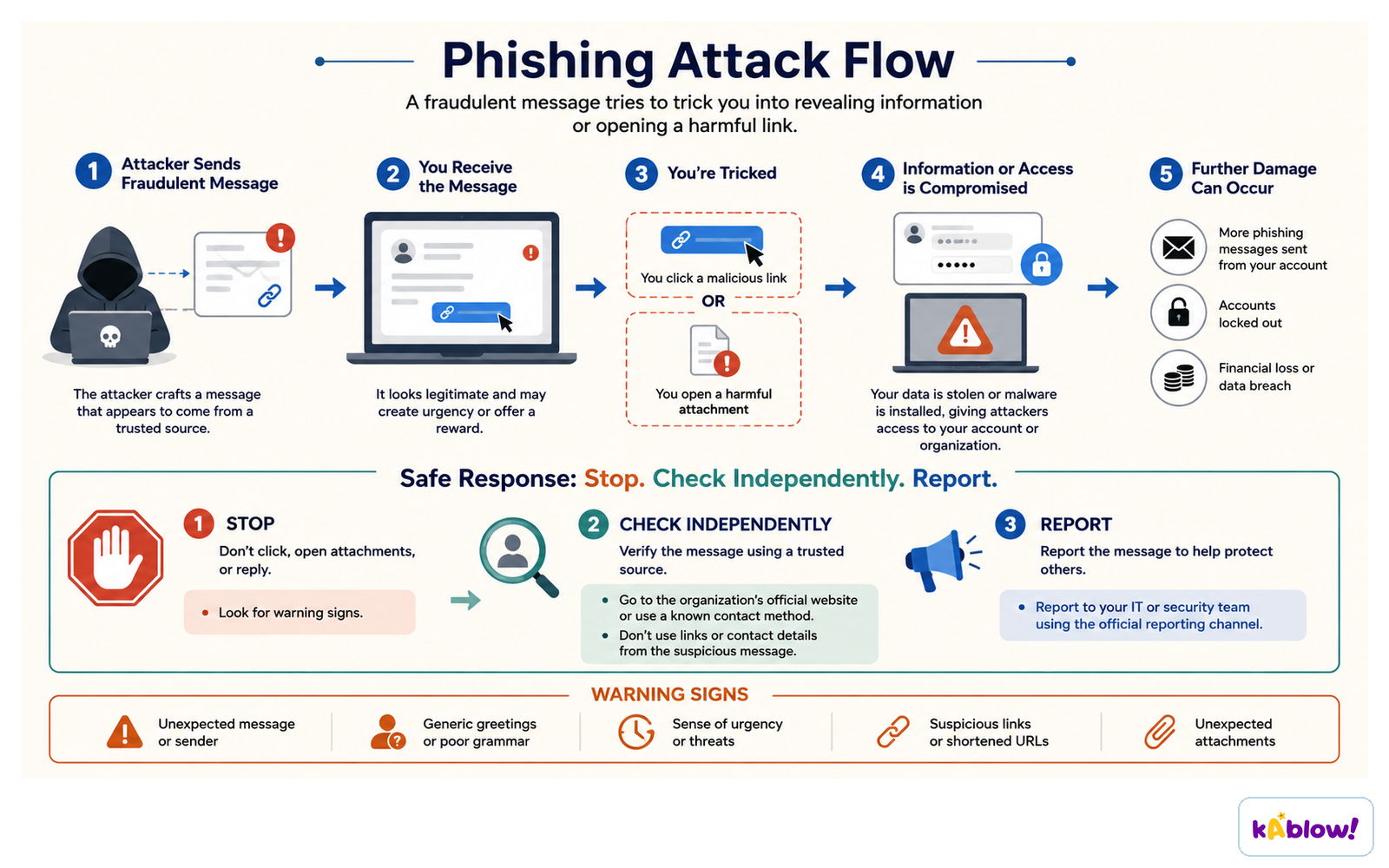
- Phishing: sends fraudulent emails/SMS claiming to be from a reputable company to trick users into revealing details.
- Social engineering: exploits human weaknesses (e.g., fraudulent phone calls, pretexting) to gain confidential data.
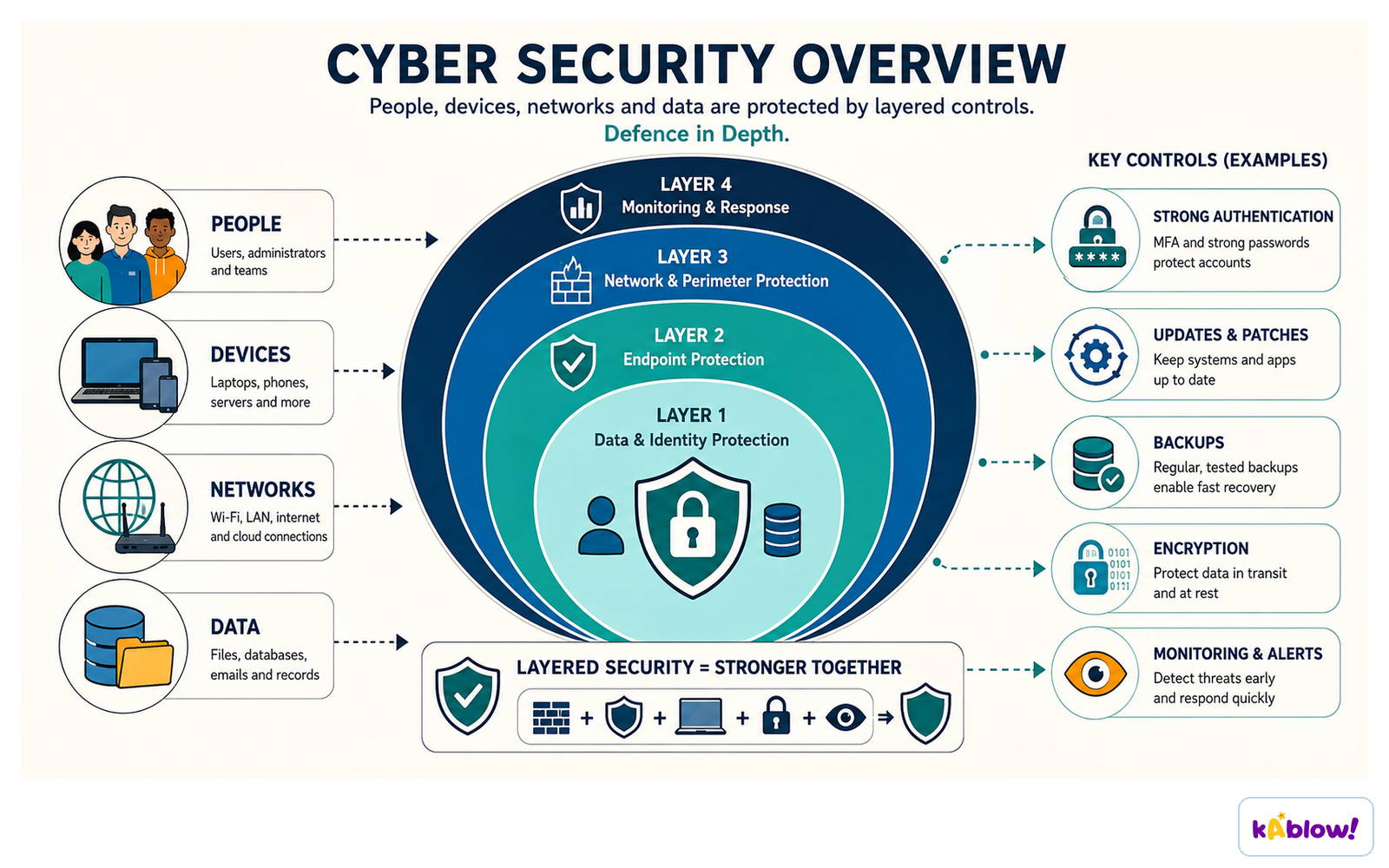
Cyber security protects people, devices, networks and data through layers of controls.
Keeping Data Safe – Access Control & Authentication
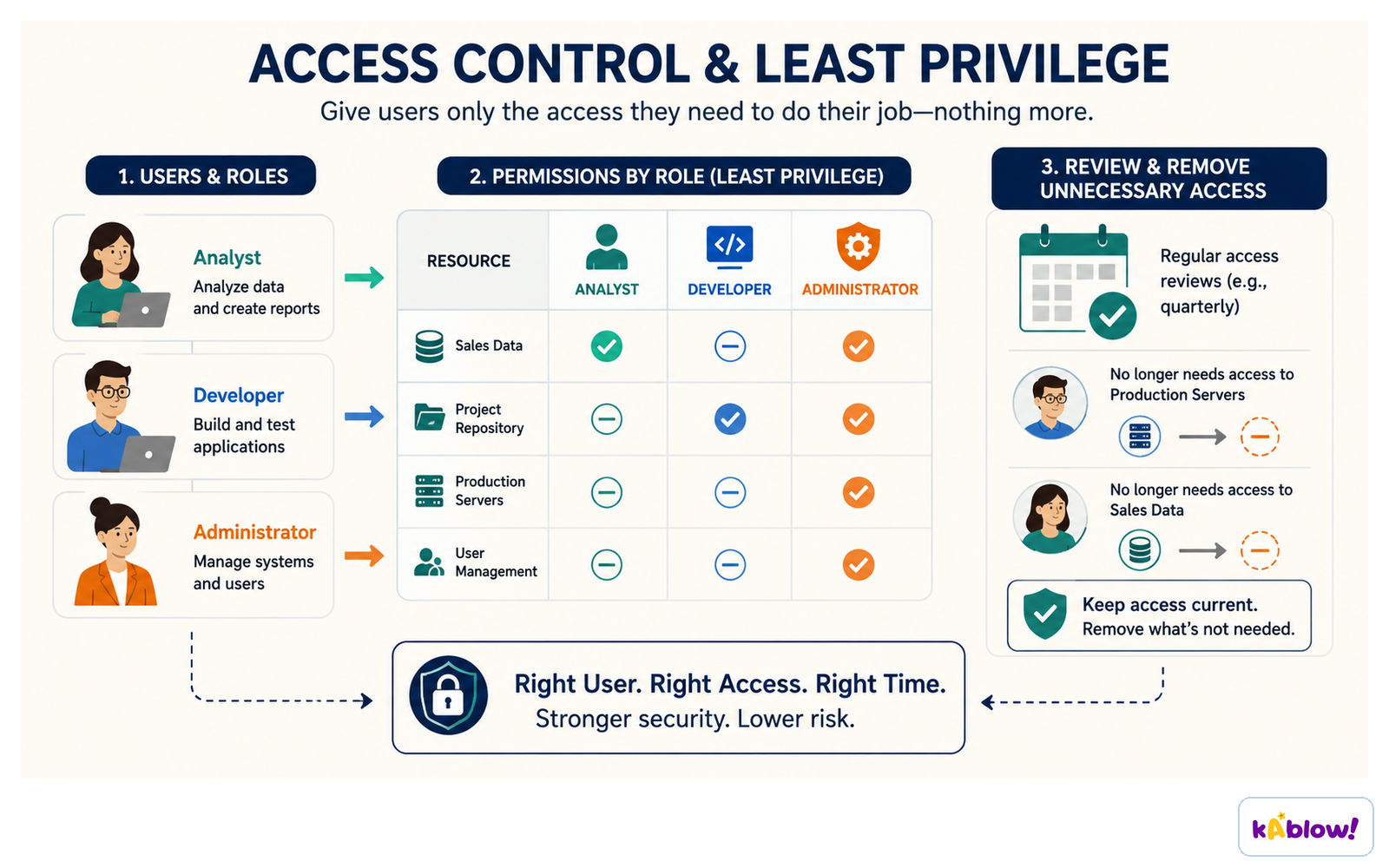
- Access levels: set based on role – full access (create/edit/delete), read-only, no access.
- Authentication: verifies user identity via usernames/passwords, multi-factor authentication, CAPTCHA, or biometrics (fingerprint, facial recognition, iris scan).
- Biometrics are more secure than passwords: cannot be guessed, faked, recorded by spyware, or shoulder-surfed.
Least privilege: each role gets only the access it needs, and unnecessary access is reviewed and removed.
Keeping Data Safe – Software & Network Defences
- Anti-malware: scans files/emails/websites for known malware signatures; includes anti-virus, anti-spam, anti-spyware; updates automatically.
- Firewall: monitors incoming/outgoing traffic, filters based on rules; can be hardware (protects whole network) or software (protects individual devices).
- Proxy server: hides user's IP address/location, filters web traffic, blocks malicious content.
- SSL (Secure Socket Layer): encrypts data transmitted over the internet; uses digital certificate with public key for authentication.
- Automatic software updates: ensure vulnerabilities are patched quickly without user intervention.
A firewall sits at the network boundary and filters incoming and outgoing traffic against a set of rules.

Keeping Data Safe – User Practices & Communication
- Privacy settings: control personal information shared online; review regularly to prevent identity theft.
- Check URLs: verify links before clicking (e.g., `amaz.on.co.uk` vs `amazon.co.uk`) to avoid phishing.
- Monitor communication: phishing emails often have spelling/grammar errors, urgent tone, or lack professionalism.
- User vigilance: lock devices, log off when not in use, do not share passwords, encrypt data, keep software up to date.
A phishing message uses urgency to make you click; the safe response is stop, check independently, report.
A denial-of-service flood overwhelms a public service, so legitimate users face delays or cannot connect at all.
슬라이드
연습 문제
무료 미리 보기 — 52개 중 8개 문제. 가입하면 전부 볼 수 있어요.
1.What is the term for a type of malware that locks a user's computer and demands payment to unlock it?
Easy- ARansomware
- BSpyware
- CAdware
- DTrojan
2.Which of the following is a method used to prevent unauthorised access by monitoring and filtering network traffic based on a set of rules?
Easy- AFirewall
- BProxy server
- CAnti-malware
- DSSL
3.A company's website becomes slow and eventually crashes because a large number of requests are sent to it from multiple compromised computers. What type of attack is this?
Medium- ADDoS attack
- BBrute-force attack
- CPhishing attack
- DData interception
4.Which security measure uses unique physical characteristics such as fingerprints or iris scans for authentication?
Easy- ABiometrics
- BCAPTCHA
- CMulti-factor authentication
- DEncryption
5.A user receives an email that appears to be from their bank, asking them to click a link and enter their login details. The email contains several spelling mistakes. What type of threat is this?
Medium- APhishing
- BPharming
- CSocial engineering
- DSpyware
6.An attacker repeatedly tries different combinations of a user's password to gain unauthorised access. Which type of attack is this?
Easy- ABrute-force attack
- BDictionary attack
- CDDoS attack
- DData interception
7.Which of the following is a type of malware that can replicate itself and spread to other computers on a network without needing to attach to a host file?
Easy- AWorm
- BVirus
- CTrojan
- DSpyware
8.What is the purpose of a proxy server in network security?
Medium- ATo hide a user's IP address and location
- BTo encrypt data transmitted over the internet
- CTo scan for malware in email attachments
- DTo manage user access levels