Tracing Algorithms With Trace Tables
플레이하며 배우기
이 문제들을 풀어 에너지를 얻은 뒤 낚시하고 탐험하세요. 계정이 필요 없어요.
교육자를 위해: Tracing Algorithms With Trace Tables(Computer Science, CIE)을(를) 위한 바로 쓸 수 있는 수업 슬라이드, 복습 노트 — 수업에 사용하거나, 학습자들이 실시간 게임으로 즐기는 인터랙티브 클래스 활동으로 진행하세요.
수업 노트
Purpose and Exam Context
- Trace tables document a dry-run of an algorithm: you execute it by hand exactly as a computer would, without running it.
- Required by CIE 0478 §7.7: complete a trace table showing variables, outputs, and user prompts at each step.
- Common on Paper 2 (1h45, 75 marks); the grid is often pre-printed with column headings and blank rows.
- Calculators are not allowed, so all arithmetic must be done and checked by hand.
- Trace tables help you verify logic, spot errors, and state the final output — a key exam skill.
A trace table records one row per step: the input taken, the variable values, the decision made and any output.
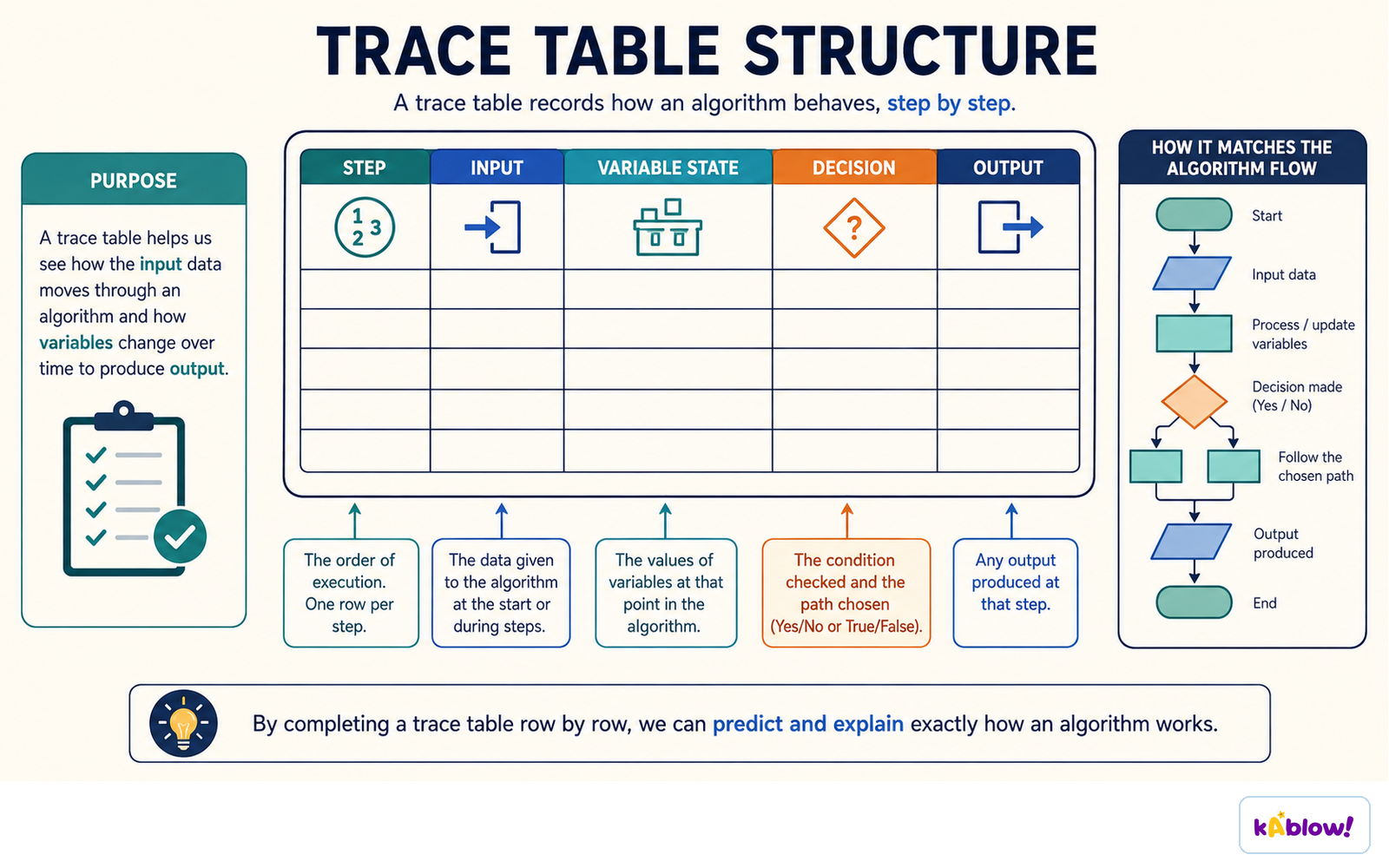
The Column Method – Six Rules
- Rule 1: Draw the table before tracing: one column per variable (in declaration order), plus OUTPUT and PROMPT columns if needed.
- For arrays, either give each element its own column (e.g., `Names[1]`, `Names[2]`) or use an index column plus an element column, matching the printed grid.
- Rule 2: Write a new value only when a variable is assigned; leave cells blank otherwise. Never overwrite previous values — the trail earns marks.
- Rule 3: Follow control flow, not page order: after `NEXT`, `ENDWHILE`, or `UNTIL`, jump back to the loop start; after `ENDIF`, continue after the block.
- Rule 4: Test conditions at the exact point they are tested: `WHILE...DO` tests before the body (may run zero times), `REPEAT...UNTIL` tests after (runs at least once), `FOR...NEXT` tests before each pass.
- Rule 5: Record every `OUTPUT` on the row it happens, exactly as the user sees it, including fixed text and spaces.
- Rule 6: Re-read the last row: the final output is what the OUTPUT column contains, in order, and nothing else.
Desk checking follows the algorithm by hand, recording each step until an unexpected value appears.
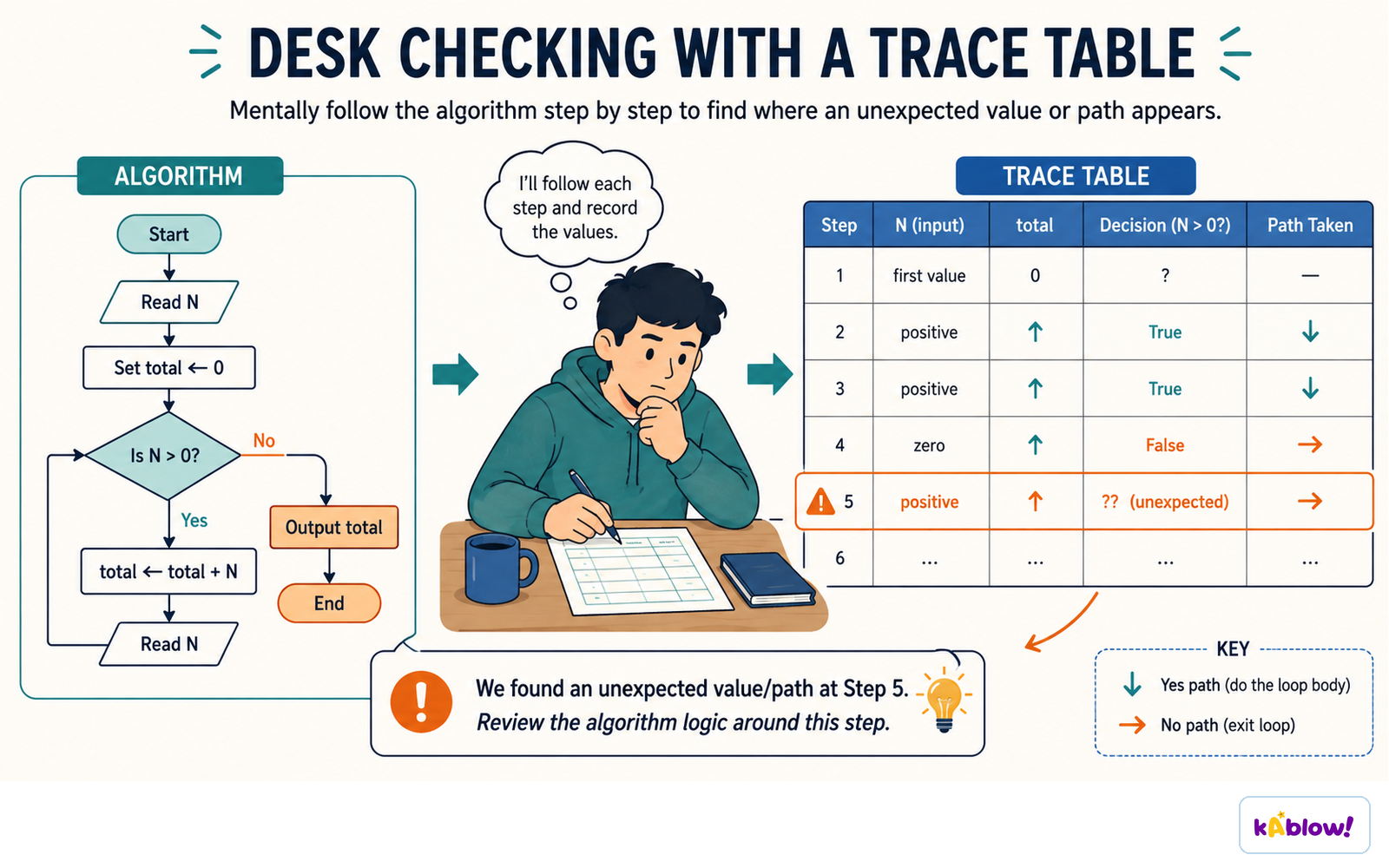
Tracing Loops and Conditions
- WHILE...DO is a pre-condition loop: condition tested before the body, so the body may run zero times.
- REPEAT...UNTIL is a post-condition loop: body always runs at least once; condition tested after.
- FOR...NEXT tests before each pass; runs zero times if the start value is already past the end value.
- Count passes before you start: `FOR 1 TO 10` runs 10 times, `FOR 0 TO 10` runs 11 times, `FOR 1 TO 10 STEP 2` runs 5 times.
- Watch `≤` vs `<` at boundaries — a common source of off-by-one errors.
- Read loop conditions as a whole, including `AND`/`OR`; a search loop may end for two reasons, and which one decides the output.
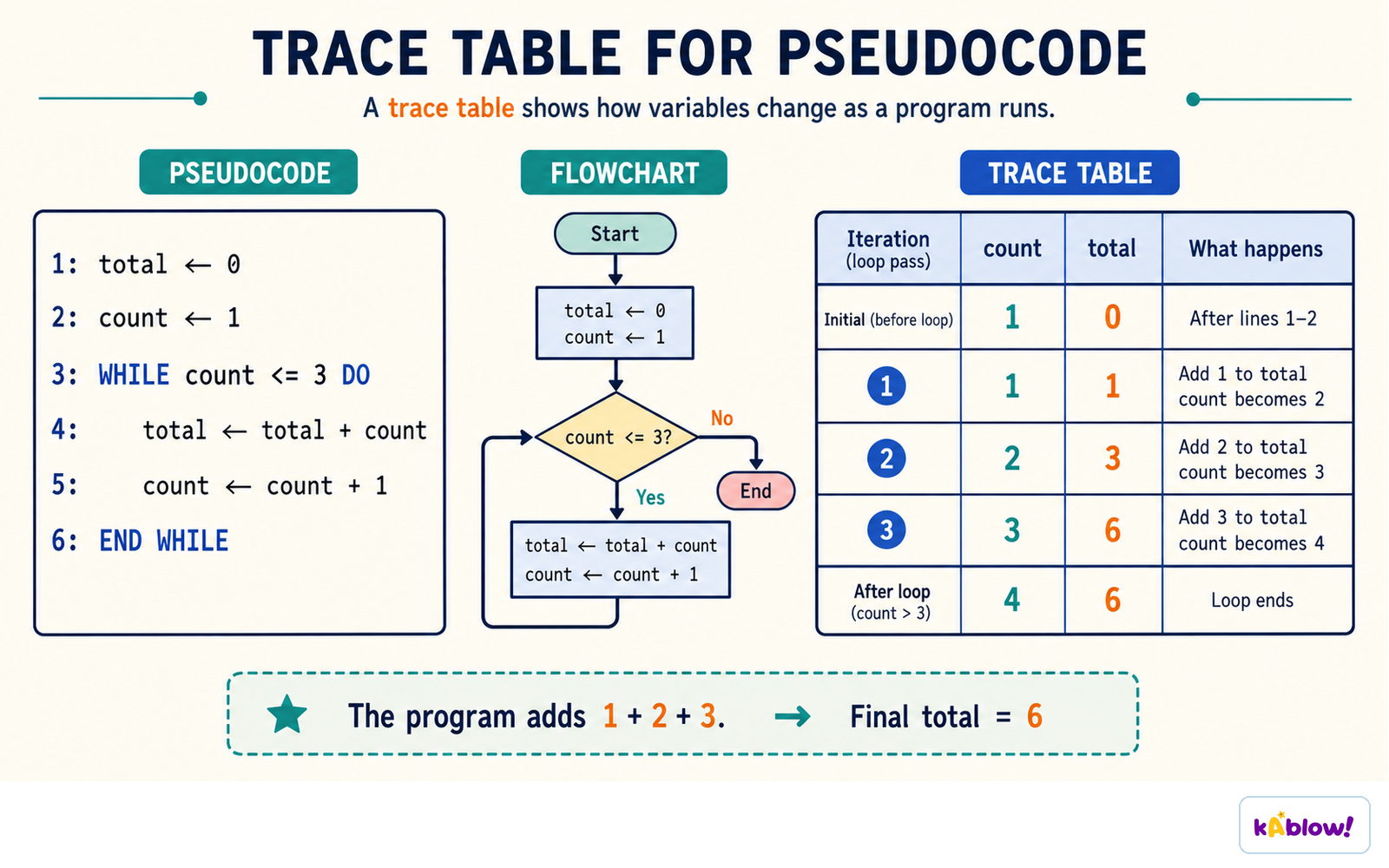
Tracing a WHILE loop that adds 1 + 2 + 3: count and total after each iteration, ending with total = 6.
Totalling and Counting
- Totalling adds each value to a running total that starts at 0.
- Counting adds 1 to a counter each time a condition is met.
- Initialise the total/counter before the loop — an uninitialised variable is a common error.
- Example: `Total ← 0` then `Total ← Total + Amount[Index]` inside a loop.
- In a trace, record the updated total on each row where it changes.
Tracing Arrays and Nested Loops
- For arrays, give each element its own column or use an index column; write the element value when accessed.
- Nested loops: the inner loop runs completely for each pass of the outer loop; e.g., 2 rows × 3 columns = 6 inner-body executions.
- Reset inner variables (like `RowTotal`) at the start of each outer pass — forgetting this is a classic slip.
- Column restarts at its start value each time the outer counter advances.
- Trace the inner loop fully before moving to the next outer iteration.
Standard Algorithms: Linear Search and Bubble Sort
- Linear search checks each item in turn from the start; stops as soon as a match is found (may end mid-list).
- Use a found flag (e.g., `Found ← FALSE`) and an index; the loop condition often includes `AND Found = FALSE`.
- If not found, the index reaches `n+1` and the loop ends; output `Not found`.
- Bubble sort compares neighbouring pairs and swaps if out of order; each pass pushes the next largest value to the end.
- After each pass, the number of comparisons can reduce by one; a pass with no swaps means the list is sorted.
- In a trace, write the whole list after every swap and keep a Swapped flag in its own column.
Handling User Prompts and Validation
- PROMPT column shows the text the user sees; the `INPUT` statement itself displays nothing.
- For validation loops (e.g., `REPEAT...UNTIL Mark ≥ 0 AND Mark ≤ 100`), the prompt appears for every attempt, including the successful one.
- Record the input value in the variable column on the same row as the prompt.
- Example: inputs -5, 120, 64 → three prompt rows, final output `Accepted: 64`.
Systematic Checks to Catch Slips
- Count loop passes before tracing to know how many rows to expect.
- Read conditions as a whole, including `AND`/`OR`.
- Watch `≤` vs `<` at boundaries.
- After a swap, write both changed values on the same row.
- If a variable never appears, check if it was ever assigned; if a column is full of identical values, check if it should be reset inside the loop.
- If trace and expected result disagree, trust the trace and look for the algorithm's error — this is the skill tested in §7.8.
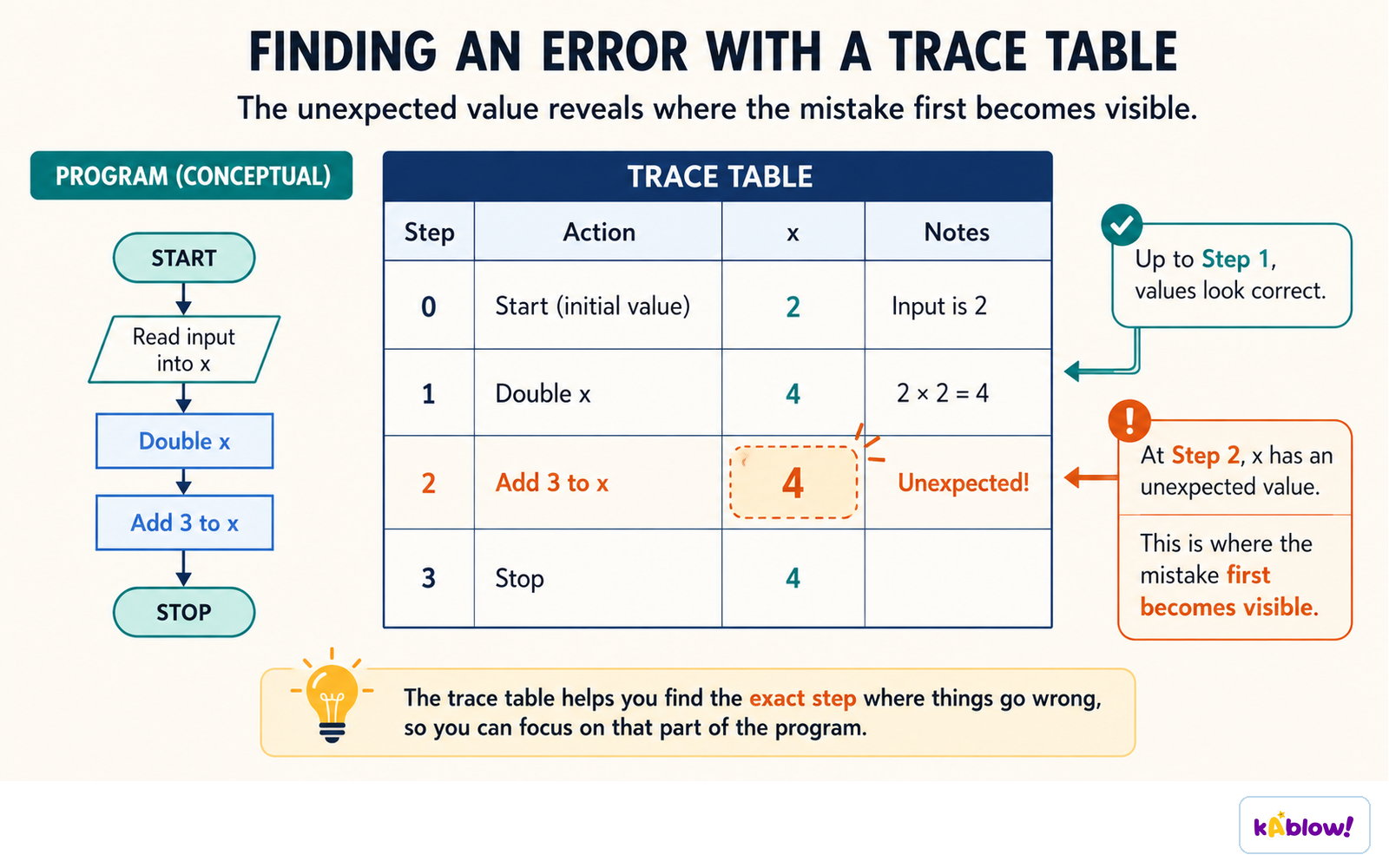
The first unexpected value in a trace table shows the exact step where the mistake becomes visible.
슬라이드
연습 문제
무료 미리 보기 — 60개 중 8개 문제. 가입하면 전부 볼 수 있어요.
1.What is a trace table used for in computer science?
Easy- ATo document a dry-run of an algorithm by hand
- BTo compile a program into machine code
- CTo store data permanently in a file
- DTo design the user interface of a program
2.A trace table must have one column for each variable used in the algorithm.
EasyTrue or false?
3.When tracing a WHILE...DO loop, when is the loop condition tested?
Easy- ABefore the loop body executes
- BAfter the loop body executes
- COnly at the end of the whole program
- DOnly when the loop is first reached
4.In a REPEAT...UNTIL loop, the body always executes at least once.
EasyTrue or false?
5.What is the purpose of a 'PROMPT' column in a trace table?
Medium- ATo record the text displayed to the user when input is requested
- BTo show the values of variables after each iteration
- CTo list the error messages generated by the algorithm
- DTo store the output of the algorithm
6.Which of the following are standard methods that can be traced using trace tables? (Select all that apply)
Medium- ALinear search
- BBubble sort
- CTotalling
- DCompilation
- ECounting
7.When tracing a FOR...NEXT loop, if the start value is already past the end value, the loop body runs zero times.
EasyTrue or false?
8.What is the first step in the column method for creating a trace table?
Easy- ADraw the table before tracing
- BExecute the algorithm on a computer
- CWrite the output first
- DCount the number of iterations
기출 문제
이 주제의 기출 문제 연습이 곧 나와요.
곧 출시