Using A Calculator
플레이하며 배우기
이 문제들을 풀어 에너지를 얻은 뒤 낚시하고 탐험하세요. 계정이 필요 없어요.
교육자를 위해: Using A Calculator(Maths [CIE], Core)을(를) 위한 바로 쓸 수 있는 수업 슬라이드, 복습 노트, 다이어그램 — 수업에 사용하거나, 학습자들이 실시간 게임으로 즐기는 인터랙티브 클래스 활동으로 진행하세요.
수업 노트
Calculator Basics & Settings
- Check your calculator is in MATH mode (display shows 'MATH').
- Set angle unit to degrees – look for a 'D' symbol on screen.
- Use SETUP or MODE button to change settings; reset before exam.
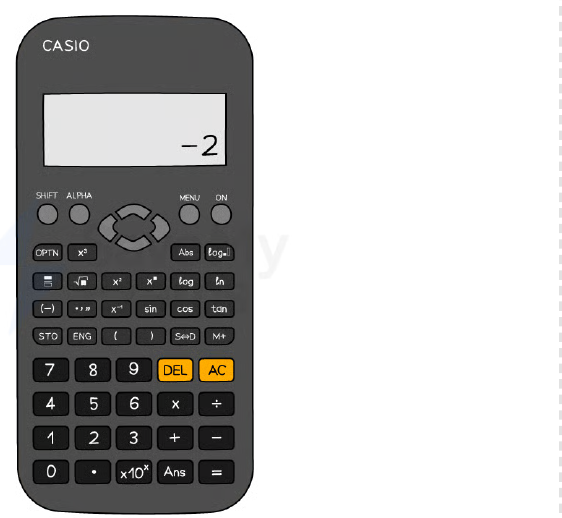
- Switch between exact (fraction) and approximate (decimal) answers using S⇔D button.
- Know your specific model (e.g., Casio fx-83GT) – functions may be accessed differently.
The Casio fx-83GTX Classwiz
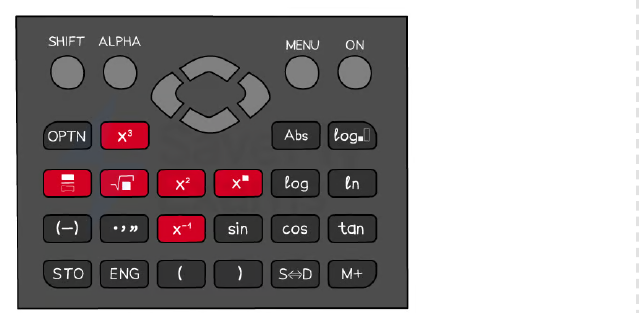
Essential Shortcut Buttons
- Use fraction button (a b/c) for fractions; square (x²), cube (x³), power (^) for exponents.
- Square root (√) and cube root (∛) via SHIFT + √ or dedicated button.
- SHIFT key gives access to inverse functions (e.g., sin⁻¹, cos⁻¹, tan⁻¹) and nth roots.
- π is often near the standard form button; may require SHIFT.
- ×10ˣ button enters standard form; modern calculators display as '×10ⁿ'.
Calculator shortcut buttons
Using Brackets Correctly
- Always use brackets around negative numbers – e.g., (-3)² gives 9, but -3² gives -9.
- Use the (-) button for negative values, not the minus button.
- Brackets ensure correct order of operations – e.g., (68+18)÷(9-5) vs 68+18÷9-5.
- Close all brackets after functions like sin(45°) – type sin(45) then close bracket.
Trigonometry Functions
- Use sin, cos, tan for finding sides; ensure calculator is in degrees mode.
- For angles, use sin⁻¹, cos⁻¹, tan⁻¹ via SHIFT + sin/cos/tan.
- After typing a trig function, an open bracket appears – remember to close it.
- Example: sin(30) = 0.5; sin⁻¹(0.5) = 30°.
Standard Form & π
- Enter standard form using ×10ˣ button – e.g., 1.2×10⁻³ is 1.2 ×10ˣ (-)3.
- Modern calculators display standard form as '1.2×10⁻³'; older models may show '1.2E-3'.
- π is a constant; use it in calculations like area of a circle (πr²).
- Combine with brackets for complex expressions: (π × 5²) gives 78.5398...
The Ans (Answer) Function
- Ans recalls the last calculated result – useful for multi-step calculations.
- Avoid rounding intermediate answers by using Ans in the next step.
- Example: compute 4.69² = 21.9961, then √(Ans) = 4.689... (but better to do in one go).
- Press Ans button (often above '=') to insert the previous answer.
Table Function for Graphs
- Use TABLE mode to generate values for functions like y = x³ – 6x + 1.
- Enter the function, set start/end/step, and calculator outputs a table.
- Helps reduce errors in 'complete the table' questions.
- Example: for y = x³ – 6x + 1, table gives x=-3 → y=-8, x=-2 → y=5, etc.
Time Calculations
- Use ° ' '' button to enter time in hours/minutes/seconds – e.g., 3°45'0'' for 3h45m.
- Convert between decimal time and hh:mm:ss using the same button.
- Example: 2.7 hours = 2°42'0'' (since 0.7×60=42 minutes).
- Useful for speed, distance, time problems.
Worked Example Tips
- Do one calculation at a time and write down intermediate results with '...' to show no rounding.
- Use fraction button for numerator/denominator – e.g., (4.69²)/(0.343+sin45°).
- For standard form substitution, use brackets: (1.2×10⁻³)² × (7.83×10⁵).
- Always write down more digits than needed; round only the final answer.
슬라이드
연습 문제
무료 미리 보기 — 39개 중 8개 문제. 가입하면 전부 볼 수 있어요.
1.Find the value of \√{3481}.
Easy- A59
- B61
- C49
- D69
2.Find the value of 3\√{2744}.
Easy- A14
- B16
- C12
- D18
3.Find the value of \√{70}.
Easy- A8.3666...
- B7.0711...
- C8.6023...
- D8.4261...
4.Find the value of 5-2.
Easy- A0.04
- B0.2
- C0.4
- D0.008
5.Find the value of \√{196}.
Easy- A14
- B16
- C12
- D18
6.Calculate 153.
Easy- A3375
- B225
- C45
- D3376
7.Edelgard tries to calculate \frac{68+18}{9-5}. She types into her calculator 68+18 \div 9-5. Explain why this does not give Edelgard the correct answer.
Medium- AThe calculator performs division before addition and subtraction, so it computes 68 + (18 \div 9) - 5.
- BThe calculator performs addition before division, so it computes (68+18) \div 9 - 5.
- CThe calculator performs subtraction before division, so it computes 68 + 18 \div (9-5).
- DThe calculator performs operations from left to right without order of operations.
8.Work out the correct answer to \frac{68+18}{9-5}.
Easy- A21.5
- B65
- C17.2
- D86
기출 문제
이 주제의 기출 문제 연습이 곧 나와요.
곧 출시