Testing and debugging programs
Learn it by playing
Answer these questions to earn energy, then fish and explore. No account needed.
Lesson notes
What are Bugs and Debugging?
- A bug is a defect or fault in a program that causes it to behave incorrectly.
- Debugging is the process of finding the root cause of a bug, and then fixing it.
- The term 'bug' dates back to at least 1878, used by Thomas Edison for 'little faults and difficulties'.
- A famous story from the 1940s: Grace Hopper's team found a moth in a relay, calling it the 'first actual case of a bug being found'.
- Debugging can involve interactive debugging, control flow analysis, log file analysis, and using debuggers.
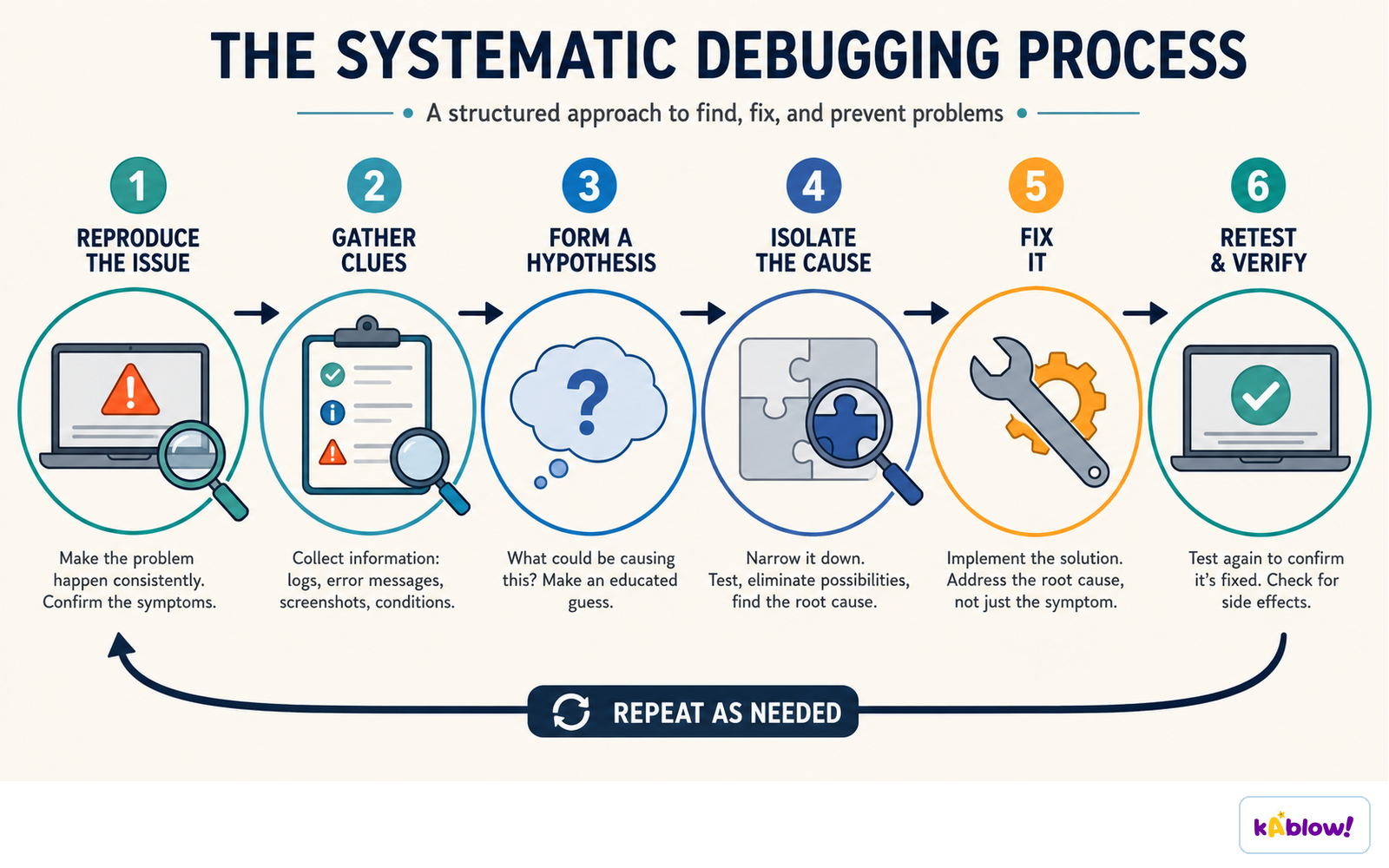
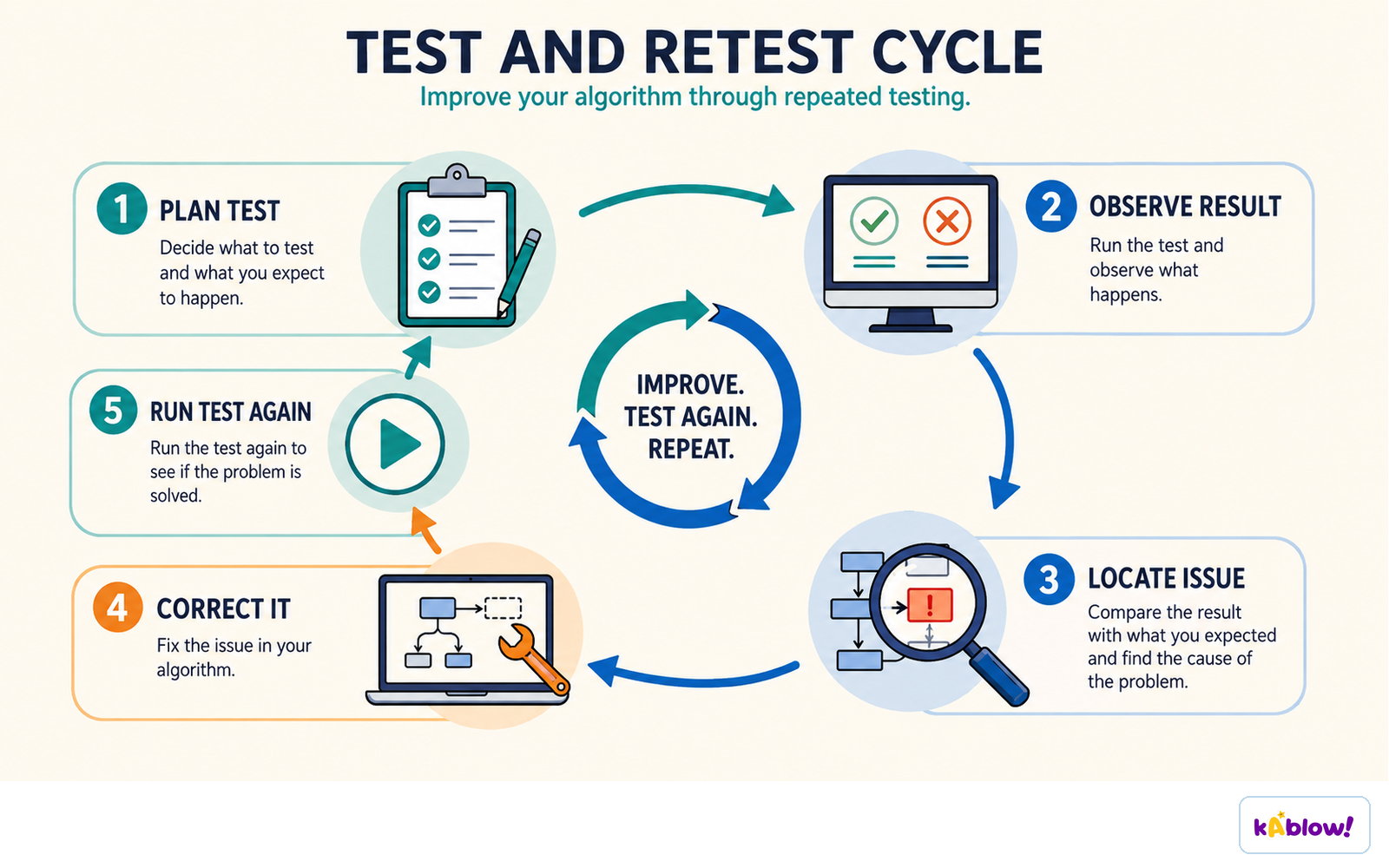
Debugging is a routine: reproduce, gather clues, form a hypothesis, isolate the cause, fix it, then retest.
Types of Errors
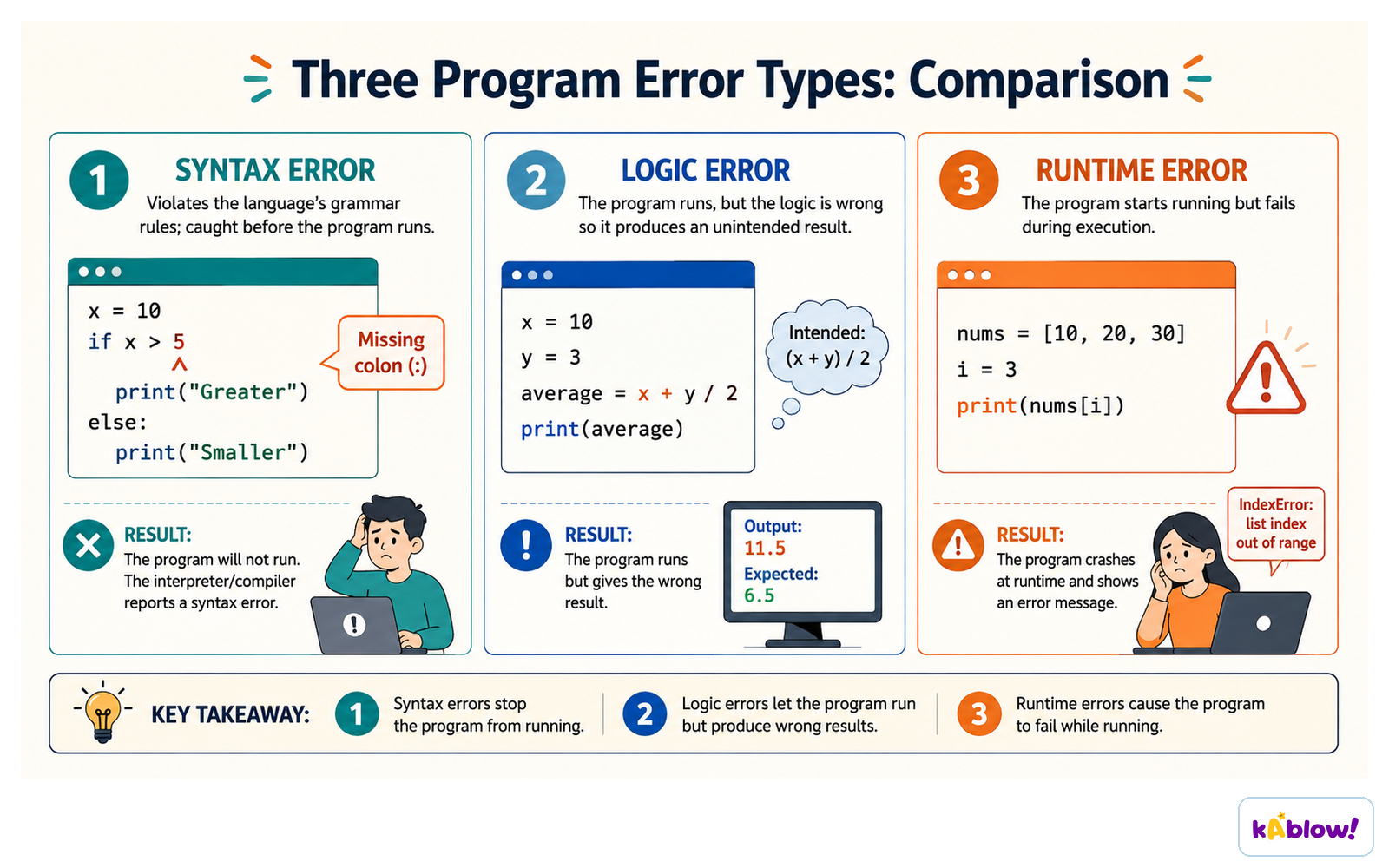
- Syntax errors: mistakes in the grammar of the programming language, e.g., missing semicolon or misspelled keyword. The program won't run.
- Runtime errors: occur while the program is running, e.g., dividing by zero or trying to open a file that doesn't exist.
- Logic errors: the program runs but produces wrong results because the algorithm or code logic is flawed.
- Error messages from the compiler or interpreter help locate syntax errors; runtime errors often show a traceback.
- Logic errors are hardest to find because there is no error message – you must test and trace the code.
Syntax errors stop the program running, logic errors run but give the wrong result, runtime errors crash it during execution.
Testing Strategies
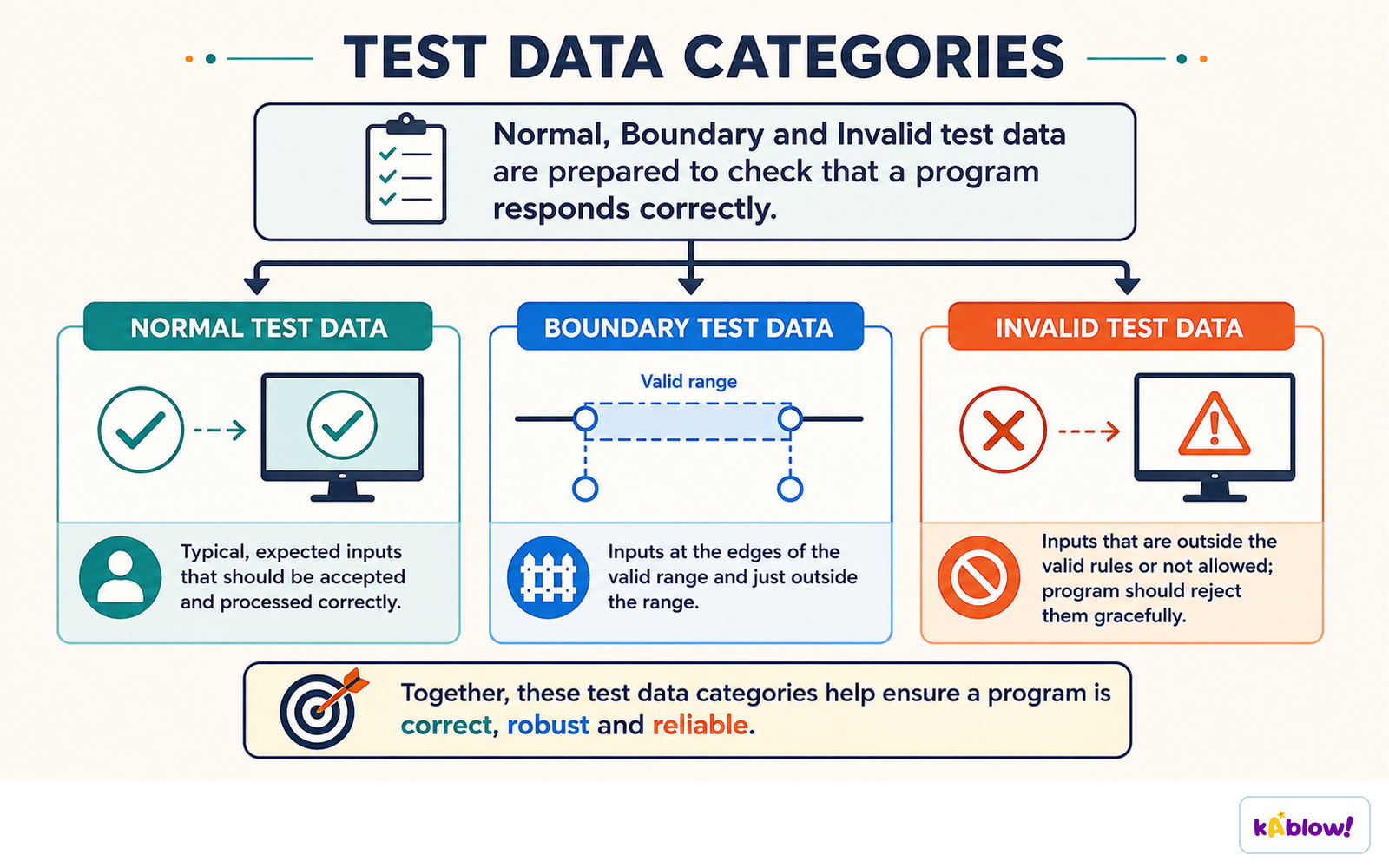
- Normal data: typical input that the program should handle correctly.
- Boundary data: values at the limits of the valid range, e.g., 0, maximum, or minimum – these often reveal bugs.
- Erroneous data: invalid or unexpected input, e.g., letters when numbers are expected – the program should handle gracefully.
- Test with a range of inputs to ensure the program works in all cases.
- Use test plans to list inputs, expected outputs, and actual outputs.
Normal, boundary and invalid test data check that a program handles each kind of input correctly.
Reading Error Messages
- Error messages often include the line number and a description of the problem.
- For syntax errors, look at the indicated line and the line before – the error may be there.
- Runtime error messages (e.g., in Python) show a traceback with the sequence of function calls.
- Read the error type (e.g., NameError, TypeError) – it tells you what kind of problem occurred.
- Don't panic – read carefully and use the message to guide your search.
Debugging Techniques
- Print statements: add temporary output to show variable values at different points.
- Trace tables: manually step through the code, recording variable values in a table.
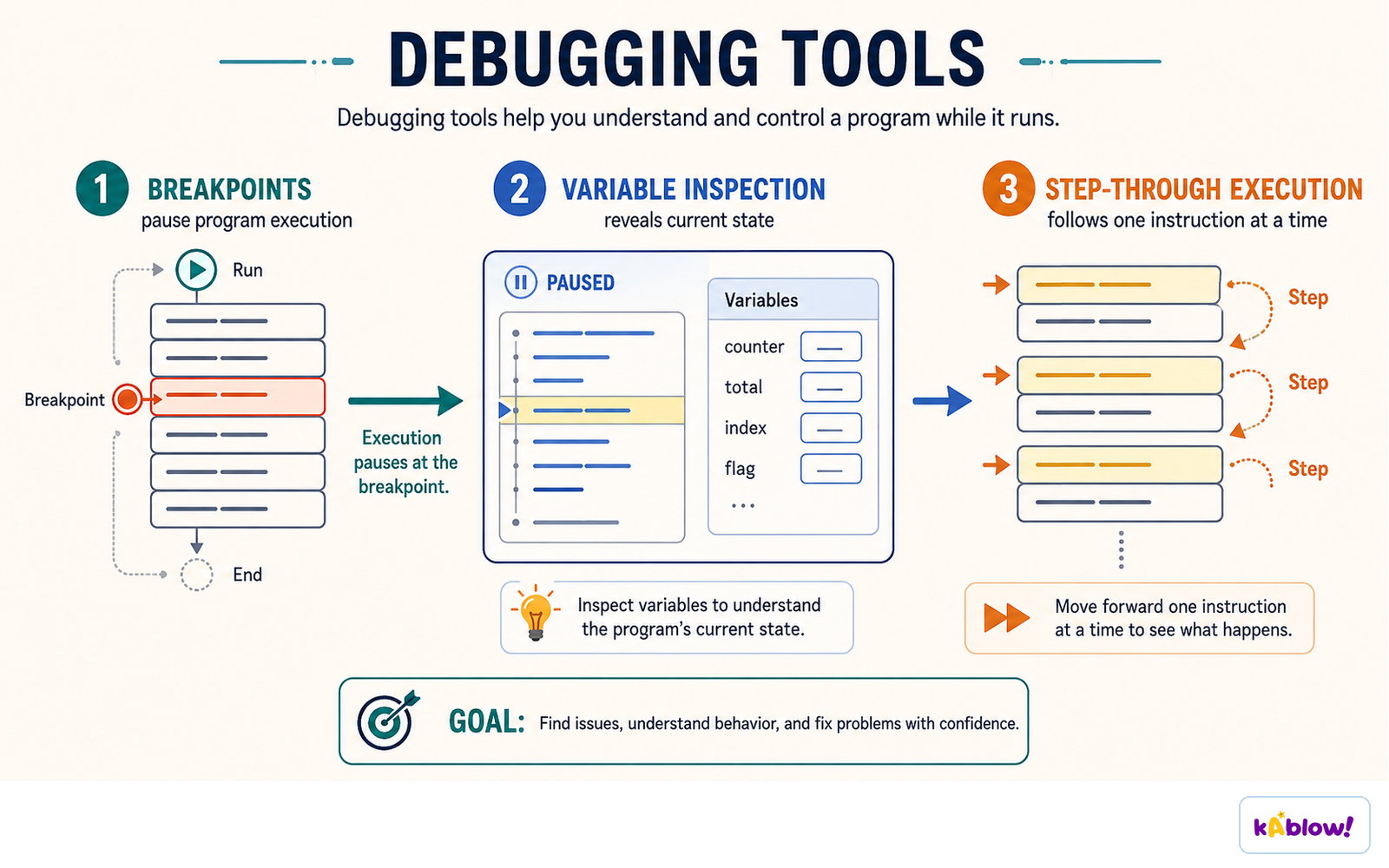
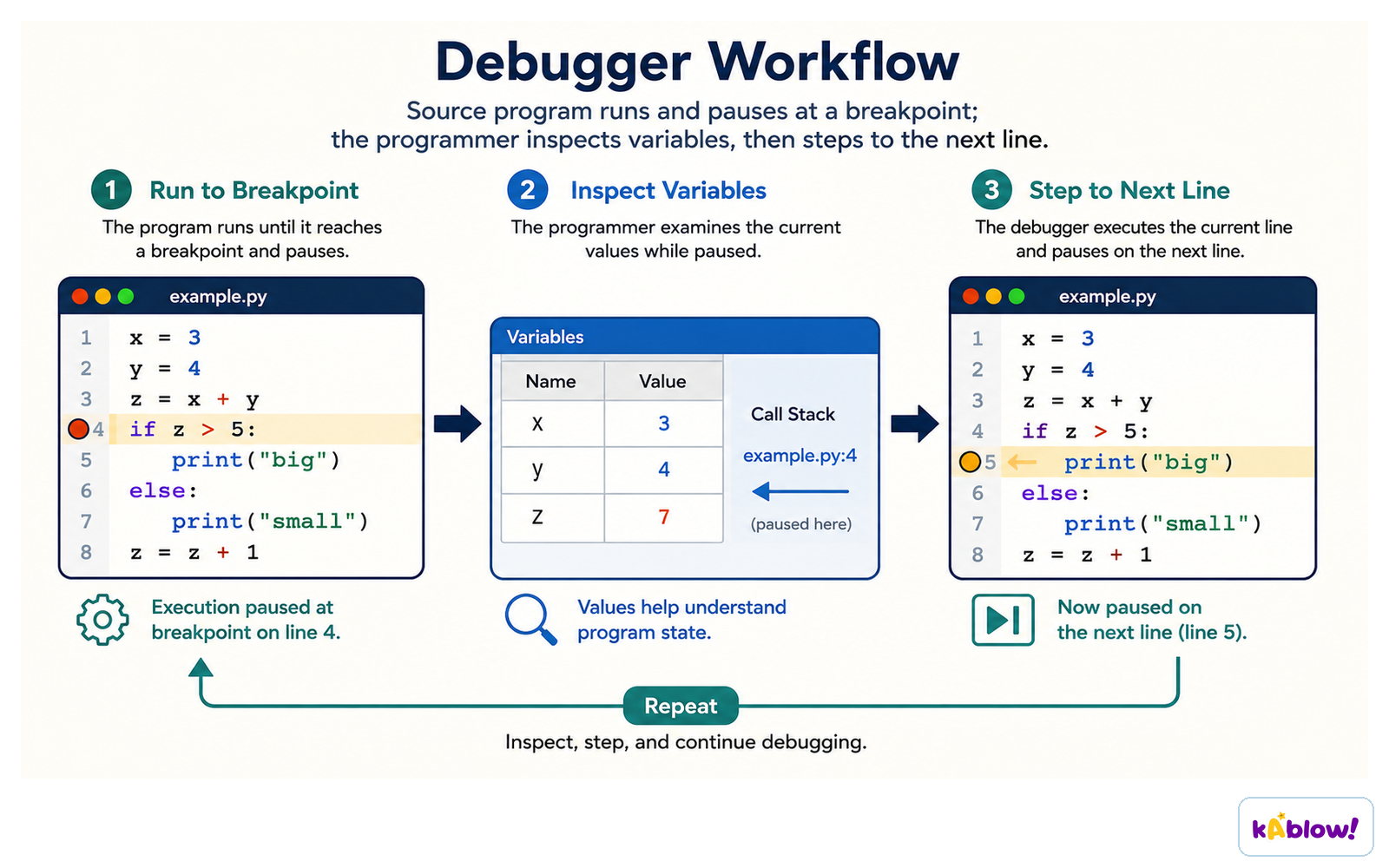
- Breakpoints: set in a debugger to pause execution at a specific line, then inspect variables.
- Step through code line by line using a debugger to see how values change.
- Rubber duck debugging: explain your code line by line to a rubber duck (or a friend) – often you spot the mistake yourself.
- Isolate the problem: narrow down the part of the code that causes the bug.
Breakpoints pause execution, variable inspection shows the current state, and stepping runs one instruction at a time.
Using Debuggers
- A debugger is a tool that lets you monitor program execution, stop it, restart it, set breakpoints, and change values in memory.
- Debuggers allow you to inspect variables at any point.
- They help you step through code line by line.
- High-level languages (like Python, Java) often have built-in debuggers or easy-to-use ones.
- Debuggers are especially useful for finding logic errors.
A debugger runs to a breakpoint, lets you inspect the variables, then steps on to the next line.
Common Pitfalls
- Off-by-one errors: loops that run one too many or too few times.
- Uninitialized variables: using a variable before giving it a value.
- Incorrect conditions: using = instead of ==, or wrong comparison operators.
- Assuming input is always valid – always validate user input.
- Not testing boundary values – these often cause failures.
Plan the test, observe the result, locate the issue, correct it, then run the test again.
Good Debugging Practice
- Be systematic: test one thing at a time, change one thing at a time.
- Keep a record of what you tried and what happened.
- Don't guess – use evidence from tests and error messages.
- Take breaks – a fresh look often helps.
- Ask for help after trying reasonable steps yourself.
- Learn from bugs – they help you understand your code better.
Slides
Sign up free to view the lesson slides
Step through every slide for this topic — plus flashcards and revision notes — with a free account.
Practice questions
Free preview — 8 of 59 questions. Sign up to see them all.
1.Which term is used to describe a defect or fault in a computer program?
Easy- ABug
- BPatch
- CDebug
- DGlitch
2.Which type of error is a violation of the rules of the programming language, such as a missing semicolon or misspelled keyword?
Easy- ASyntax error
- BRuntime error
- CLogic error
- DType error
3.A debugger is a software tool that allows a programmer to monitor the execution of a program, set breakpoints, and change values in memory.
EasyTrue or false?
4.A program asks the user to enter their age. Which of the following test inputs would be a boundary value?
Medium- A0
- B17
- C18
- D150
5.Which of the following are common types of program errors? (select all that apply)
Medium- ASyntax errors
- BRuntime errors
- CLogic errors
- DCompilation errors
- EDesign errors
6.Match each type of error with its description.
Medium- Syntax error
- Runtime error
- Logic error
- Violates language rules
- Occurs during execution
- Program runs but gives wrong output
7.Put these steps of debugging a program in the correct order.
Medium- Identify the error message
- Locate the faulty line of code
- Fix the code
- Test the program again
8.A logic error will always cause the program to crash or stop running.
EasyTrue or false?
Unlock all 59 questions, flashcards & more
Create a free account to see every question, the slides, flashcards and revision notes for this topic.