Using A Calculator
விளையாடிக் கற்றுக்கொள்ளுங்கள்
ஆற்றல் சம்பாதிக்க இந்த கேள்விகளுக்குப் பதிலளியுங்கள், பின்னர் மீன் பிடித்து ஆராயுங்கள். கணக்கு தேவையில்லை.
பாட குறிப்புகள்
Calculator Basics
- Use a scientific calculator; know its specific functions (e.g., Casio fx-83GT).
- Reset your calculator before an exam to ensure correct settings.
- Default to MATH mode (display shows 'MATH').
- Set angle unit to degrees (display shows 'D').
- Use 'S⇔D' button to switch between exact (fraction) and approximate (decimal) answers.
- Press 'SHIFT' to access secondary functions (e.g., cube root, inverse trig).
The Casio fx-83GTX Classwiz
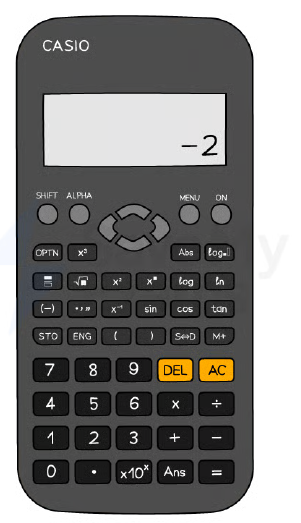
Using Brackets Correctly
- Use brackets as in written mathematics to avoid order-of-operations errors.
- Put brackets around negative numbers: e.g., `(-3)²` not `-3²`.
- Use the '(-)' button for negative values, not the minus sign.
- Always close brackets after functions like sin(45°).
Trigonometry Functions
- Use sin, cos, tan for missing sides; ensure degrees mode.
- Use sin⁻¹, cos⁻¹, tan⁻¹ (via SHIFT) for missing angles.
- Type angle inside brackets: e.g., `sin(57)`.
- For older calculators, you may need to enter angle first then press function.
Standard Form and π
- Use ×10ˣ button (or 'EXP') to enter standard form: e.g., `1.2×10⁻³`.
- Modern calculators display as `1.2×10⁻³`; older models may show `1.2E-3`.
- Access π via SHIFT button (often near standard form).
The Ans (Answer) Function
- Press 'Ans' to recall the last calculated result.
- Use Ans to avoid rounding intermediate decimals in multi-step problems.
- Example: after computing 4.69, press Ans to use it in next calculation.
Table Function
- Use TABLE mode to generate values for functions like y = x³ – 6x + 1.
- Enter the function, then specify start, end, and step values.
- Helps reduce errors in 'complete the table' questions.
Time Calculations
- Enter time using ° ' '' button (degrees/minutes/seconds).
- Example: 3 min 45 sec = `0°3'45''`.
- Press the same button to convert between decimal and HMS formats.
Worked Example Tips
- Do one calculation at a time and write down each step.
- Write down more digits than needed in working; round only final answer.
- Use fraction button for division, square root and cube buttons as needed.
- For multi-step, type whole expression in one go using brackets.
ஸ்லைடுகள்
Sign up free to view the lesson slides
Step through every slide for this topic — plus flashcards and revision notes — with a free account.
பயிற்சி கேள்விகள்
இலவச முன்னோட்டம் — 30-இல் 8 கேள்விகள். அனைத்தையும் பார்க்க பதிவு செய்யவும்.
1.Calculate 4 / 0.0025.
Easy- A1600
- B160
- C0.000625
- D0.00625
2.Calculate 5/8 + 3/4.
Easy- A1.375
- B1.25
- C1.5
- D1.625
3.Calculate 5.39 − 0.98.
Easy- A4.41
- B4.31
- C4.51
- D5.31
4.What is the value of 2.38 + 6.42?
Easy- A8.80
- B8.7
- C8.8
- D8.70
5.Calculate 0.743 − 0.0743.
Easy- A0.6687
- B0.669
- C0.668
6.Calculate 38.5 × 14.2 ÷ (18.4 − 5.9). Write down all the figures on your calculator display.
Easy- A44.44
- B44.4
- C44.444
7.Round the answer 44.44 to 1 significant figure.
Easy- A40
- B44
- C44.4
- D50
8.Calculate (16.379 − 0.879) / (4.2 × 1.241). Give your answer correct to 2 significant figures.
Medium- A3.0
- B2.9
- C3.1
Unlock all 30 questions & more
இந்த தலைப்பிற்கான ஒவ்வொரு கேள்வியையும், ஸ்லைடுகளையும், ஃப்ளாஷ் கார்டுகளையும் மற்றும் திருப்புதல் குறிப்புகளையும் பார்க்க இலவச கணக்கை உருவாக்கவும்.