Computer networks: LANs, WANs and the internet
விளையாடிக் கற்றுக்கொள்ளுங்கள்
ஆற்றல் சம்பாதிக்க இந்த கேள்விகளுக்குப் பதிலளியுங்கள், பின்னர் மீன் பிடித்து ஆராயுங்கள். கணக்கு தேவையில்லை.
பாட குறிப்புகள்
Why Network Computers?
- Networks let computers and peripherals (hosts) communicate and share data.
- They support services like the World Wide Web, email, instant messaging, digital video/audio, and shared printers.
- Many applications have limited functionality without a network connection.
- Networks allow resource sharing (e.g., storage servers, applications).
- They enable remote access to computers and data.
LANs and WANs
- A Local Area Network (LAN) covers a small area, like a home, school, or office.
- A Wide Area Network (WAN) spans a large geographical area, often connecting multiple LANs.
- The internet is the largest WAN, connecting networks worldwide.
- LANs are usually owned and managed by a single organisation, while WANs may be owned by multiple providers.
- WANs often use leased telecommunication lines or satellite links.
Wired and Wireless Connections
- Wired connections use physical media like copper cables (e.g., Ethernet) or optical fibres.
- Wireless connections use radio-frequency signals, such as Wi-Fi and Bluetooth.
- Wired connections generally offer faster and more stable speeds.
- Wireless connections provide mobility and easier setup.
- The choice depends on factors like speed, reliability, and convenience.
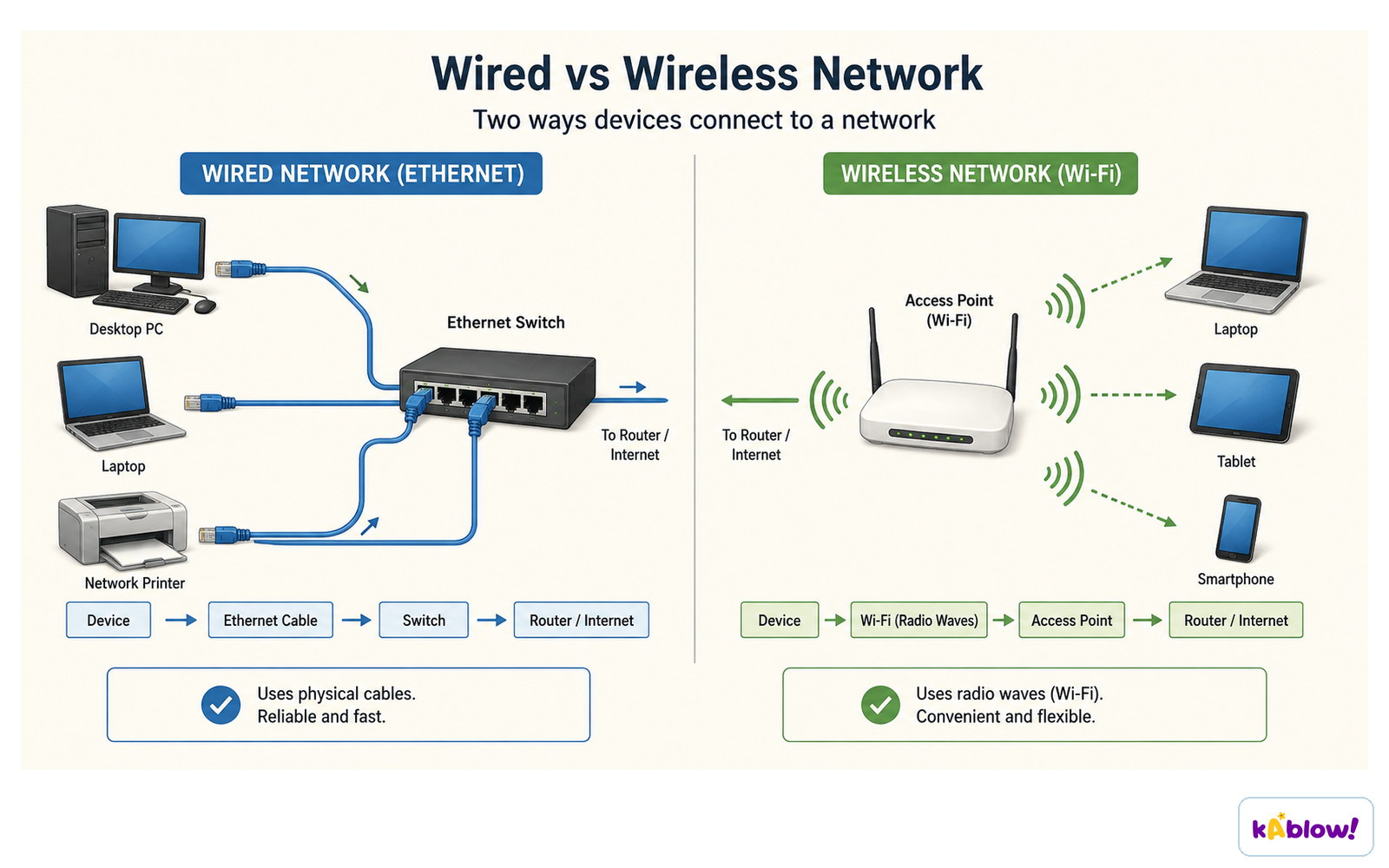
Wired networks use cables and are fast and reliable; wireless uses radio waves and is convenient and flexible.
Network Hardware
- Routers forward data packets between different networks, e.g., a home LAN to the internet.
- Switches connect devices within a LAN, directing data to the correct device.
- Servers provide resources or services to other computers (clients) on the network.
- Hosts are any devices that send or receive data, such as computers, printers, or smartphones.
- Modems (like the Bell 101) modulate/demodulate signals for transmission over telephone lines.
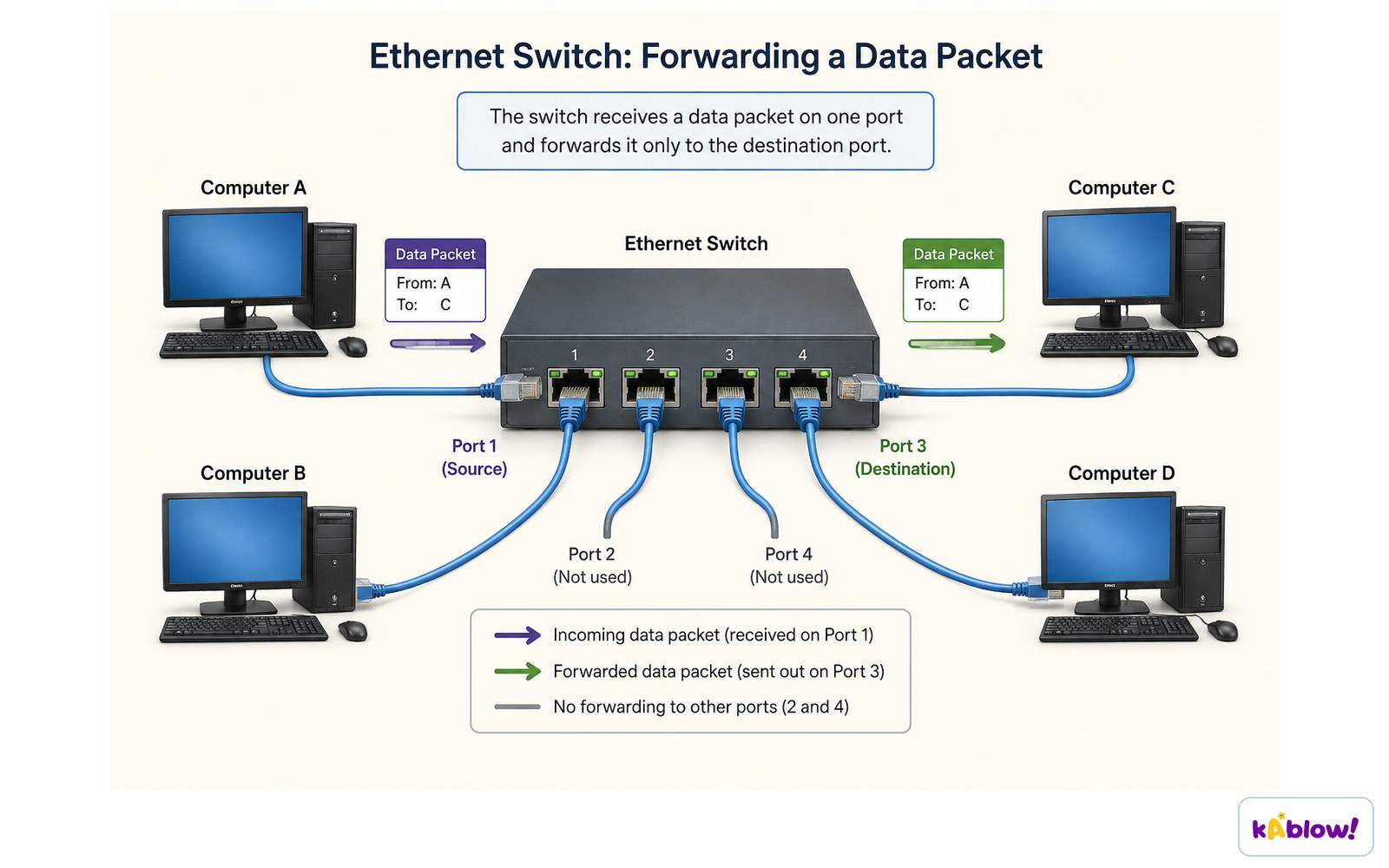
A switch receives a data packet on one port and forwards it only to the destination port.
The Internet as a Global Network
- The internet is a global network of networks that connects millions of devices.
- It evolved from the ARPANET, which began in 1969 with four nodes.
- The internet uses packet switching to send data in small chunks.
- It relies on communication protocols (like TCP/IP) to ensure data is sent and received correctly.
- The internet enables services like the World Wide Web, email, and streaming.
How Systems Communicate
- Each host on a network has a network address (e.g., IP address) that identifies it.
- Hosts may also have hostnames (like www.example.com) that are easier to remember.
- A name server (e.g., Domain Name System) maps hostnames to network addresses.
- Data is transmitted using communication protocols that define rules for exchange.
- Packet switching breaks data into packets that travel independently and are reassembled at the destination.
Network Topologies
- Network topology is the arrangement of hosts and hardware in a network.
- Common topologies include bus, star, ring, and mesh.
- In a star topology, all devices connect to a central switch or hub.
- In a mesh topology, devices connect to many others, providing redundancy.
- Topology affects performance, cost, and reliability.
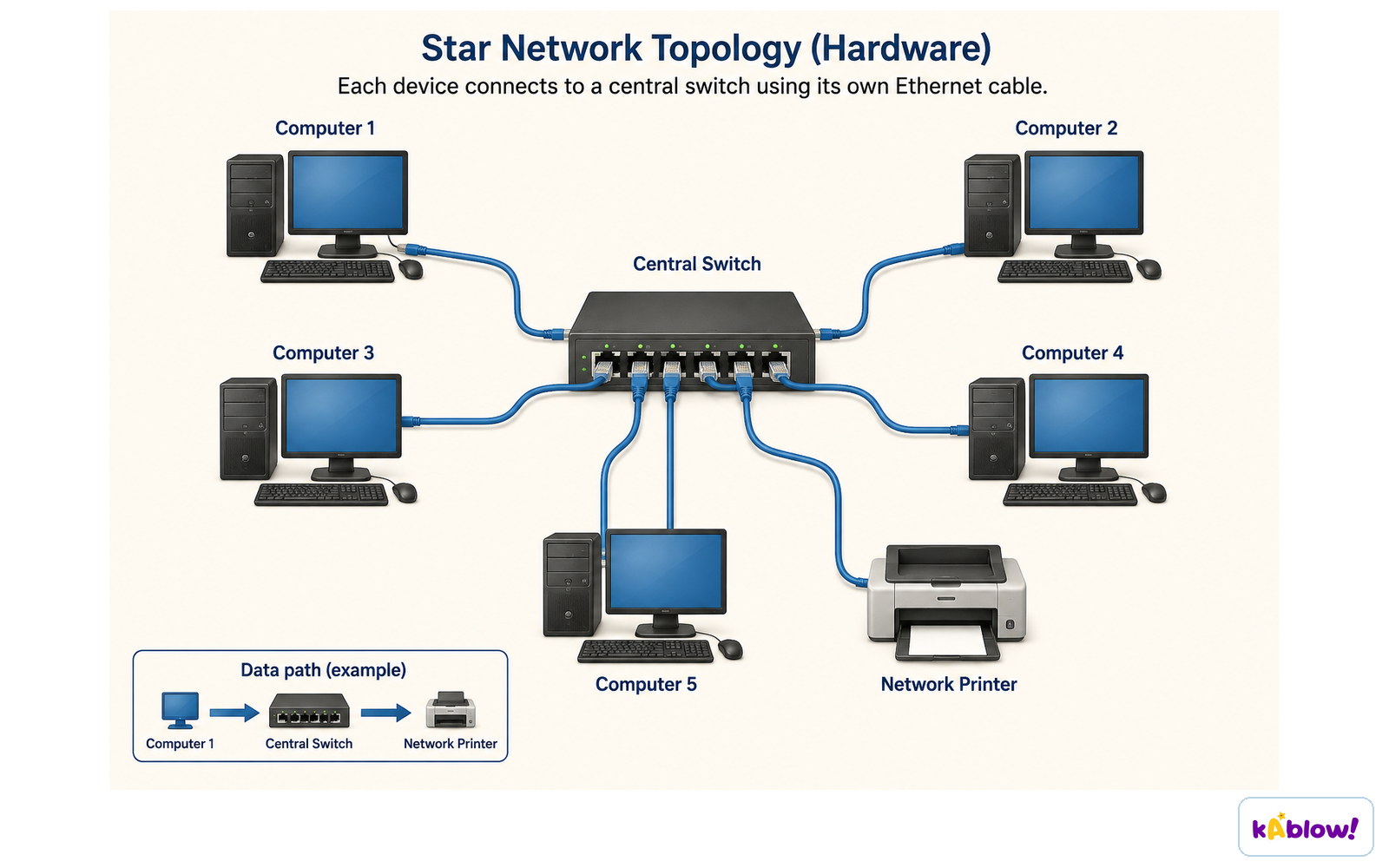
In a star topology every device connects to a central switch using its own cable.
History of Networks
- The first computer network was created in 1940 when George Stibitz connected a terminal to a computer at Bell Labs.
- The SAGE radar system in the late 1950s used the first commercial modem (Bell 101) at 110 bit/s.
- Packet switching was invented independently by Paul Baran and Donald Davies in the 1960s.
- The ARPANET (1969) was the first network to use packet switching and became the basis for the internet.
- Ethernet was developed by Robert Metcalfe at Xerox PARC in 1973.
A home network: the broadband line reaches a modem, then a router, a switch and a wireless access point serve the devices.
A message is split into numbered packets that may take different routes and are reassembled in order at the destination.
ஸ்லைடுகள்
Sign up free to view the lesson slides
Step through every slide for this topic — plus flashcards and revision notes — with a free account.
பயிற்சி கேள்விகள்
இலவச முன்னோட்டம் — 60-இல் 8 கேள்விகள். அனைத்தையும் பார்க்க பதிவு செய்யவும்.
1.A computer network is a group of communicating computers and peripherals known as hosts.
EasyTrue or false?
2.What is the name for the memorable labels that can be mapped to a network address using a hosts file or a name server?
Easy- AHostnames
- BIP addresses
- CProtocols
- DTopologies
3.Which of the following are examples of physical media that support information exchange in a computer network? (Select all that apply)
Easy- ACopper cables
- BOptical fibres
- CRadio-frequency media
- DRouters
- EHostnames
4.A WAN (Wide Area Network) typically covers a smaller geographical area than a LAN (Local Area Network).
EasyTrue or false?
5.Which device is used to connect a local network to the internet and route data between networks?
Easy- ARouter
- BSwitch
- CServer
- DModem
6.Match each network term to its correct definition.
Medium- LAN
- WAN
- Router
- Connects devices over a large geographical area
- Connects devices within a limited area like a school
- Device that forwards data between networks
7.Packet switching was independently invented by Paul Baran and Donald Davies.
MediumTrue or false?
8.Match each network component to its primary function.
Easy- Router
- Switch
- Server
- Connects different networks and routes data
- Connects devices within a single network
- Provides resources or services to clients
Unlock all 60 questions, flashcards & more
இந்த தலைப்பிற்கான ஒவ்வொரு கேள்வியையும், ஸ்லைடுகளையும், ஃப்ளாஷ் கார்டுகளையும் மற்றும் திருப்புதல் குறிப்புகளையும் பார்க்க இலவச கணக்கை உருவாக்கவும்.