Algorithms
Học bằng cách chơi
Trả lời những câu hỏi này để kiếm năng lượng, rồi câu cá và khám phá. Không cần tài khoản.
Ghi chú bài học
What is an Algorithm?
- An algorithm is a precise set of rules or instructions to solve a specific problem or task.
- Algorithms can be designed using structure diagrams, flowcharts, or pseudocode.
- A well-designed algorithm should be interpretable by a new user to explain its purpose.
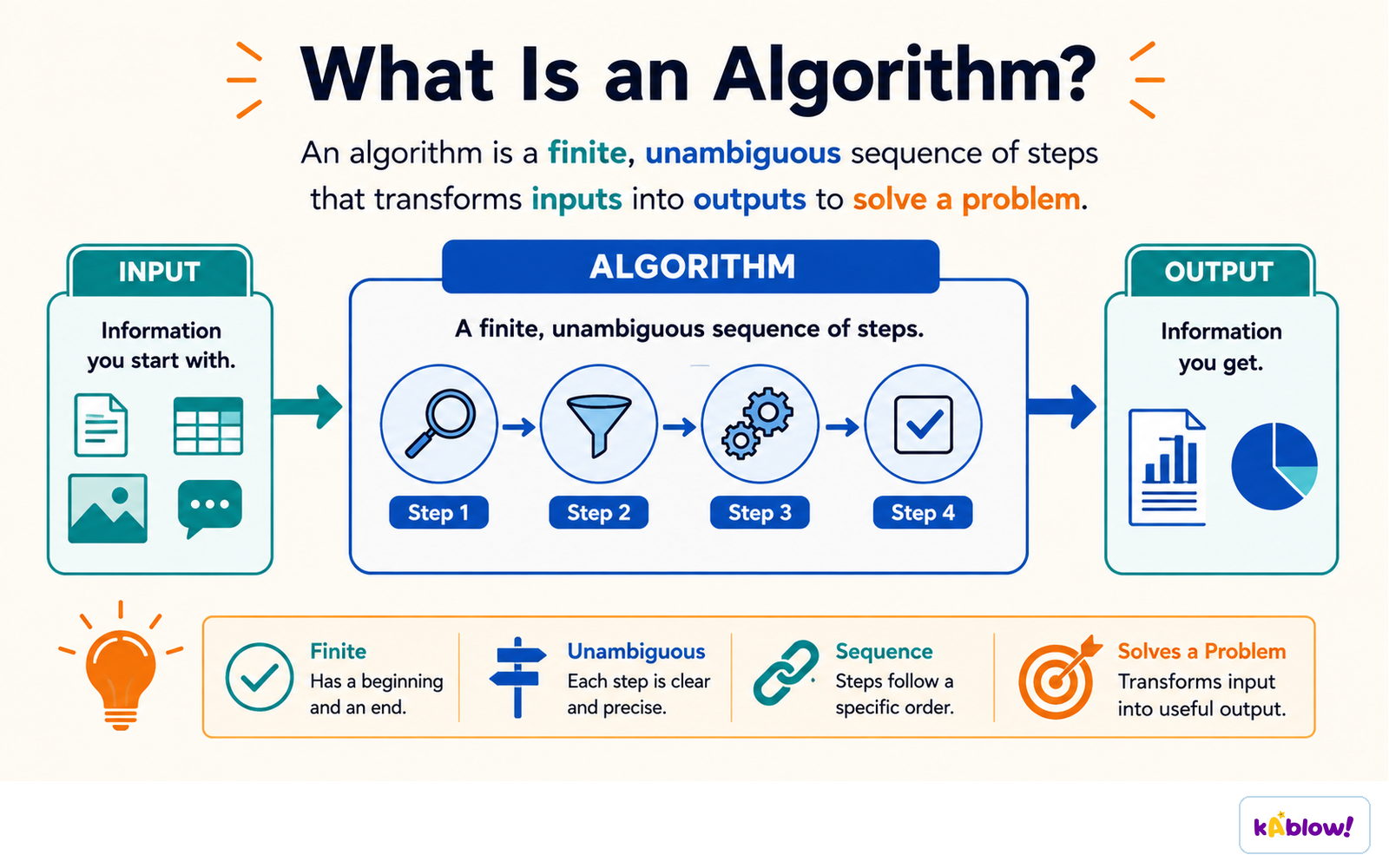
An algorithm is a finite, unambiguous sequence of steps that turns an input into an output.
Structure Diagrams
- Structure diagrams show hierarchical top-down design in a visual form.
- Each problem is divided into sub-problems, and each sub-problem is further divided.
- At each level, the problem is broken down into more detailed tasks that can be implemented using a single subroutine.
- Example: A mobile app structure diagram might show top-level modules like 'Login', 'Main Menu', and 'Settings', each with sub-tasks.
Flowcharts
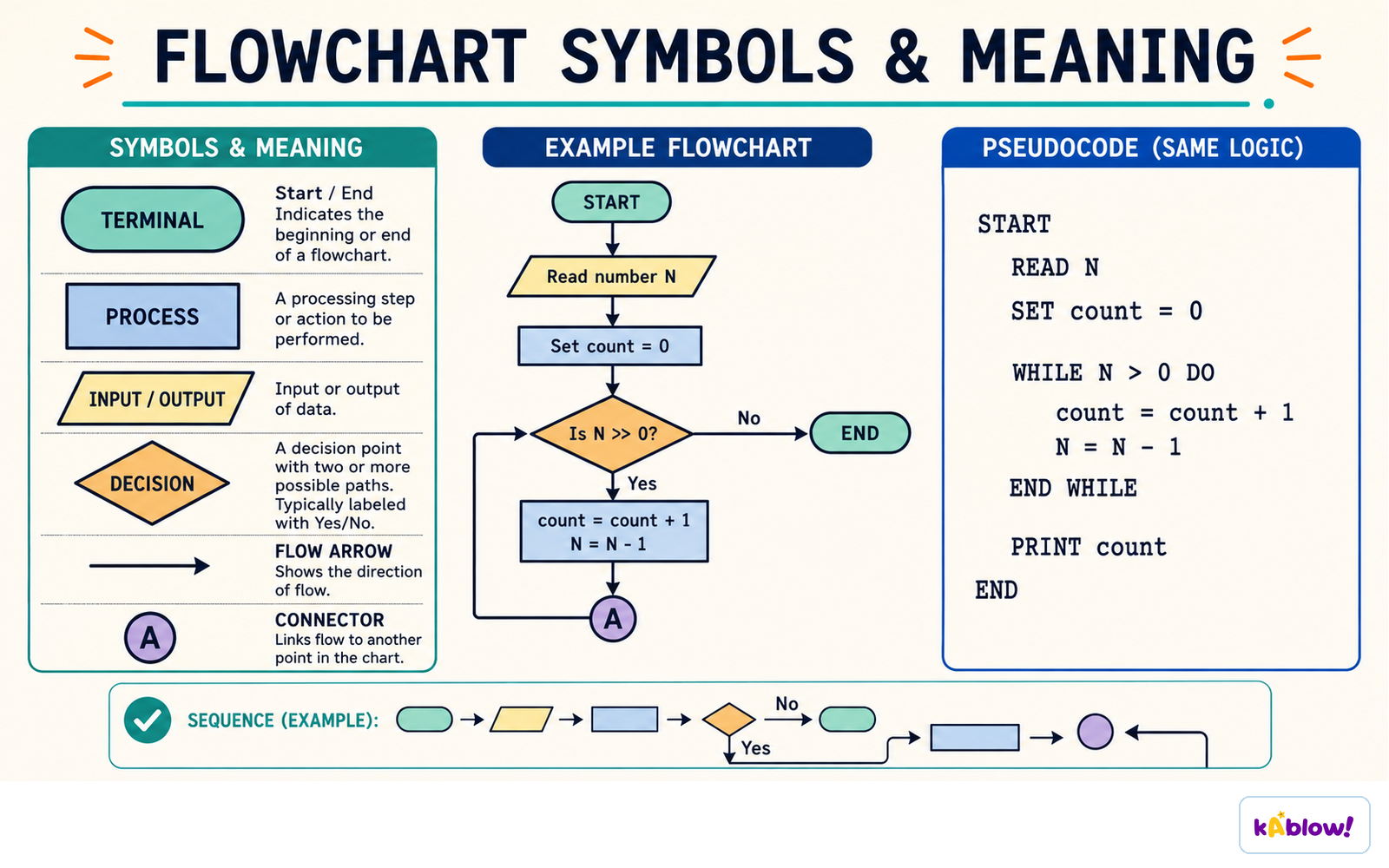
- Flowcharts use shapes to represent different functions (e.g., process, decision, input/output).
- Lines show the flow of control between steps.
- Common shapes: oval (start/end), rectangle (process), diamond (decision), parallelogram (input/output).
- Example: A flowchart for age verification inputs age, checks if ≥18, and outputs appropriate message.
The standard flowchart symbols - terminal, process, input/output and decision - and the same logic written as pseudocode.
Pseudocode
- Pseudocode is a text-based tool using short English words/statements to describe an algorithm.
- It is more structured than plain English but very flexible.
- Use INPUT and OUTPUT statements (not `print()` or `input()` with brackets).
- Example: `INPUT Age` / `IF Age ≥ 18 THEN OUTPUT "Welcome"`.
- Default to pseudocode when writing algorithms; use flowcharts only when asked.
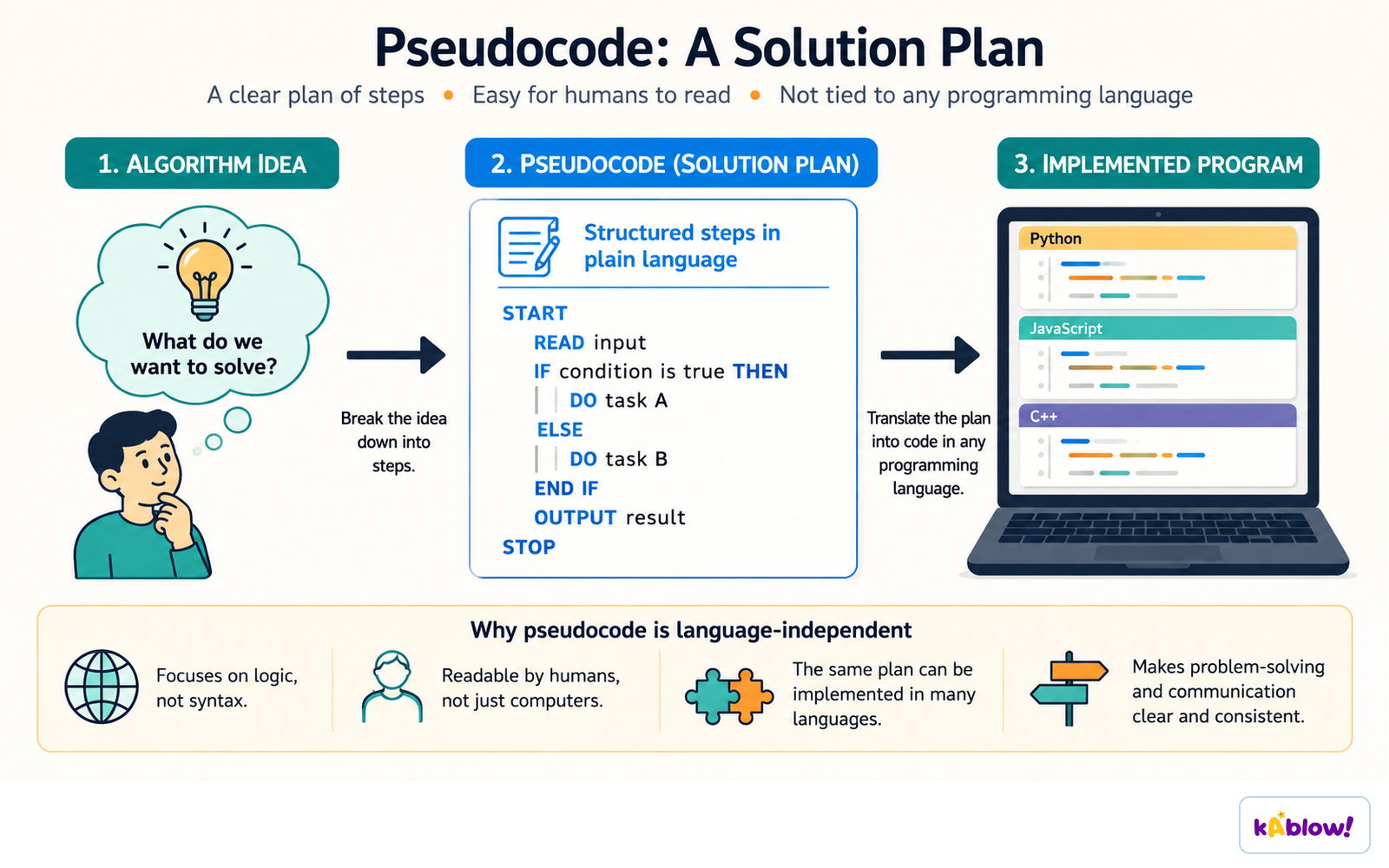
Pseudocode is a language-independent plan: the idea becomes structured steps before it becomes code.
Explaining Algorithms
- To explain an algorithm, follow the instructions step by step to determine its purpose.
- Look for comments in the code, consider the context, and test with different inputs.
- The algorithm's purpose should become clear by tracing its logic.
- Example: A REPEAT loop that inputs 10 numbers and outputs the total adds ten user-entered numbers.
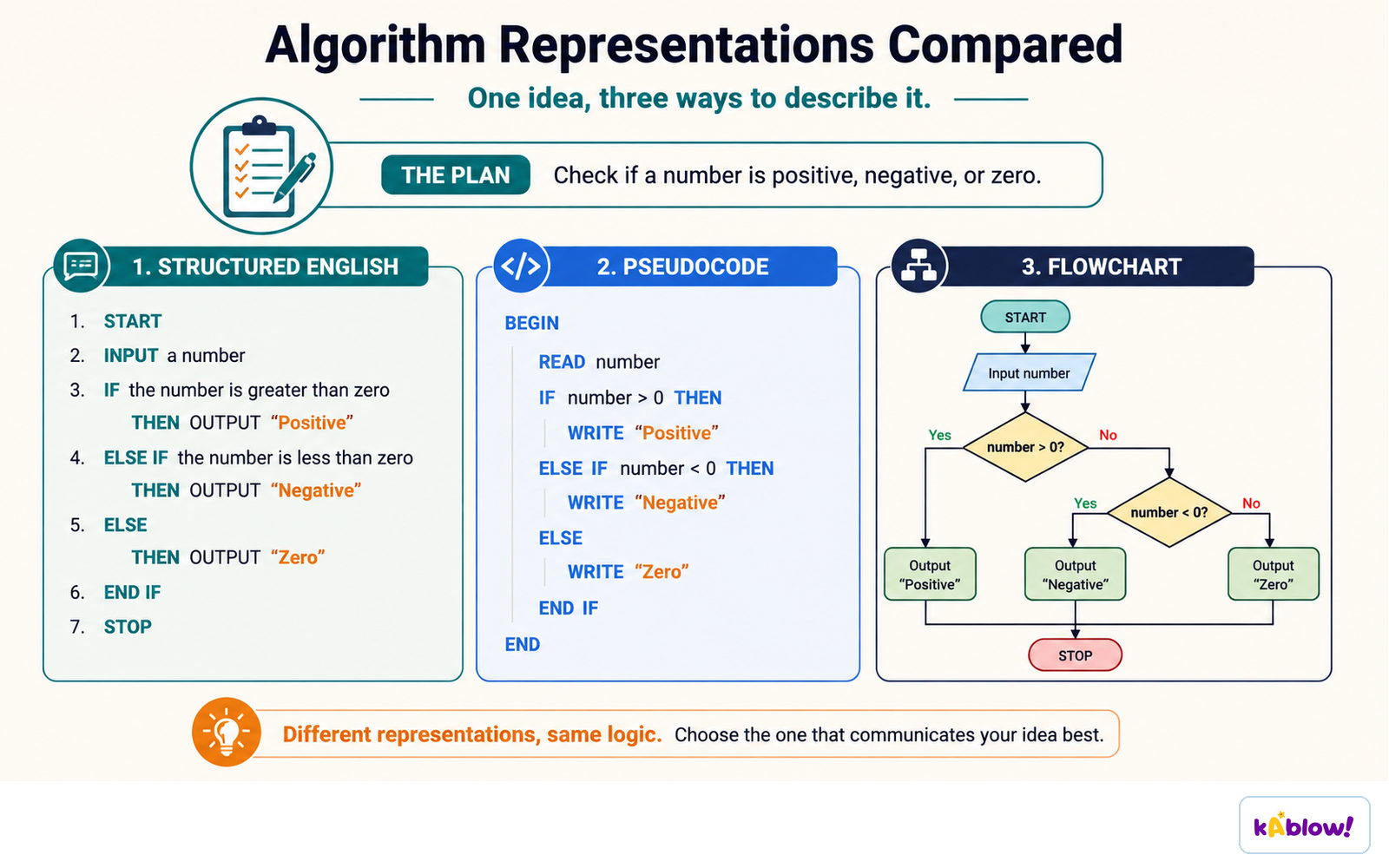
One algorithm written three ways: structured English, pseudocode and a flowchart.
Worked Example: Grade Assignment
- Input marks are stored in an array `Score[]`.
- Each mark is checked against boundaries (70, 60, 50, 40, 30) to assign a grade (A–F).
- The grade is stored in `Grade[]` at the same index as the mark.
- The algorithm repeats until 30 marks have been input and processed.
Slide
Sign up free to view the lesson slides
Step through every slide for this topic — plus flashcards and revision notes — with a free account.
Câu hỏi luyện tập
Xem trước miễn phí — 8 trên 52 câu hỏi. Đăng ký để xem tất cả.
1.What is an algorithm?
Easy- AA precise set of rules or instructions to solve a specific problem
- BA type of computer hardware
- CA programming language
- DA data structure
2.Which of the following is NOT a method for designing an algorithm?
Easy- AStructure diagrams
- BFlowcharts
- CPseudocode
- DBinary search
3.In a flowchart, which shape is used to represent a decision?
Easy- ARectangle
- BDiamond
- COval
- DParallelogram
4.What does a structure diagram show?
Easy- AThe flow of control through an algorithm
- BHierarchical top-down design, breaking a problem into sub-problems
- CThe exact syntax of a programming language
- DThe data types used in a program
5.In pseudocode, which of the following is the correct way to output a message?
Easy- AOUTPUT 'Hello'
- Bprint('Hello')
- CPRINT 'Hello'
- DDISPLAY 'Hello'
6.Consider the following pseudocode: Count ← 1 Total ← 0 REPEAT INPUT Number Total ← Total + Number Count ← Count + 1 UNTIL Count > 10 OUTPUT Total What does this algorithm do?
Medium- AIt outputs the sum of ten numbers entered by the user
- BIt outputs the average of ten numbers entered by the user
- CIt outputs the largest of ten numbers entered by the user
- DIt outputs the count of numbers entered
7.In the following pseudocode, what is stored in Grade[2] if the input Score[2] is 65? Count ← 0 REPEAT INPUT Score[Count] IF Score[Count] ≥ 70 THEN Grade[Count] ← 'A' ELSE IF Score[Count] ≥ 60 THEN Grade[Count] ← 'B' ELSE IF Score[Count] ≥ 50 THEN Grade[Count] ← 'C' ELSE IF Score[Count] ≥ 40 THEN Grade[Count] ← 'D' ELSE IF Score[Count] ≥ 30 THEN Grade[Count] ← 'E' ELSE Grade[Count] ← 'F' ENDIF ENDIF ENDIF ENDIF ENDIF Count ← Count + 1 UNTIL Count = 30
Medium- A'B'
- B'A'
- C'C'
- D'D'
8.Which of the following is a characteristic of pseudocode?
Easy- AIt uses strict syntax like a programming language
- BIt is a visual tool using shapes
- CIt uses short English words/statements to describe an algorithm
- DIt is written in binary
Unlock all 52 questions & more
Tạo tài khoản miễn phí để xem mọi câu hỏi, slide, thẻ ghi nhớ và ghi chú ôn tập cho chủ đề này.