Explaining The Purpose Of An Algorithm
Học bằng cách chơi
Trả lời những câu hỏi này để kiếm năng lượng, rồi câu cá và khám phá. Không cần tài khoản.
Ghi chú bài học
What the Syllabus Requires
- Section 7.3 requires you to explain the purpose of a given algorithm, which includes stating the purpose and describing the processes involved.
- Algorithms may be given as pseudocode, flowcharts, or structure diagrams.
- Section 7.2 frames problems in terms of inputs, processes, outputs, and storage – use this vocabulary in answers.
- Standard methods you must recognise: linear search, bubble sort, totalling, counting, finding maximum/minimum/average, validation, and authentication.
- Unseen algorithms on Paper 2 are usually one of these methods or a short combination.
The Two Commands
- "State the purpose" (1–2 marks): give one sentence naming the overall job and the data it works on.
- Do not narrate the code line-by-line; that scores nothing.
- "Describe the processes" (3–4 marks): give the ordered steps in technical language – inputs, storage, repetition, decisions, outputs.
- Usually one mark per identified process, so write one clear point per mark.
- Match answer length to marks: one sentence for 1 mark, one point per mark for describe.
Five-Step Method to Find the Purpose
- 1. Read the OUTPUT statements first – what is finally output is usually what the algorithm is for.
- 2. Find initialisations – `Total ← 0` signals totalling, `Count ← 0` signals counting, `Max ← first value` signals finding a maximum, `Found ← FALSE` signals a search.
- 3. Look at the loop – a `FOR` loop over an array means 'every item'; a `WHILE` with a `Found` flag means 'stop early when match'; a `REPEAT...UNTIL` around `INPUT` means validation.
- 4. Look at the condition inside the loop – `IF Value > Max` means finding largest; `IF Value < 40` with counter means counting a category; comparing and swapping neighbours means bubble sort.
- 5. Say it in one sentence using real quantities: what data it takes in, what it does, what it gives back – with actual range, size, or threshold.
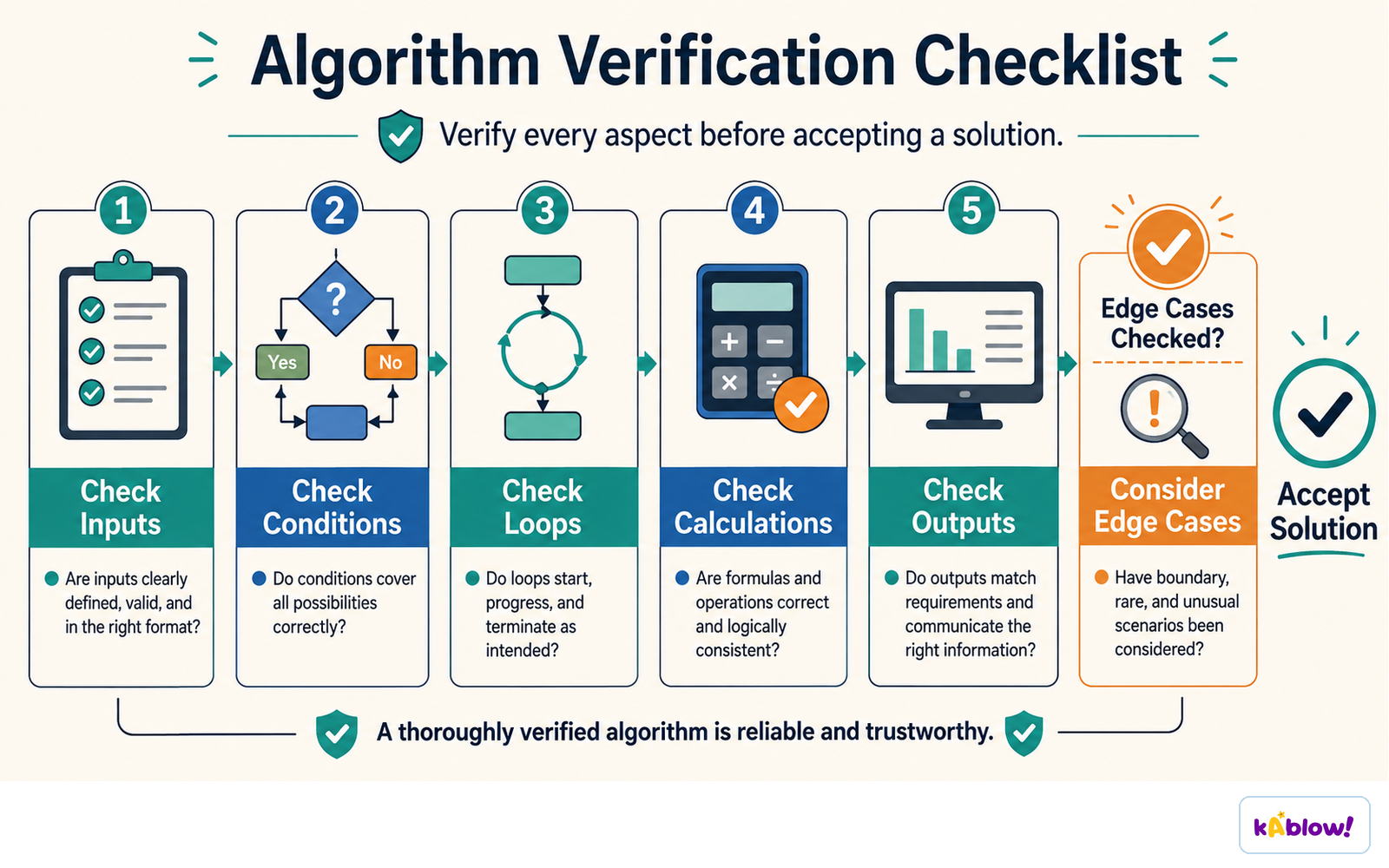
Checking an algorithm means checking its inputs, conditions, loops, calculations, outputs and edge cases.
Sentence Templates That Earn Marks
- Totalling/Average: "It inputs <n> <values> and outputs the total / average of them."
- Counting: "It counts how many of the <n> <values> are <condition> and outputs that count."
- Maximum/Minimum: "It finds and outputs the largest / smallest value in the array <Name> and, where relevant, its position."
- Search: "It searches the array <Name> for <SearchItem> and outputs its position, or a message if it is not there."
- Sort: "It sorts the array <Name> into ascending / descending order."
- Validation: "It validates the input <Name>, rejecting values outside <range> and re-prompting until an acceptable value is entered."
- Authentication: "It checks a password against a stored value and allows a maximum of <n> attempts."
Worked Example 1 – Totalling and Counting
- Pseudocode: initialises `Count` and `Total` to 0, loops 30 times, inputs a `Mark`, adds to `Total`, increments `Count` if `Mark < 40`, then outputs average and count.
- Purpose: "It inputs 30 marks, then outputs their average and how many of them were below 40."
- Processes: total and counter initialised; count-controlled loop inputs each mark; each mark added to total; if less than 40, counter incremented; after loop, total divided by 30 to give average; average and count output.
- Not acceptable: "it works out marks", "it uses a loop 30 times", "it checks if the mark is less than 40".
Worked Example 2 – Finding Maximum
- Pseudocode: sets `Max` to first temperature, `Position` to 1, loops from index 2 to 7, updates `Max` and `Position` if current temperature is greater, then outputs highest and day.
- Purpose: "It finds the highest of the seven stored temperatures and outputs it together with the day it occurred."
- Note precision: array holds seven values, and algorithm reports position as well as value.
- Starting `Max` at the first element (not 0) makes it work for negative temperatures – a good point when describing processes.
Worked Example 3 – Validation
- Pseudocode: `REPEAT` output prompt, input `Age`, `UNTIL Age ≥ 11 AND Age ≤ 18`, then output "Thank you".
- Purpose: "It validates the age entered by the user, repeatedly re-prompting until a value between 11 and 18 inclusive is entered."
- Technical term: a range check performed by a post-condition loop.
- Saying "it makes sure the age is right" does not score.
Worked Example 4 – Flowchart
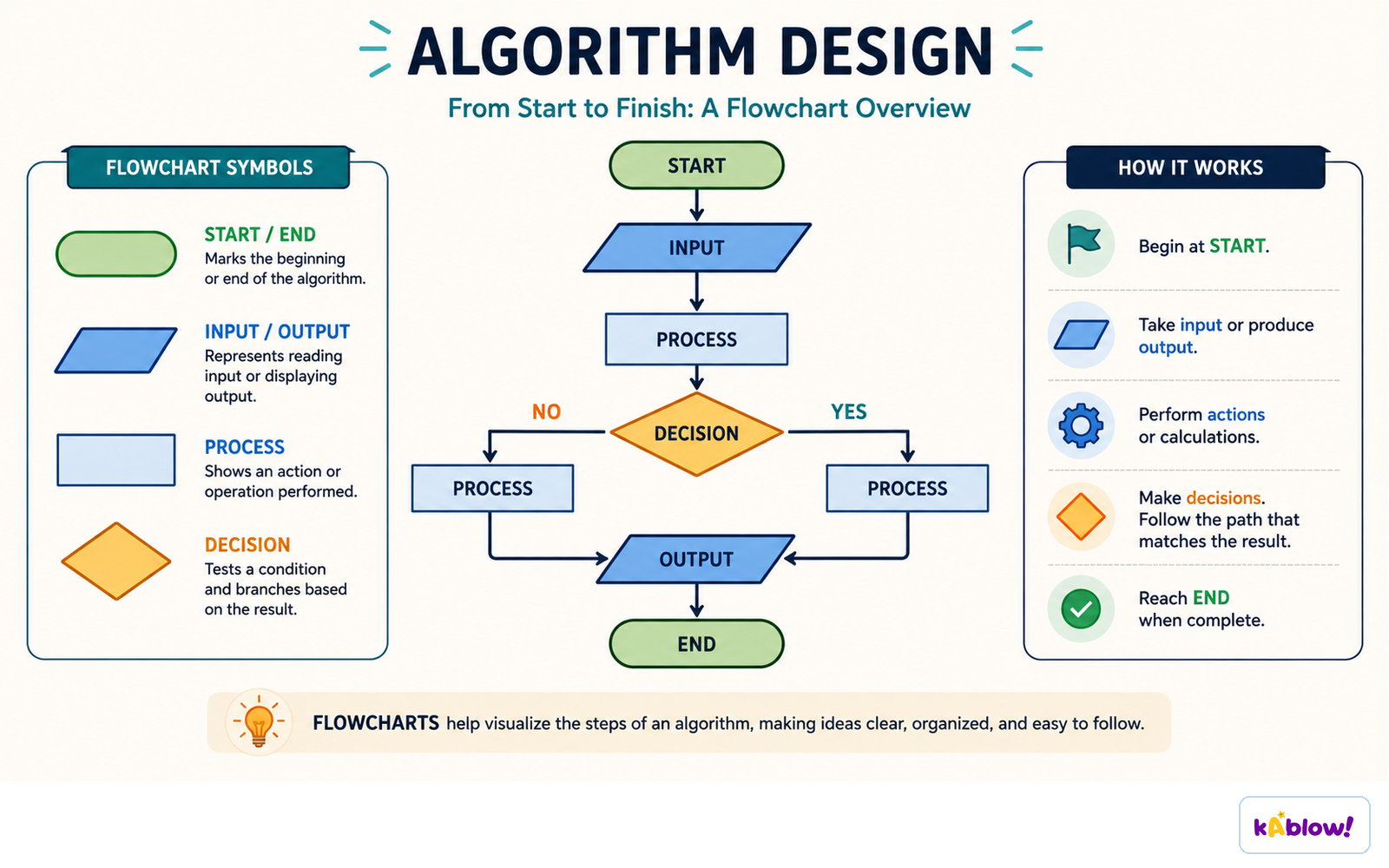
- A flowchart with start terminator, input, decision diamond, and two output branches.
- Purpose: "It inputs a temperature and outputs a warning if it is above 30°, otherwise it outputs that conditions are normal."
- Use standard symbols as reading guide: terminator (start/stop), input/output parallelogram, process rectangle, decision diamond, subroutine, and flow-line arrows showing order.
A flowchart runs from START to END, branching at each decision.
Precision Rules for Wording
- Name the data as the algorithm names it: the array `Temperature`, the variable `Count`, the 30 marks.
- Give the actual threshold, range, or size: "below 40", "between 11 and 18 inclusive", "the seven values".
- Use verbs that name the method: inputs, validates, totals, counts, searches, sorts into ascending order, compares, swaps, outputs. Avoid: does, gets, deals with, checks stuff, sorts it out.
- Say ascending or descending – never just "sorts".
- Do not describe syntax (e.g., "it uses a FOR loop") unless asked for processes; even then, say what the loop achieves.
- Do not invent behaviour not in the code, and do not state the purpose of only part of it – if it both totals and counts, include both halves.
Why This Skill Pays Off Elsewhere
- Recognising the purpose quickly makes the rest of Paper 2 faster.
- It tells you what a trace table should end up showing (section 7.7).
- It helps identify errors and suggest corrections (section 7.8).
- It gives you the plan sentence for the final 15-mark scenario question (about 30 minutes).
Slide
Sign up free to view the lesson slides
Step through every slide for this topic — plus flashcards and revision notes — with a free account.
Câu hỏi luyện tập
Xem trước miễn phí — 8 trên 62 câu hỏi. Đăng ký để xem tất cả.
1.What is the purpose of an algorithm?
Easy- ATo provide a step-by-step set of instructions to solve a problem
- BTo store data in a database
- CTo create a graphical user interface
- DTo compile a program
2.When asked to 'state the purpose of an algorithm', what should your answer include?
Easy- AA line-by-line explanation of the code
- BA single sentence describing the overall job of the algorithm
- CA list of all variables used
- DA description of the syntax of the programming language
3.When describing the processes involved in an algorithm, you should write one clear point per mark available.
EasyTrue or false?
4.Which of the following is an example of a standard method that an algorithm might use?
Easy- ALinear search
- BObject-oriented programming
- CRecursion
- DMachine learning
5.Which of the following are standard methods that you should be able to recognise in an algorithm? (Select all that apply)
Easy- ALinear search
- BBubble sort
- CTotalling
- DCounting
- ERecursion
6.In an algorithm, the statement 'Total ← 0' before a loop typically indicates that the algorithm is totalling values.
EasyTrue or false?
7.An algorithm contains the following pseudocode: Max ← Temperature[1] FOR Index ← 2 TO 7 IF Temperature[Index] > Max THEN Max ← Temperature[Index] ENDIF NEXT Index What is the purpose of this algorithm?
Medium- AIt finds the highest temperature in the array Temperature and outputs it.
- BIt sorts the array Temperature into ascending order.
- CIt counts the number of temperatures above a threshold.
- DIt calculates the average temperature.
8.Which of the following statements is NOT an acceptable purpose for an algorithm?
Medium- AIt inputs 30 marks, then outputs their average and how many of them were below 40.
- BIt sets Count to 0, then loops through the array.
- CIt finds the highest of the seven stored temperatures and outputs it together with the day it occurred.
- DIt validates the age entered by the user, repeatedly re-prompting until a value between 11 and 18 inclusive is entered.
Unlock all 62 questions, flashcards & more
Tạo tài khoản miễn phí để xem mọi câu hỏi, slide, thẻ ghi nhớ và ghi chú ôn tập cho chủ đề này.