Number Systems
Học bằng cách chơi
Trả lời những câu hỏi này để kiếm năng lượng, rồi câu cá và khám phá. Không cần tài khoản.
Ghi chú bài học
Why Computers Use Binary
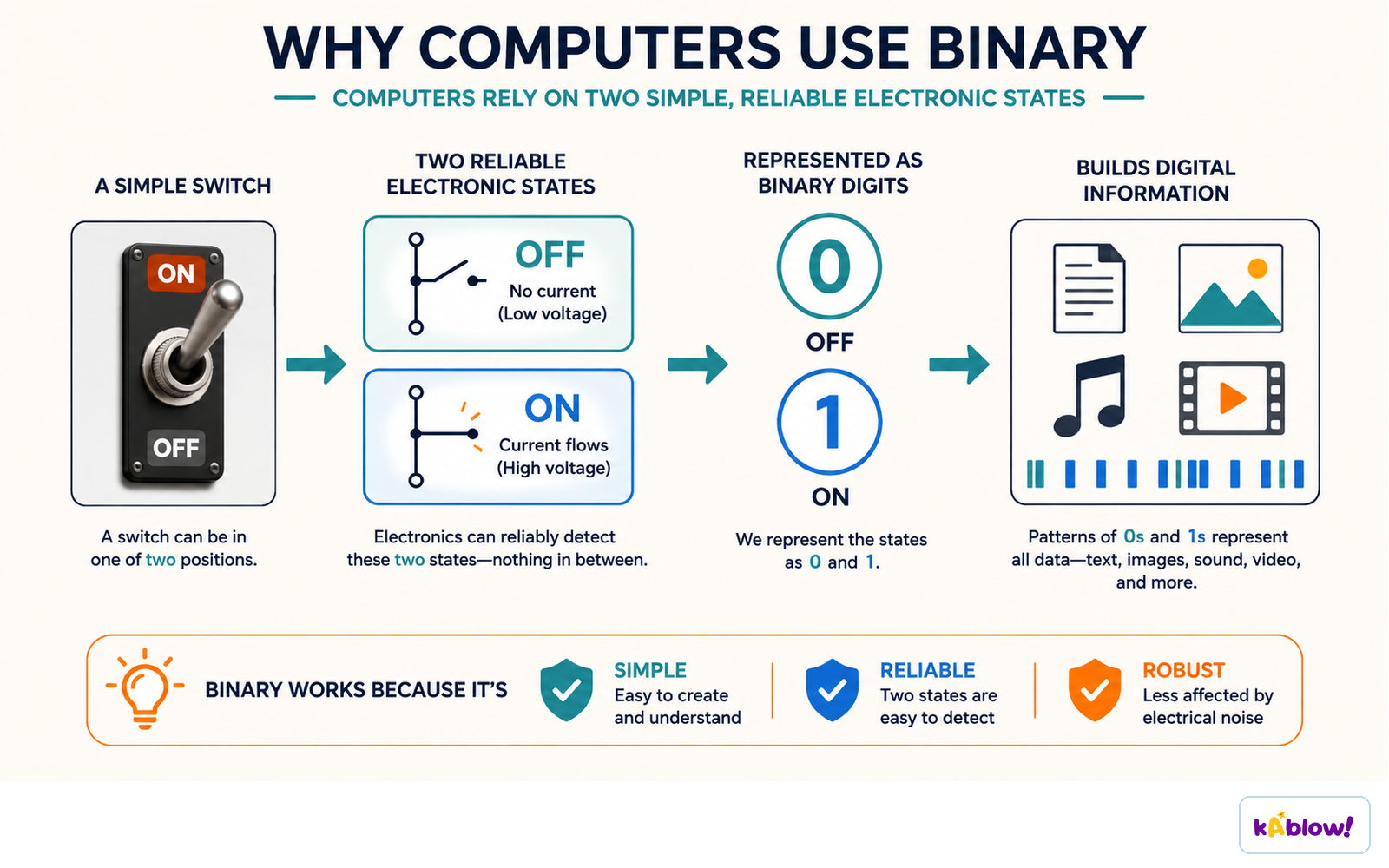
- Computers process data using logic gates that have only two states (on/off).
- Binary (base-2) uses digits 1 (on) and 0 (off) to match these states.
- All data must be converted to binary before a computer can process it.
- Examples: magnetic hard drives use North/South polarity; optical disks use land/pit.
- Binary allows fast processing and efficient storage.
Computers use binary because a switch has two reliable states, easy to detect and hard to confuse.
Number Systems Overview
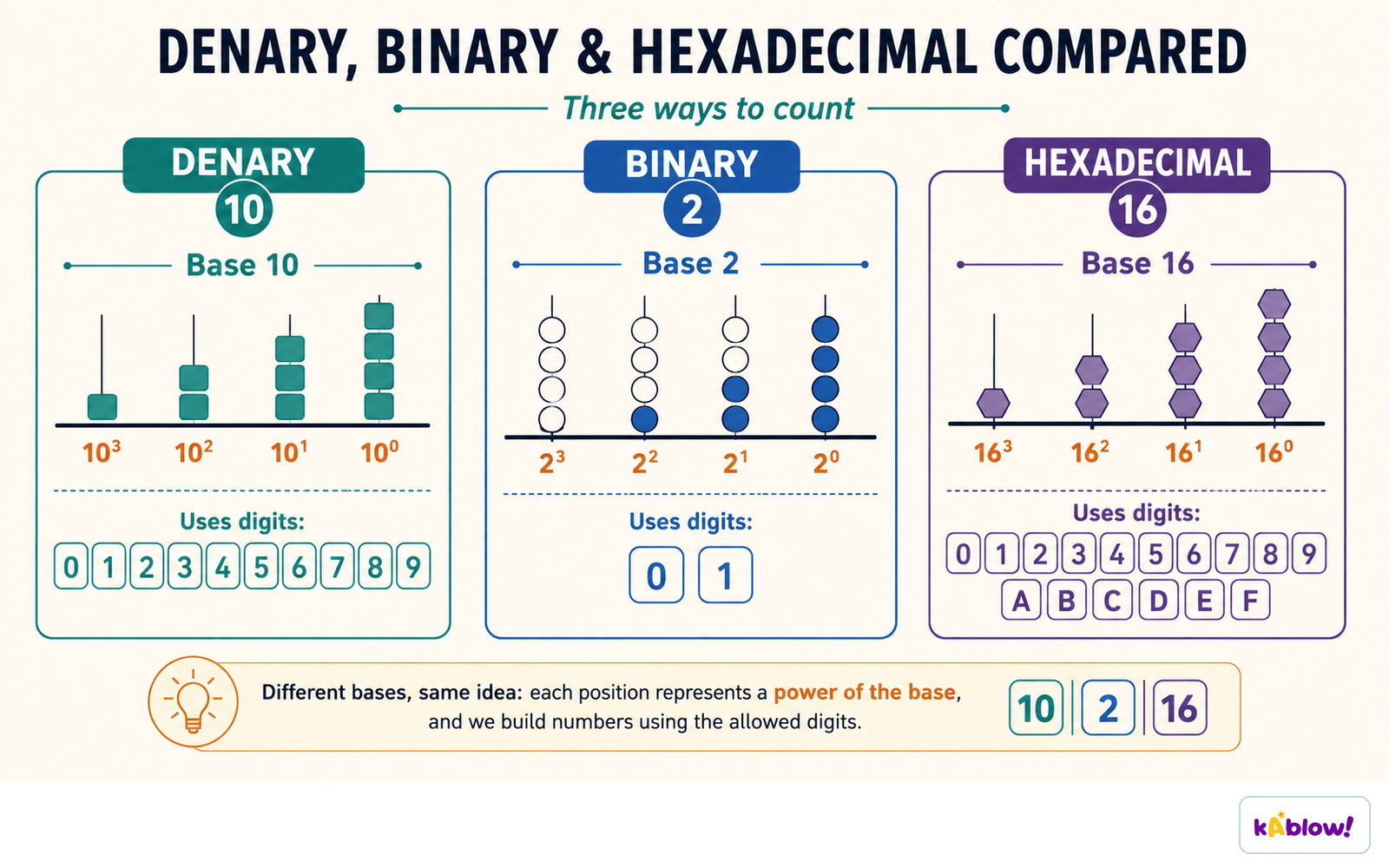
- Denary (base-10): digits 0–9, each column is a power of 10.
- Binary (base-2): digits 0–1, each column is a power of 2.
- Hexadecimal (base-16): digits 0–9 and letters A–F (A=10, B=11, C=12, D=13, E=14, F=15).
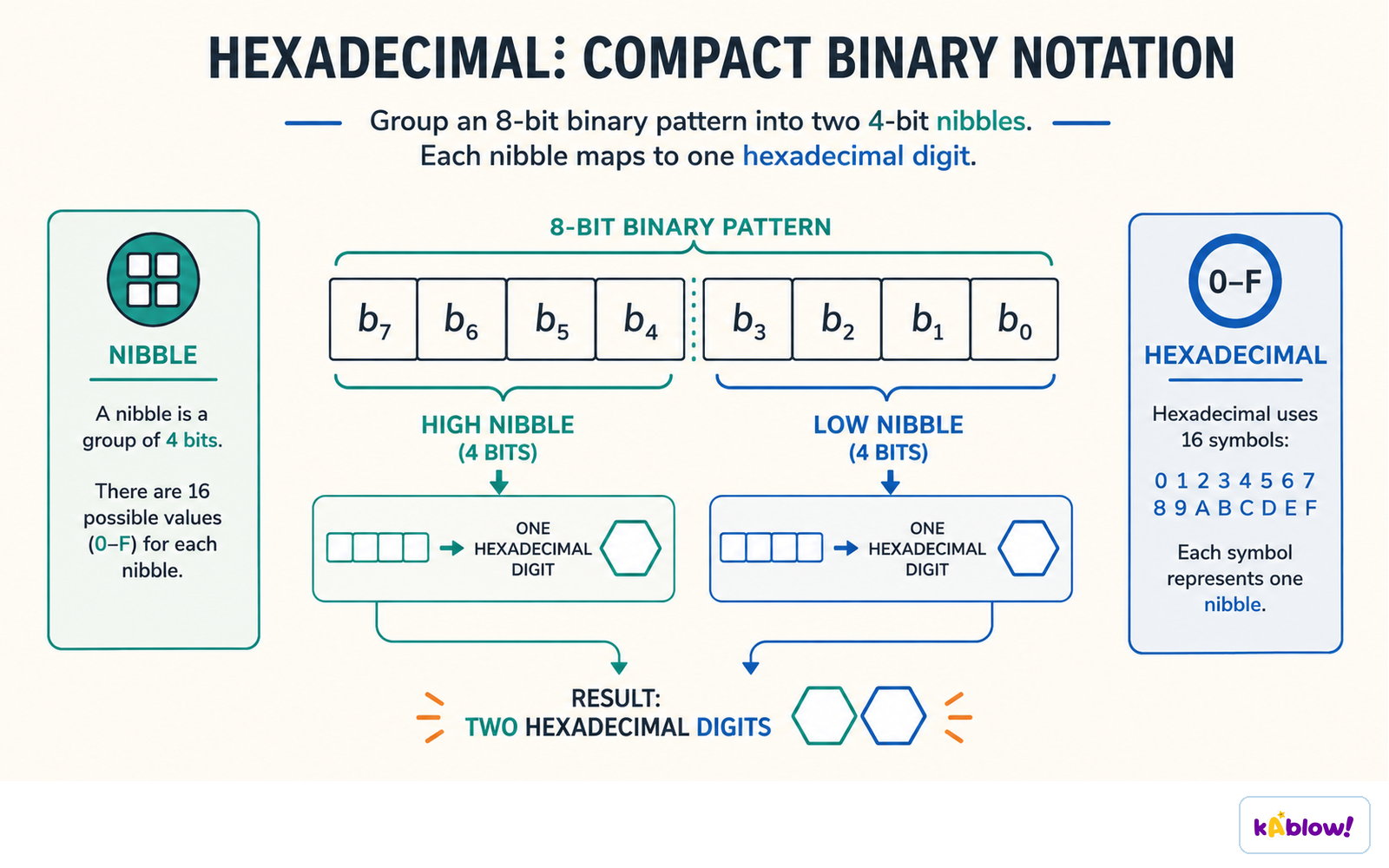
- One hex digit represents exactly 4 bits (a nibble).
- Largest 16-bit denary value: 65,535 (binary 1111111111111111).
Denary, binary and hexadecimal are three ways to count: the same idea in a different base.
Converting Between Binary & Denary
- Denary → Binary: write column headings (powers of 2) from largest ≤ number down to 1; for each column, put 1 if the value fits, subtract it, else 0.
- Binary → Denary: write column headings, multiply each 1-bit by its heading, sum the results.
- If a binary number ends in 1, the denary result is odd (quick check).
- Pad with leading zeros if a specific bit-length is required (e.g., 8-bit).
Converting Between Hexadecimal & Denary
- Denary → Hex: Method 1: convert denary to binary, split into nibbles, convert each nibble to hex. Method 2: divide by 16; quotient = first hex digit, remainder = second hex digit.
- Hex → Denary: Method 1: convert each hex digit to a nibble, join to 8-bit binary, convert to denary. Method 2: multiply first digit by 16, add second digit.
- Exam is non-calculator; use binary method if unsure of multiplication/division by 16.
Converting Between Hexadecimal & Binary
- Binary → Hex: split 8-bit binary into two nibbles (4 bits each); convert each nibble to its hex digit (0–F).
- Hex → Binary: convert each hex digit to its 4-bit binary nibble; join the nibbles.
- Always write out the full 8-bit binary result for clarity.
An 8-bit pattern splits into two nibbles, and each nibble becomes one hexadecimal digit.
Uses of Hexadecimal
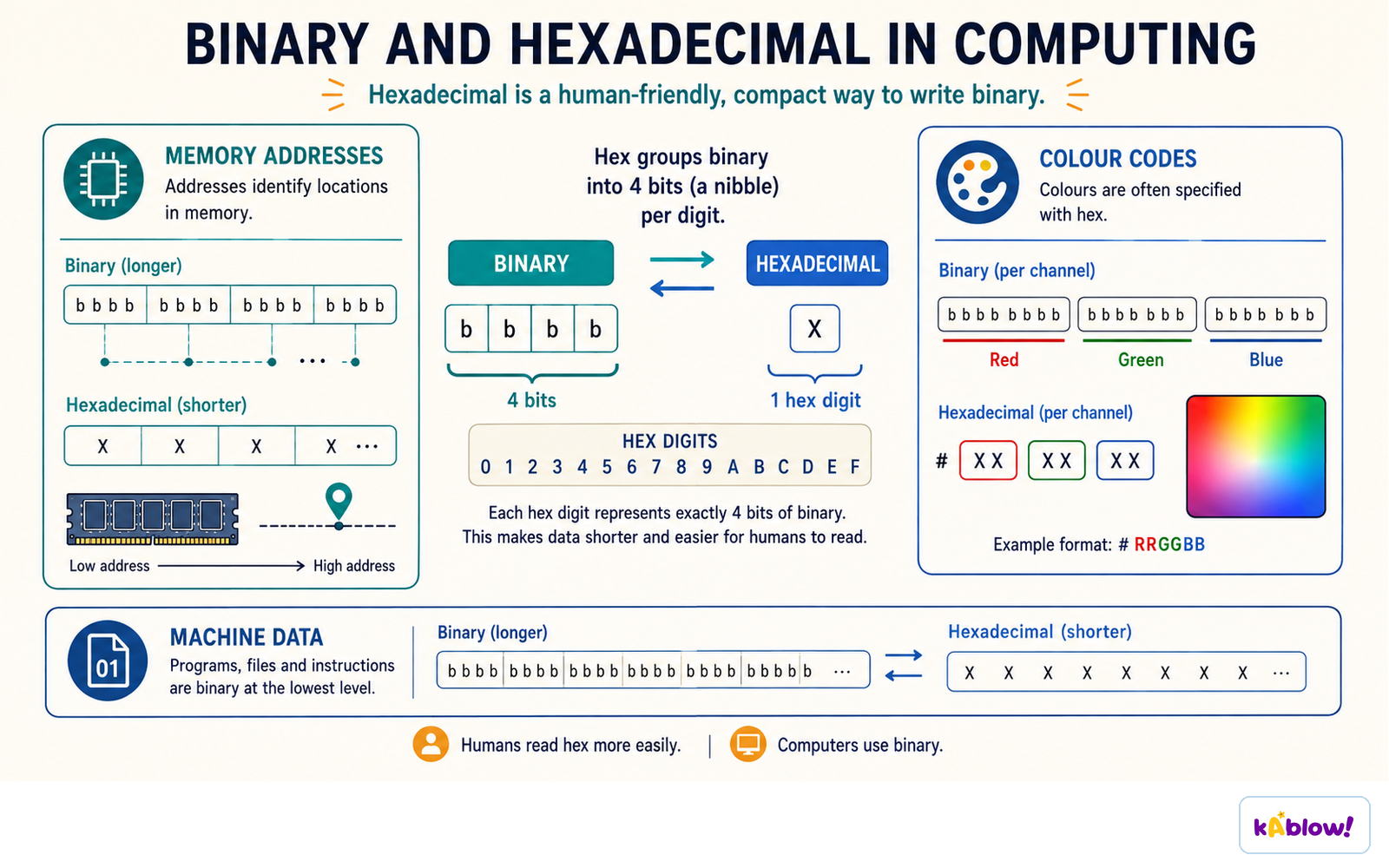
- Hex is used because it is shorter than binary and easier for humans to read with fewer copying errors.
- MAC addresses: 12 hex digits (e.g., AA:BB:CC:DD:EE:FF) instead of 48 binary digits.
- Colour codes: 6 hex digits (e.g., #66FF33) instead of 24 binary digits.
- URLs: non-standard characters are encoded as hex preceded by % (e.g., %20 for space).
Hexadecimal writes long binary patterns compactly for memory addresses, colour codes and machine data.
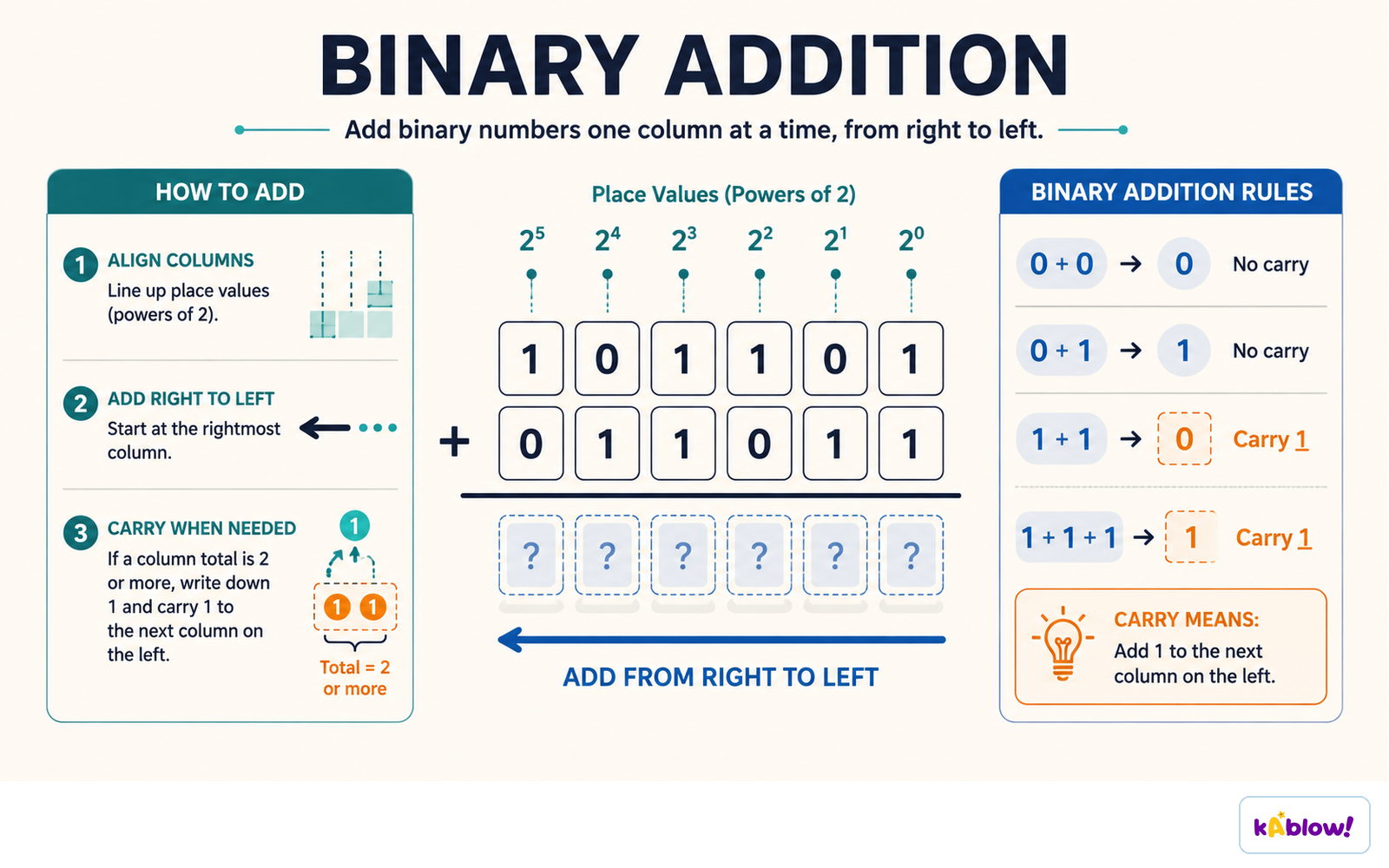
Binary Addition
- Rules: 0+0=0, 0+1=1, 1+0=1, 1+1=0 carry 1, 1+1+1=1 carry 1.
- Add from rightmost bit to left, carrying over when sum ≥ 2.
- Overflow occurs when the result exceeds the available bits (e.g., 8-bit sum > 255).
- Always show carry bits clearly; marks are awarded for correct carries even if final answer is wrong.
Binary addition works column by column from the right, carrying whenever a column totals two or more.
Binary Shifts
- Logical left shift multiplies by 2 for each shift (e.g., shift left 1 → ×2).
- Logical right shift divides by 2 for each shift (e.g., shift right 1 → ÷2).
- Bits shifted out are lost; empty positions are filled with 0.
- Overflow occurs when a 1 is shifted out of the most significant bit (MSB) on a left shift.
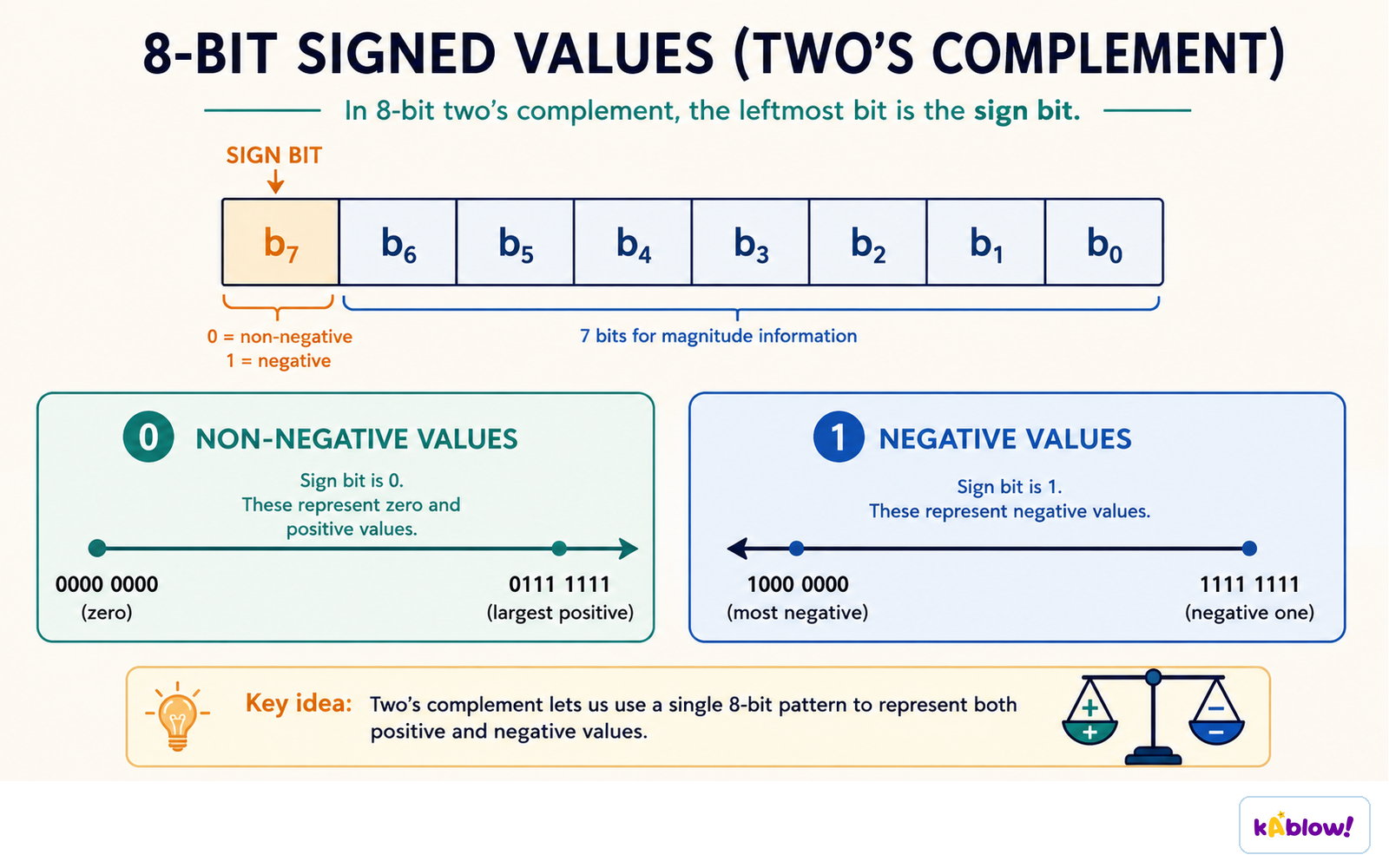
Two's Complement
- Two's complement represents signed (positive and negative) binary numbers.
- The MSB has a negative weight (−128 in 8-bit); remaining bits are positive.
- To convert a negative denary number: write the positive binary, then copy bits from right until the first 1, then invert all remaining bits.
- Example: −76 → positive 01001100 → copy rightmost bits (100) → invert rest → 10110100.
In 8-bit two's complement the leftmost bit is the sign bit: 0 marks zero and positive values, 1 marks negative ones.
Slide
Sign up free to view the lesson slides
Step through every slide for this topic — plus flashcards and revision notes — with a free account.
Câu hỏi luyện tập
Xem trước miễn phí — 8 trên 55 câu hỏi. Đăng ký để xem tất cả.
1.Why do computers use binary to process data?
Easy- ABecause logic gates have only two states, on and off
- BBecause binary is easier for humans to read than denary
- CBecause binary uses digits 0-9
- DBecause binary is the only number system that can represent negative numbers
2.What is the denary value of the binary number 1011?
Easy- A11
- B13
- C9
- D14
3.Convert the denary number 45 to binary.
Medium- A101101
- B111101
- C101011
- D110101
4.Convert the hexadecimal number B9 to denary.
Medium- A185
- B177
- C169
- D191
5.What is the result of adding the binary numbers 00011001 and 10001001?
Medium- A10100010
- B10000010
- C10101010
- D10010010
6.What is the denary value of the two's complement binary number 11111111?
Hard- A-1
- B255
- C-127
- D0
7.What is the two's complement representation of -76?
Hard- A10110100
- B11001100
- C10101100
- D10010100
8.Which of the following is a valid use of hexadecimal in computing?
Easy- ARepresenting MAC addresses
- BStoring text files
- CPerforming arithmetic in spreadsheets
- DDisplaying images
Unlock all 55 questions & more
Tạo tài khoản miễn phí để xem mọi câu hỏi, slide, thẻ ghi nhớ và ghi chú ôn tập cho chủ đề này.