Using A Calculator
Học bằng cách chơi
Trả lời những câu hỏi này để kiếm năng lượng, rồi câu cá và khám phá. Không cần tài khoản.
Dành cho nhà giáo dục: slide bài học, ghi chú ôn tập sẵn dùng cho Using A Calculator (Maths [CIE], Extended) — dùng trong bài giảng của bạn, hoặc chạy chủ đề như một hoạt động lớp học tương tác để người học chơi như một trò chơi trực tiếp.
Ghi chú bài học
Calculator Basics
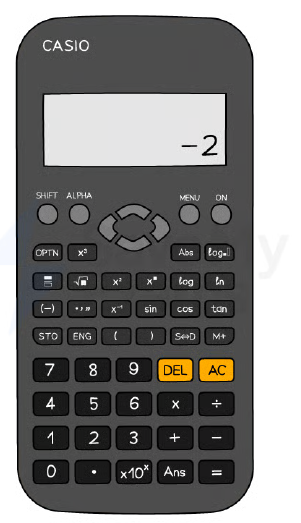
- Use a scientific calculator; know its specific functions (e.g., Casio fx-83GT).
- Reset your calculator before an exam to ensure correct settings.
- Default to MATH mode (display shows 'MATH').
- Set angle unit to degrees (display shows 'D').
- Use 'S⇔D' button to switch between exact (fraction) and approximate (decimal) answers.
- Press 'SHIFT' to access secondary functions (e.g., cube root, inverse trig).
The Casio fx-83GTX Classwiz
Using Brackets Correctly
- Use brackets as in written mathematics to avoid order-of-operations errors.
- Put brackets around negative numbers: e.g., `(-3)²` not `-3²`.
- Use the '(-)' button for negative values, not the minus sign.
- Always close brackets after functions like sin(45°).
Trigonometry Functions
- Use sin, cos, tan for missing sides; ensure degrees mode.
- Use sin⁻¹, cos⁻¹, tan⁻¹ (via SHIFT) for missing angles.
- Type angle inside brackets: e.g., `sin(57)`.
- For older calculators, you may need to enter angle first then press function.
Standard Form and π
- Use ×10ˣ button (or 'EXP') to enter standard form: e.g., `1.2×10⁻³`.
- Modern calculators display as `1.2×10⁻³`; older models may show `1.2E-3`.
- Access π via SHIFT button (often near standard form).
The Ans (Answer) Function
- Press 'Ans' to recall the last calculated result.
- Use Ans to avoid rounding intermediate decimals in multi-step problems.
- Example: after computing 4.69, press Ans to use it in next calculation.
Table Function
- Use TABLE mode to generate values for functions like y = x³ – 6x + 1.
- Enter the function, then specify start, end, and step values.
- Helps reduce errors in 'complete the table' questions.
Time Calculations
- Enter time using ° ' '' button (degrees/minutes/seconds).
- Example: 3 min 45 sec = `0°3'45''`.
- Press the same button to convert between decimal and HMS formats.
Worked Example Tips
- Do one calculation at a time and write down each step.
- Write down more digits than needed in working; round only final answer.
- Use fraction button for division, square root and cube buttons as needed.
- For multi-step, type whole expression in one go using brackets.
Slide
Sign up free to view the lesson slides
Step through every slide for this topic — plus flashcards and revision notes — with a free account.
Câu hỏi luyện tập
Xem trước miễn phí — 8 trên 30 câu hỏi. Đăng ký để xem tất cả.
1.Calculate 4 / 0.0025.
Easy- A1600
- B160
- C0.000625
- D0.00625
2.Calculate 5/8 + 3/4.
Easy- A1.375
- B1.25
- C1.5
- D1.625
3.Calculate 5.39 − 0.98.
Easy- A4.41
- B4.31
- C4.51
- D5.31
4.What is the value of 2.38 + 6.42?
Easy- A8.80
- B8.7
- C8.8
- D8.70
5.Calculate 0.743 − 0.0743.
Easy- A0.6687
- B0.669
- C0.668
6.Calculate 38.5 × 14.2 ÷ (18.4 − 5.9). Write down all the figures on your calculator display.
Easy- A44.44
- B44.4
- C44.444
7.Round the answer 44.44 to 1 significant figure.
Easy- A40
- B44
- C44.4
- D50
8.Calculate (16.379 − 0.879) / (4.2 × 1.241). Give your answer correct to 2 significant figures.
Medium- A3.0
- B2.9
- C3.1
Unlock all 30 questions & more
Tạo tài khoản miễn phí để xem mọi câu hỏi, slide, thẻ ghi nhớ và ghi chú ôn tập cho chủ đề này.
Đề thi cũ
Luyện đề thi cũ cho chủ đề này sắp ra mắt.
Sắp ra mắt