Inside the case: identifying and labelling internal components
边玩边学
回答这些题目来赚取能量,然后钓鱼探索。无需账号。
给教育者: 面向 Inside the case: identifying and labelling internal components(KS3 Computing,Computer Systems)的即用型课程幻灯片, 复习笔记——用在你的课堂上,或将该知识点作为学习者可实时游玩的互动课堂活动来运行。
课程笔记
What is Computer Hardware?
- Hardware refers to the physical parts of a computer, such as the CPU, RAM, motherboard, storage, graphics card, and case.
- Software is a set of written instructions that can be stored and run by hardware.
- Hardware is 'hard' because it is difficult to change, while software is 'soft' because it is easy to modify.
- Hardware is directed by software to execute commands; together they form a usable computing system.
- External devices like monitors, mice, keyboards, and speakers are also hardware.
The Computer Case
- The case encloses most components of a desktop computer, providing mechanical support and protection.
- It controls and directs the flow of cooling air over internal components.
- The case helps control electromagnetic interference and protects against electrostatic discharge.
- Large tower cases stand on the floor and offer space for multiple drives; desktop cases are smaller with less expansion room.
- All-in-one designs integrate the display into the case; portable/laptop cases provide impact protection.
- Case modding is decorating cases with lights, paint, or other features.
Power Supply Unit (PSU)
- The power supply unit (PSU) converts AC (alternating current) from a wall outlet to DC (direct current) at lower voltages.
- Most desktop PSUs meet the ATX standard.
- Typical output voltages are 12V, 5V, and 3.3V.
- The PSU provides power to the motherboard, drives, and other components.
The Motherboard
- The motherboard is the main circuit board that connects all other components.
- It has integrated circuitry and connects the CPU, RAM, disk drives, and peripherals via ports and expansion slots.
- Integrated circuit (IC) chips contain billions of tiny transistors (MOSFETs).
- Components are either directly attached to the motherboard or connected via slots/ports.
CPU (Central Processing Unit)
- The CPU performs most computational tasks and is often called the 'brain' of the computer.
- It fetches instructions from RAM, decodes and executes them, then returns results – this is the instruction cycle.
- Modern CPUs are microprocessors fabricated on an integrated circuit using photolithography.
- They are typically cooled by a heatsink and fan or liquid cooling.
- Many CPUs include an integrated GPU (graphics processing unit), eliminating the need for a separate graphics card in basic systems.
- Performance is influenced by clock speed (in GHz) and the number of cores (multi-core designs).
Buses and Chipsets
- The internal bus connects the CPU to main memory using multiple lines (address, data, control).
- Historically, parallel buses were used; now high-speed serial buses like PCI Express and USB are common.
- The northbridge traditionally linked the CPU, memory, and high-speed peripherals; the southbridge handled slower I/O devices.
- Modern architectures (e.g., Intel QuickPath, AMD Ryzen) integrate these functions into the CPU, forming a system-on-a-chip (SoC)-like design.
RAM (Random-Access Memory)
- RAM stores code and data actively used by the CPU; it is volatile – contents lost when power is off.
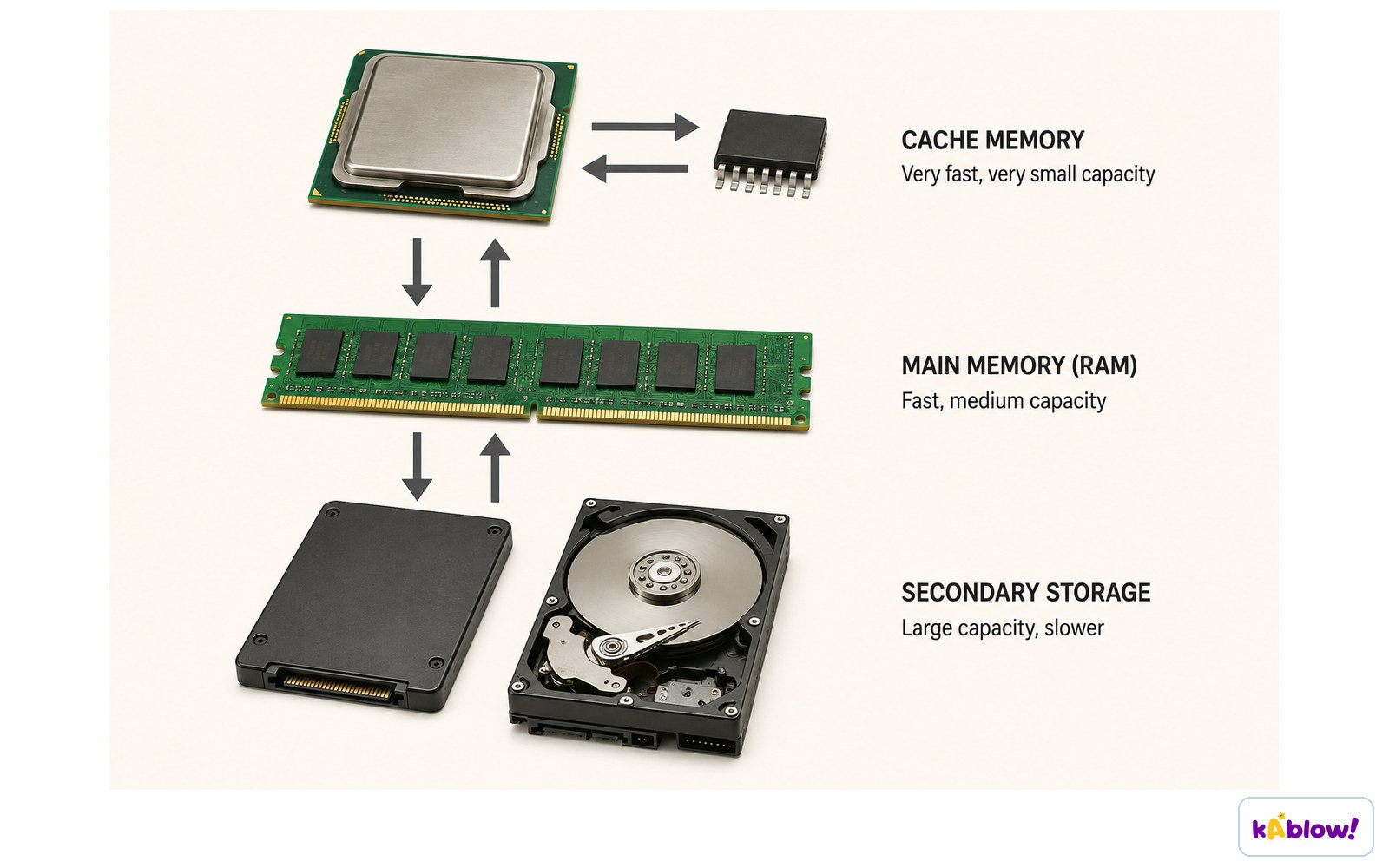
- It is organized in a memory hierarchy: registers, cache (L1, L2, L3), and main memory.
- Registers are inside the CPU, fastest but very small; caches use SRAM and are faster than main memory.
- Main memory uses DRAM, often DDR SDRAM (e.g., DDR4, DDR5).
- Caching improves performance by prefetching frequently used data, reducing latency.
Cache is smallest and fastest, RAM is larger and slower, secondary storage is largest and slowest.
Secondary Storage
- Secondary storage is non-volatile, meaning it retains data without power.
- It is typically higher capacity and cheaper than RAM but slower to access.
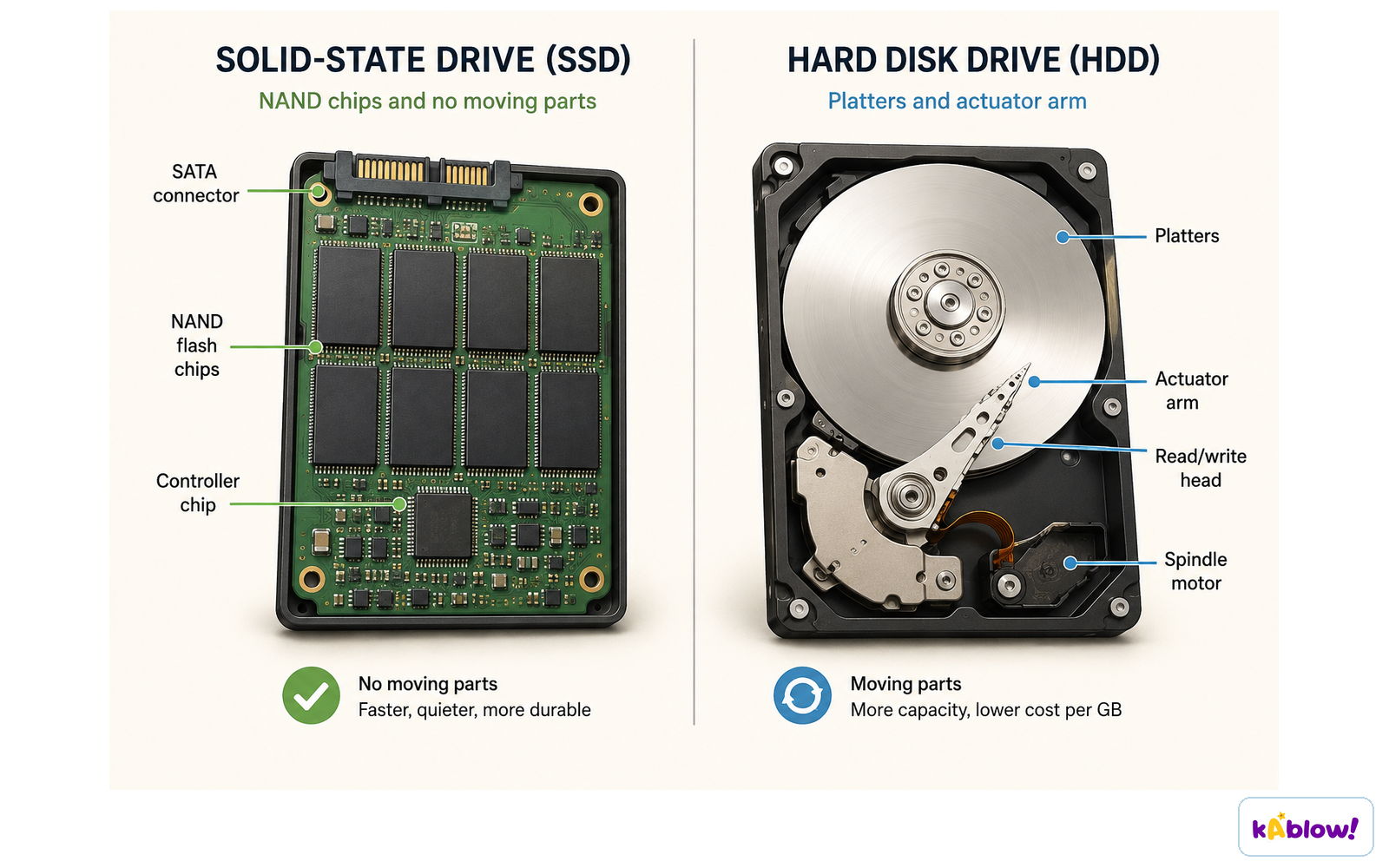
- Historically, hard disk drives (HDDs) were used; now solid-state drives (SSDs) are faster and increasingly common.
- Other options include USB drives and network/cloud storage.
An SSD uses NAND flash chips with no moving parts; an HDD uses spinning platters and an actuator arm.
Expansion Cards and Cooling
- Expansion cards like graphics cards and sound cards plug into motherboard slots to add functionality.
- A graphics card (GPU) handles rendering images; it may be discrete or integrated into the CPU.
- Cooling fans and heatsinks dissipate heat from the CPU and other components.
- The case and fans manage airflow to keep internal temperatures safe.
Internal vs. External Components
- Internal components are inside the case: motherboard, CPU, RAM, storage, PSU, expansion cards.
- External peripherals are outside: monitor, mouse, keyboard, speakers, printer.
- Ports on the motherboard/case connect internal components to external devices.
- Labelling a diagram involves identifying each component and matching it to its job.
幻灯片
练习题
免费预览——60 题中的 8 题。注册即可查看全部。
1.The motherboard is the main component of a computer that connects all other parts together.
EasyTrue or false?
2.Which component is often described informally as the 'brain' of the computer?
Easy- ARAM
- BCPU
- CHard drive
- DPower supply
3.RAM is non-volatile, meaning its contents are retained when the system loses power.
EasyTrue or false?
4.Which of the following is NOT an internal component typically found inside a computer case?
Easy- ACPU
- BRAM
- CMonitor
- DPower supply unit
5.Solid-state drives (SSDs) are generally faster than traditional hard disk drives (HDDs).
EasyTrue or false?
6.Match each component to its primary function.
Medium- CPU
- RAM
- Power supply
- Performs calculations
- Stores active data
- Converts AC to DC
7.The power supply unit converts direct current (DC) from the wall outlet to alternating current (AC) for the computer.
MediumTrue or false?
8.Match each internal component to its primary function.
Easy- CPU
- RAM
- Power supply unit
- Motherboard
- Executes program instructions
- Stores data and code in active use
- Converts AC to DC
- Connects all components together
历年真题
该知识点的历年真题练习即将推出。
即将推出