Memory and storage: RAM, ROM and secondary storage
边玩边学
回答这些题目来赚取能量,然后钓鱼探索。无需账号。
给教育者: 面向 Memory and storage: RAM, ROM and secondary storage(KS3 Computing,Computer Systems)的即用型课程幻灯片, 复习笔记, 图示——用在你的课堂上,或将该知识点作为学习者可实时游玩的互动课堂活动来运行。
课程笔记
What is Computer Memory?
- Computer memory stores data and programs for immediate use by the computer.
- Memory is also called main memory or primary storage.
- RAM (Random-Access Memory) is the most common type of main memory.
- Main memory is fast but more expensive per bit and has lower capacity than mass storage.
- Memory holds open programs and data being actively processed.
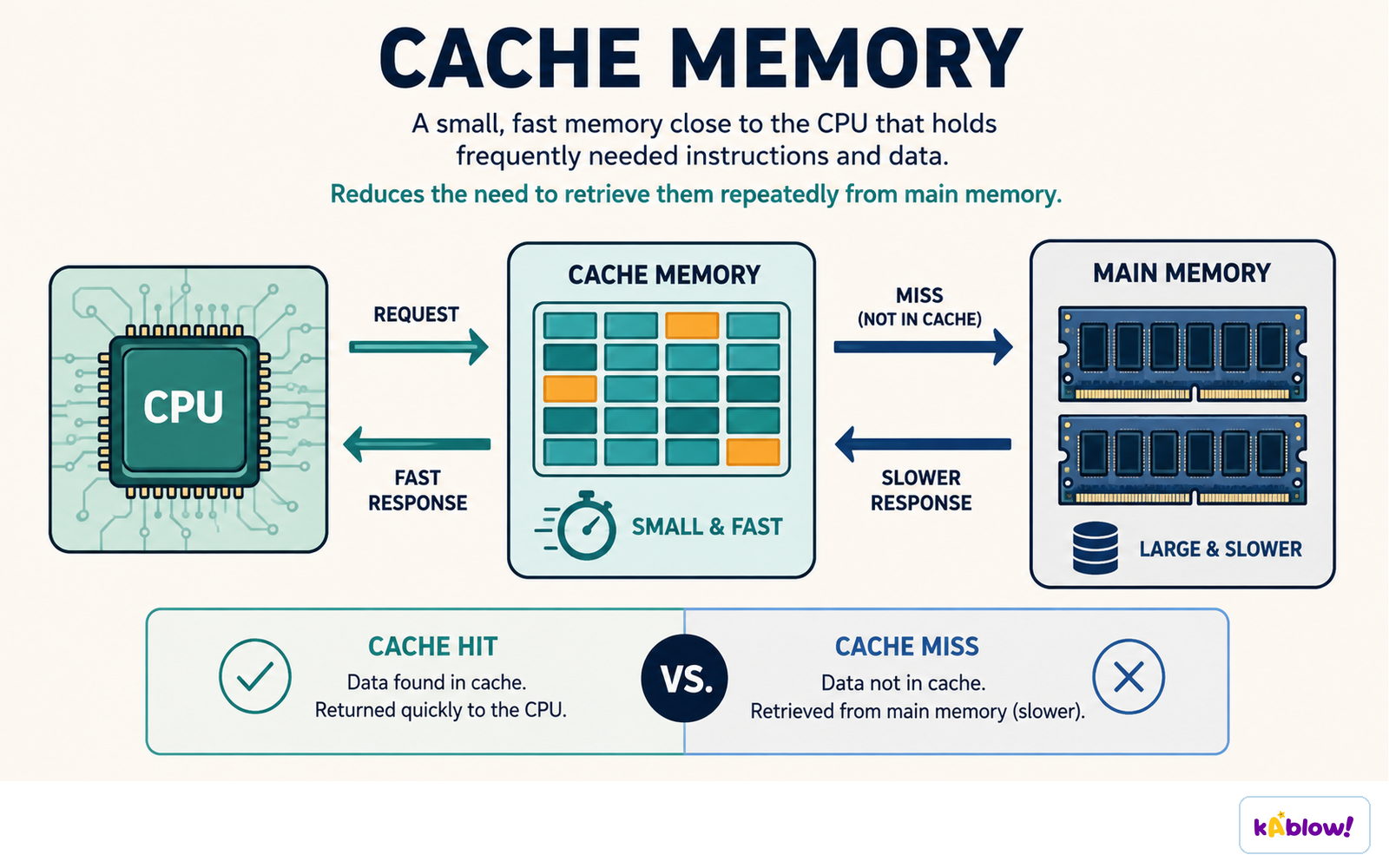
- Operating systems use spare RAM as a cache to speed up reading and writing.
RAM: Volatile Working Memory
- RAM stands for Random-Access Memory.
- RAM is volatile: it loses its contents when power is off.
- RAM is used for temporary storage of running programs and data.
- The two main types of RAM are DRAM (dynamic) and SRAM (static).
- DRAM is used for primary storage (main memory).
- SRAM is used mainly for CPU cache because it is faster but more expensive.
ROM: Non-Volatile Start-Up Memory
- ROM stands for Read-Only Memory.
- ROM is non-volatile: it keeps its data even when power is off.
- ROM contains start-up instructions (firmware) that the computer uses when it boots.
- ROM is usually read-only, meaning data cannot be easily changed.
- Other non-volatile memories include PROM, EPROM, and EEPROM.
Secondary Storage
- Secondary storage is non-volatile storage for keeping data long-term.
- It is slower than main memory but cheaper per bit and has higher capacity.
- Common types: magnetic, optical, and solid-state.
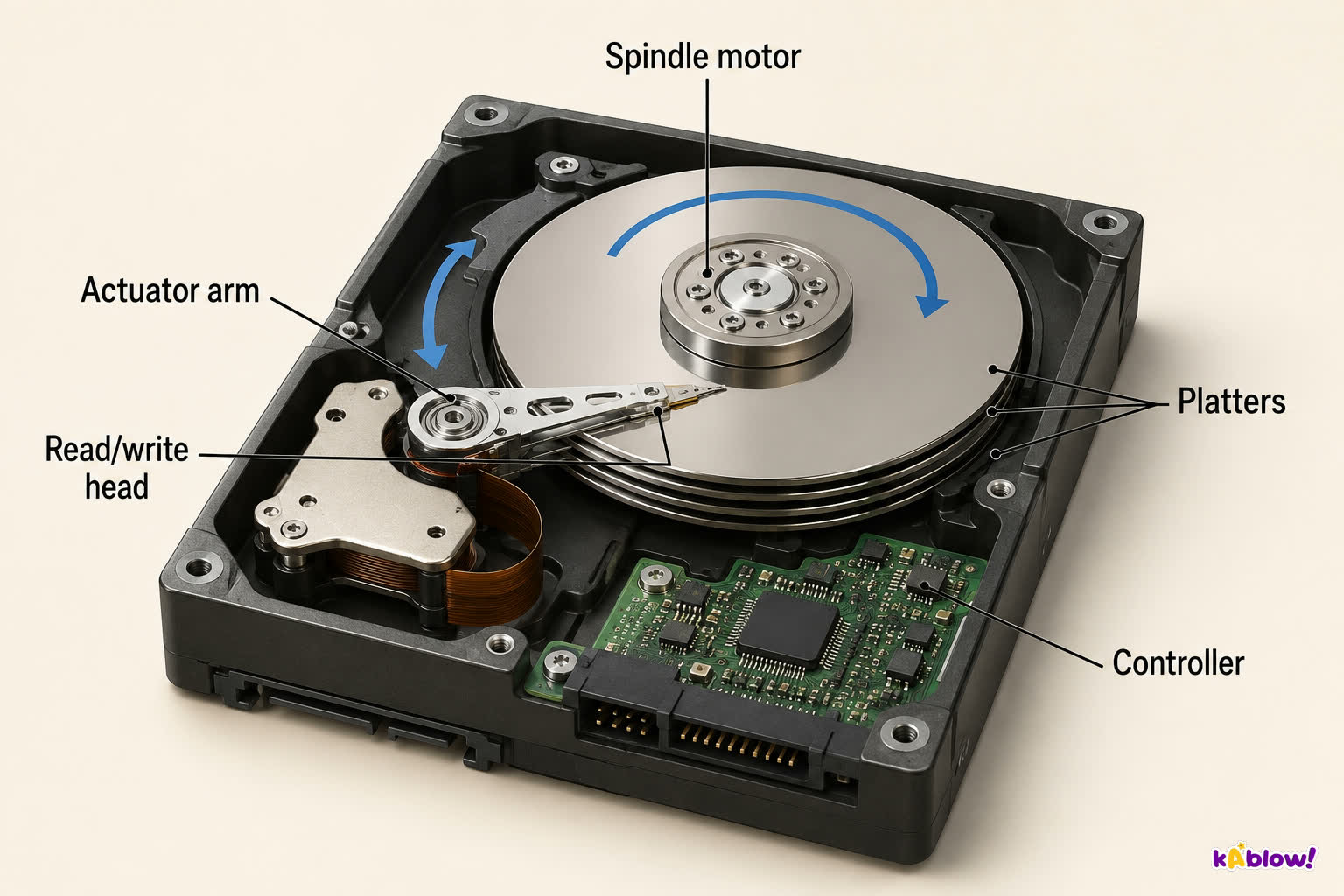
- Magnetic storage (e.g., hard disk drives) uses magnetised spots on spinning platters.
- Optical storage (e.g., CDs, DVDs) uses lasers to read/write pits on discs.
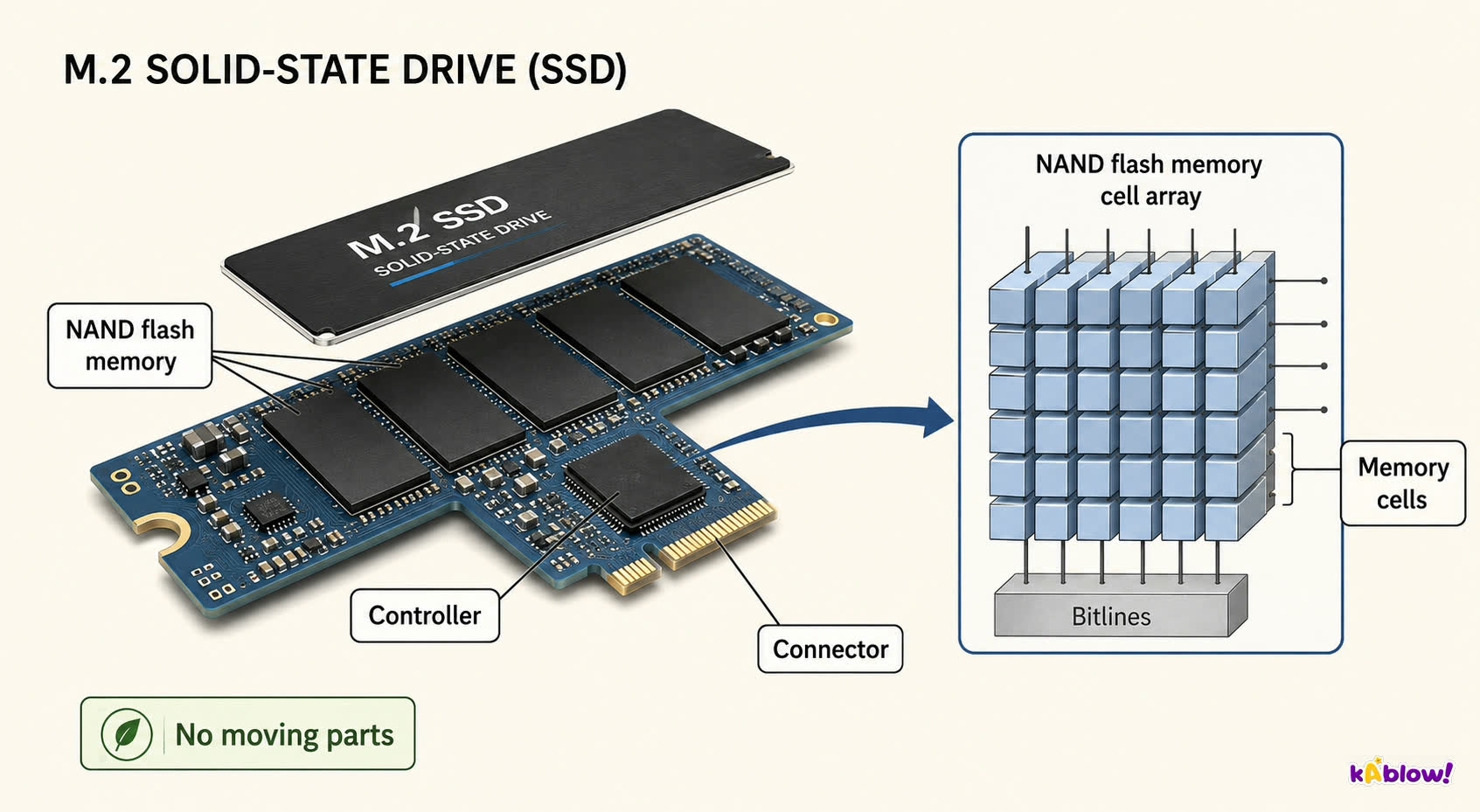
- Solid-state storage (e.g., SSDs, USB flash drives) uses flash memory with no moving parts.
Hard disk drive mechanism
Comparing Storage Types
- Speed: RAM is fastest, then solid-state, then magnetic, then optical.
- Cost: RAM is most expensive per GB, then solid-state, then magnetic, then optical.
- Capacity: Secondary storage typically has much larger capacity than RAM.
- Portability: Optical discs and USB flash drives are highly portable; internal HDDs/SSDs are less so.
- Volatility: RAM is volatile; ROM and secondary storage are non-volatile.
Solid-state drive architecture
Why a Computer Needs All Three
- RAM provides fast, temporary workspace for running programs.
- ROM ensures the computer can start up even when no other software is loaded.
- Secondary storage saves data permanently for future use.
- Without RAM, the CPU would have to use slow storage, making the computer very slow.
- Without ROM, the computer wouldn't know how to boot.
- Without secondary storage, you couldn't save files or install programs permanently.
How Memory is Organised
- Memory is made of memory cells, each storing one bit (0 or 1).
- Cells are grouped into words of fixed length (e.g., 8, 16, 32, 64 bits).
- Each word has a unique binary address of N bits, allowing 2N words to be stored.
- Modern memory uses semiconductor technology on integrated circuits.
- Flash memory can store multiple bits per cell (multi-level cells).
Cache holds frequently needed data close to the CPU, so a hit avoids the slower trip to main memory.
Historical Context (Brief)
- Early computers used vacuum tubes (e.g., ENIAC) with tiny capacity.
- Delay-line memory used sound waves in mercury to store bits.
- Magnetic-core memory was the first non-volatile memory and dominated until the 1970s.
- MOS semiconductor memory (invented in the 1960s) was cheaper and faster, replacing magnetic core.
Closer to the CPU means faster and smaller; further away means larger, slower and cheaper per bit.
Main memory holds work in progress and is lost when power goes off; secondary storage keeps files permanently.
幻灯片
练习题
免费预览——62 题中的 8 题。注册即可查看全部。
1.What does RAM stand for?
Easy- ARead-Only Memory
- BRandom-Access Memory
- CRapid-Access Memory
- DRandom-Access Module
2.RAM is volatile memory, meaning it loses its contents when the power is turned off.
EasyTrue or false?
3.Which type of memory is used to store the start-up instructions that a computer needs when it is first turned on?
Easy- ARAM
- BROM
- CSecondary storage
- DCache
4.ROM is a type of non-volatile memory.
EasyTrue or false?
5.Which of the following are characteristics of secondary storage compared to RAM? (Select all that apply)
Medium- AIt is slower
- BIt is less expensive per bit
- CIt has higher capacity
- DIt is volatile
- EIt is used for long-term storage
6.Which of the following is an example of a solid-state storage device?
Easy- AHard disk drive
- BCD-ROM
- CUSB flash drive
- DFloppy disk
7.Magnetic storage is generally more portable than solid-state storage.
EasyTrue or false?
8.Match each type of memory/storage with its correct description.
Medium- RAM
- ROM
- SSD
- Volatile main memory
- Non-volatile start-up memory
- Solid-state secondary storage
历年真题
该知识点的历年真题练习即将推出。
即将推出