Types Of Software & Interrupts
邊玩邊學
回答這些題目賺取能量,接著就能釣魚、探索。不需要帳號。
給教育者: 為 Types Of Software & Interrupts(Computer Science、CIE)準備好可直接使用的課程投影片, 複習筆記——用於你的課程,或把這個主題當成互動班級活動,讓學習者以即時遊戲的方式進行。
課程筆記
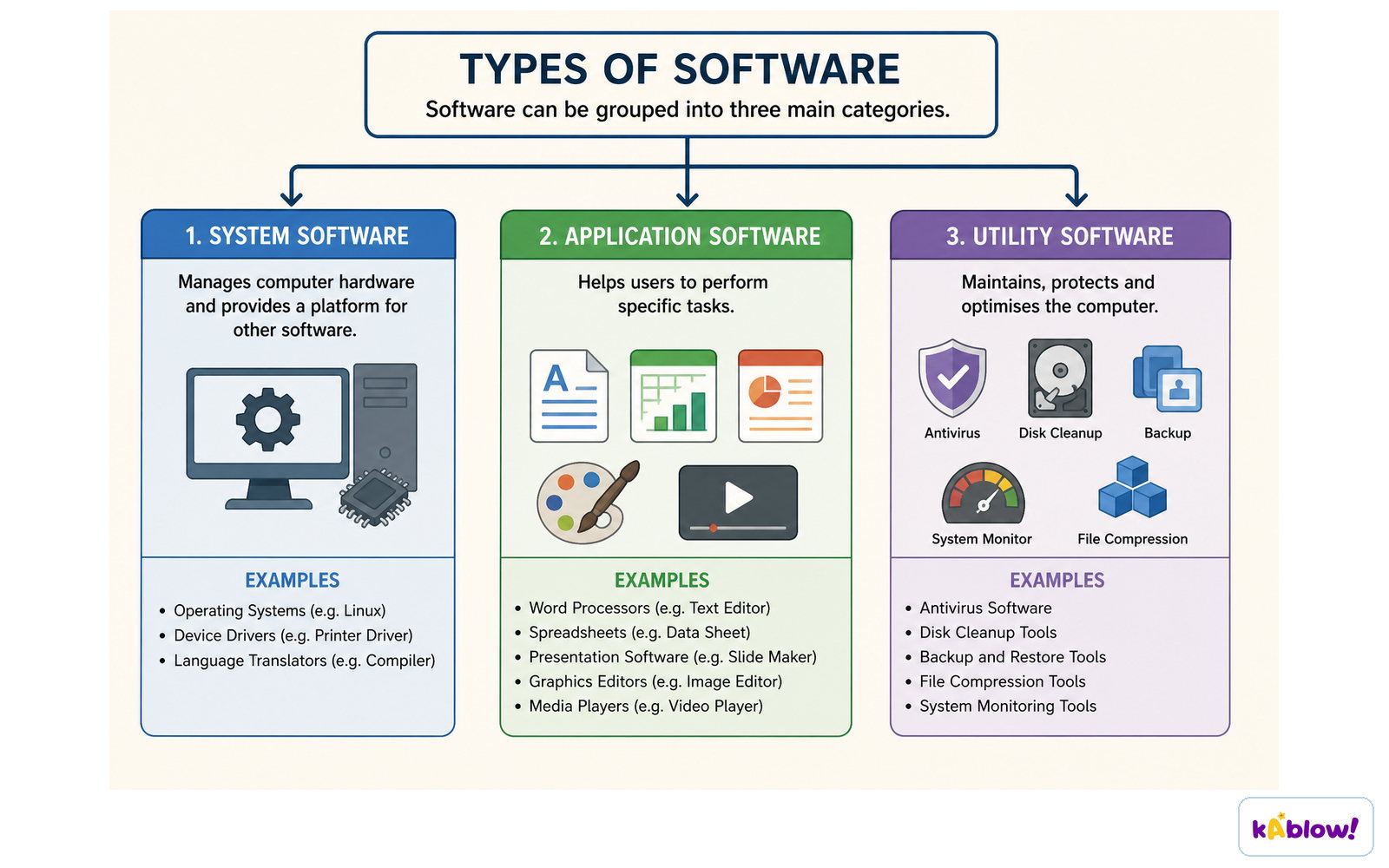
System Software & Application Software
- System software is essential for the computer to operate; it provides a platform to run applications.
- Examples: operating system and utility software.
- Utility software helps maintain, enhance, or troubleshoot a computer system (e.g., defragmentation, compression, encryption, task manager).
- Application software is chosen by the user to perform specific tasks (e.g., word processor, browser, email client).
- In exams, use generic software types, not brand names.
Software divides into system software, application software and utility software.
Purpose & Functions of an Operating System
- An operating system (OS) manages hardware and provides a platform for running applications.
- It acts as an interface between the user and hardware, hiding complexity.
- Key functions: file management, memory management, peripheral management, user interface, security, user management, handling interrupts, and providing a platform for applications.
- File management: creating, organising, naming, copying, moving, deleting files/folders; setting permissions; search facility.
- Memory management: allocates RAM to programs, copies data from secondary to primary storage, enables multitasking.
- Peripheral management: manages hardware devices; enables plug-and-play (PnP); uses device drivers.
- User interface: CLI, GUI, menu, natural language (NLI) — each has advantages/disadvantages.
- Security: password protection, firewall, virus scanning, file encryption.
The operating system manages CPU time, memory, files, devices and the user interface.

Hardware, Firmware & the Operating System
- Communication flow: Application software → Operating System → Hardware.
- The OS acts as a bridge; never say software 'talks' directly to hardware without the OS.
- Firmware is embedded in hardware (e.g., BIOS in ROM) and controls basic functions.
- On startup, the bootstrap loader in ROM loads the OS into RAM.
- Firmware translates between hardware and software; it is permanent, unlike device drivers.
Firmware is held in non-volatile memory and controls the hardware from the moment the device powers on.

Interrupts
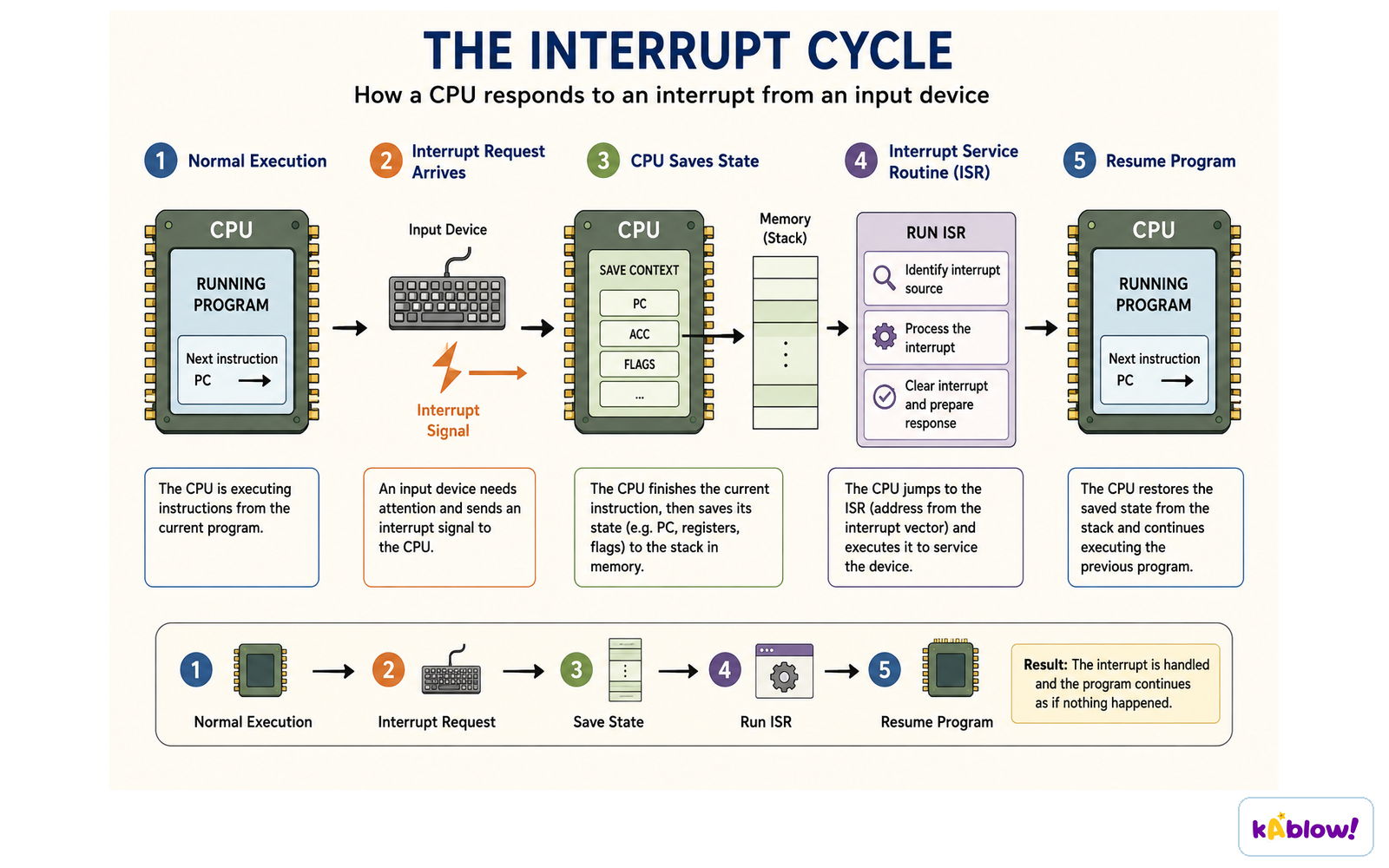
- An interrupt is a signal telling the CPU to pause its current task and handle a higher-priority event.
- Interrupts can be hardware (e.g., mouse click, power button) or software (e.g., division by zero, program crash).
- The CPU saves its current register values to a stack in RAM before handling the interrupt.
- The Interrupt Service Routine (ISR) contains instructions to process the interrupt.
- After the ISR completes, the CPU restores the saved state from the stack and resumes the original task.
- Interrupts enable multitasking and ensure vital tasks are dealt with immediately.
On an interrupt the CPU saves its state, runs the interrupt service routine, then resumes the program.
投影片
練習題
免費預覽——58 題中的 8 題。註冊即可查看全部。
1.Which of the following is an example of system software?
Easy- AOperating system
- BWord processor
- CWeb browser
- DSpreadsheet
2.What is the main purpose of utility software?
Easy- ATo help maintain, enhance and troubleshoot/repair a computer system
- BTo provide a platform for running applications
- CTo allow users to create documents
- DTo manage user accounts
3.Which of the following is a function of an operating system?
Easy- AFile management
- BWord processing
- CWeb browsing
- DSpreadsheet calculation
4.When an interrupt occurs, what does the CPU do with the contents of its registers?
Medium- ACopies them to a stack in RAM
- BDeletes them permanently
- CStores them in the hard disk
- DIgnores them until the interrupt is serviced
5.Which of the following is an example of a software interrupt?
Easy- ADivision by zero
- BMoving the mouse
- CPressing the power button
- DKeyboard press
6.What is the role of firmware in a computer system?
Easy- ATo control basic hardware functions and translate between hardware and software
- BTo provide a graphical user interface
- CTo manage files and folders
- DTo run application software
7.Which of the following is a disadvantage of a Command Line Interface (CLI)?
Easy- ARequires users to remember commands
- BUses more system resources
- CLess intuitive than a GUI
- DCan be frustrating when doing repetitive tasks
8.A user wants to ensure that files are stored in a more secure format. Which type of utility software should they use?
Medium- AEncryption software
- BDefragmentation software
- CCompression software
- DTask manager
歷屆試題
這個主題的歷屆試題練習即將推出。
即將推出