Software: operating systems and applications
邊玩邊學
回答這些題目賺取能量,接著就能釣魚、探索。不需要帳號。
給教育者: 為 Software: operating systems and applications(KS3 Computing、Computer Systems)準備好可直接使用的課程投影片, 複習筆記, 圖表——用於你的課程,或把這個主題當成互動班級活動,讓學習者以即時遊戲的方式進行。
課程筆記
Software Types
- System software manages and runs the computer itself, while application software performs tasks for the user.
- The operating system (OS) is the main system software, managing hardware and software resources.
- System programs are associated with the OS but may not be part of the kernel; applications are all other software.
- Examples of application software include word processors, web browsers, and games.
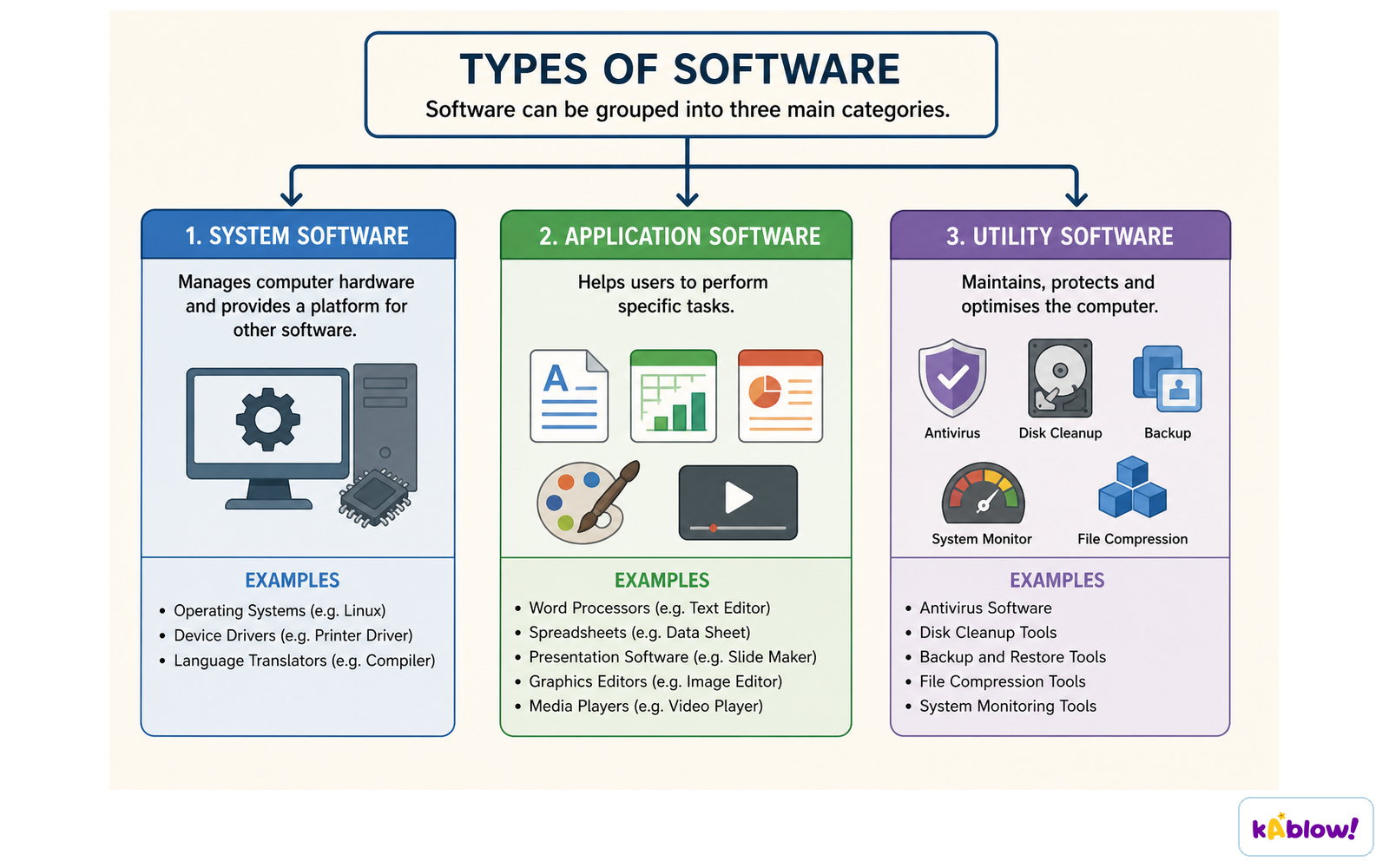
Software divides into system software, application software and utility software.
What an Operating System Does
- The OS acts as an intermediary between programs and hardware, handling input/output and memory allocation.
- It allocates resources like CPU time and memory between running applications, preventing any one program from monopolizing them.
- It isolates applications from each other to protect against errors and security issues, while still allowing them to communicate.
- It provides an abstract interface for hardware, making it easier for programmers to write software without knowing hardware details.
- It offers common services such as file system access and network connectivity, so apps can run on different hardware without rewriting.
The Kernel and System Programs
- The kernel is the core part of the OS that is always running.
- The kernel manages the CPU, memory, and devices, and provides basic services to other software.
- System programs are utilities that help manage the computer but are not part of the kernel; examples include disk formatters and file managers.
- Applications rely on the kernel via system calls to request services like reading a file or sending data over a network.
Types of Operating Systems
- Desktop OSes like Windows, macOS, and Linux are designed for personal computers.
- Mobile OSes like Android and iOS are for smartphones and tablets.
- Embedded OSes run on devices like smart TVs, microwaves, and smartwatches; they do not load user-installed software.
- Real-time OSes guarantee timely responses for critical tasks, used in industrial machines and medical devices.
- Distributed systems connect multiple computers that work together, often using middleware to coordinate.
- Multicomputer OSes manage clusters of computers, common in cloud computing, using techniques like remote procedure calls.
Popular Operating Systems
- As of November 2025, Android is the most popular OS with 38% market share, followed by Windows at 33%.
- iOS and iPadOS together have 15%, macOS 4%, and Linux 1%.
- Linux dominates servers and supercomputers.
- Some OSes come pre-installed on new computers (OEM), while others can run from a live CD or USB without installation.
How Software and Hardware Work Together
- When a program runs, the CPU executes its instructions directly, but the OS manages the hardware resources it needs.
- Programs make system calls to the OS for tasks like reading input or writing output.
- The OS schedules tasks to use the CPU efficiently, giving each program a share of processing time.
- Virtual memory lets programs use more memory than physically available by using disk space, giving the illusion of large memory.
Utilities and System Programs
- Utilities are system programs that help manage and maintain the computer, such as disk cleanup, antivirus, and backup tools.
- They are part of the OS but not the kernel.
- Utilities handle tasks like file compression, data backup, and system monitoring.
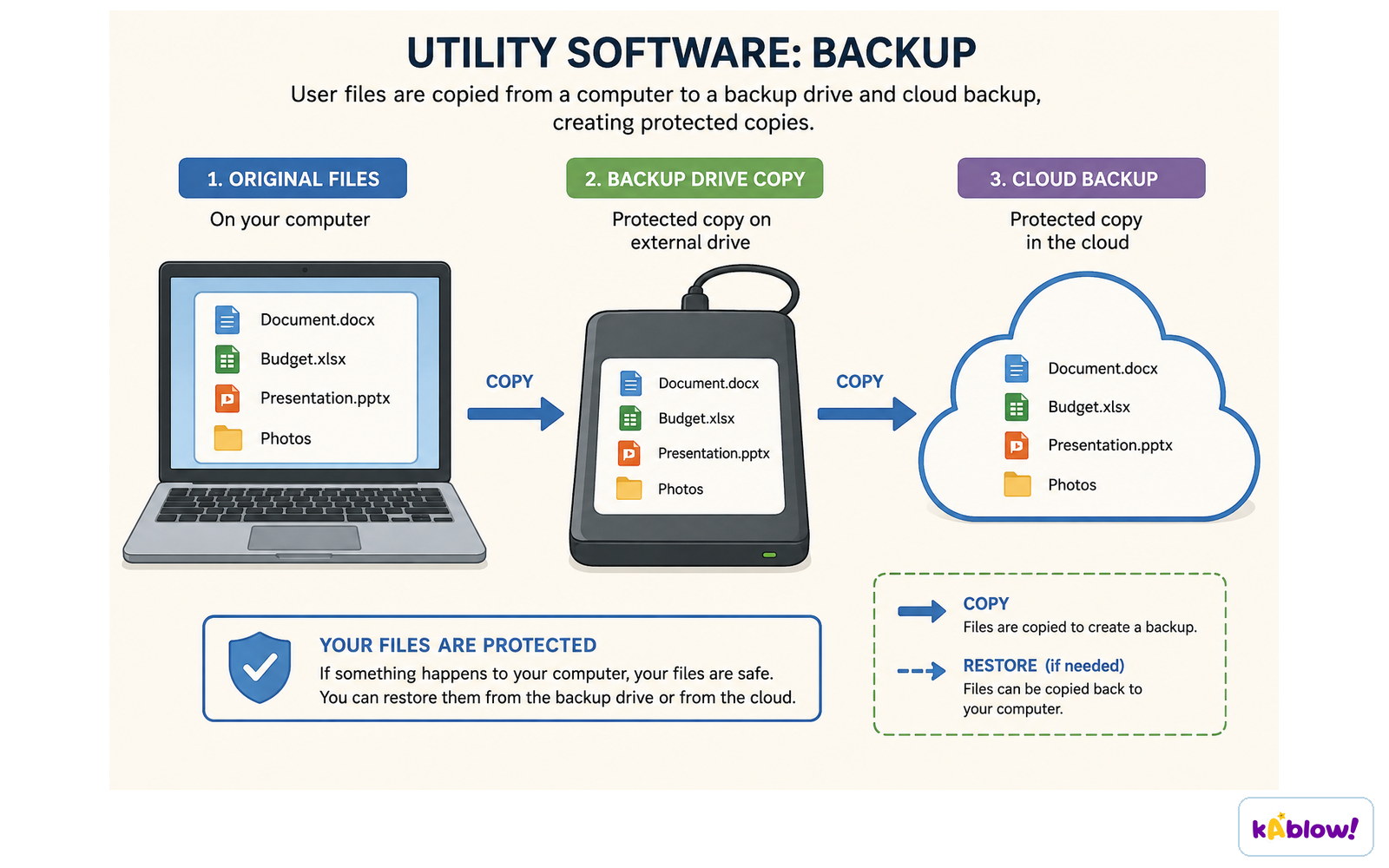
A backup utility copies user files to an external drive and to cloud storage.
The operating system sits between application programs and the hardware, managing CPU, memory, storage and devices.
A multitasking operating system gives each application a short slice of CPU time in turn, so they all appear to run together.
An application sends a print command to the operating system, which passes it to the printer driver.
When RAM is full the operating system moves inactive pages out to storage and brings needed pages back in.
投影片
練習題
免費預覽——61 題中的 8 題。註冊即可查看全部。
1.An operating system is an example of system software.
EasyTrue or false?
2.Application software manages the computer's hardware resources.
EasyTrue or false?
3.The kernel is the part of the operating system that is always running.
EasyTrue or false?
4.An embedded operating system typically allows users to install their own applications.
EasyTrue or false?
5.Which of the following is the most popular operating system as of November 2025?
Easy- AAndroid
- BMicrosoft Windows
- CiOS
- DLinux
6.Which of the following are listed in the source as purposes of an operating system? (select all that apply)
Easy- AAllocating resources between applications
- BProviding an interface that abstracts hardware details
- CCompiling application source code
- DProviding common services such as network and disk access
7.Match each type of operating system with its description.
Medium- Embedded OS
- Distributed system
- Multicomputer OS
- Designed for devices that do not load user-installed software
- A group of distinct networked computers that may be dispersed worldwide
- Multiple CPUs each with their own memory
8.Arrange the following steps in the order they occur when a program runs on a computer, according to the source.
Medium- The application makes a system call to the OS
- The application code is executed directly by the hardware
- The OS may interrupt the application for hardware functions
歷屆試題
這個主題的歷屆試題練習即將推出。
即將推出